

edio AI is a good pick for language schools and tutors who teach online. In my edio AI review test, it built a full six-chapter B1 lesson with 28 exercises in about 40 seconds, read every item and price off a photo of a café menu correctly, and let me open the lesson straight in its virtual classroom. The weak spots are a few exercises with two right answers, a PDF mode that can give you less than you expect, and admin tools that are fine but basic. Pricing starts at €20 a month for 5 students, there is a 7-day free trial with no card, and the trial only gives you 50 AI credits, which is about 5 lessons.
edio is really three tools in one box: an AI lesson generator, a virtual classroom, and a school management system. So instead of one score, I graded each part on its own.
Part of edio | What it does | My grade |
|---|---|---|
AI lesson generator | Builds interactive lessons from a topic, PDF or image | 4.5 / 5 |
Virtual classroom | Live 1-on-1 and group lessons inside the lesson | 4 / 5 |
School management | Students, lesson balances, schedule, analytics, white label | 3.5 / 5 |
Overall | 4.2 / 5 |
What Is edio AI and Who Makes It?
edio (they write it in lowercase) is an AI teaching platform for language schools, private tutors and people who sell online courses. It is made by Poledio, a small company based in Katowice, Poland.
 The pitch is simple. You type a topic, upload a PDF, or upload an image, and edio turns it into a complete lesson with interactive exercises that check answers on their own. Then you teach that lesson live in edio's classroom, assign the homework, and track each student's progress, all without leaving the app.
edio says more than 15,000 students learn on it, that teachers have run over 110,000 lessons there, and that it saves each teacher 18 hours a week. I can't check those numbers. What I can tell you is that when I looked, I couldn't find any user reviews of edio on G2, Capterra or Trustpilot. That is not a red flag on its own for a young product, but it does mean you are relying on the free trial and on reviews like this one.
My Test Setup: 50 Credits and Seven Days
I signed up for the free trial on October 30, 2026, as a teacher who runs a school. No card was asked for. The account came with:
50 AI credits, not the 150 that the cheapest paid plan includes
Room for 5 students, two of which were already taken by demo students
7 days before the trial ends
Then I gave the AI lesson generator three jobs, the way a real teacher would:
A topic lesson: "Booking a hotel room by phone, using 'would like' and 'could I' for polite requests", level B1, for Spanish speakers.
A PDF lesson: a one-page reading I wrote myself about a woman called Maria who works from home.
An image lesson: a photo of a café menu with 11 items and prices.
After that, I opened the hotel lesson inside the virtual classroom and went through every school admin screen I could reach. I did not run a live class with a real student on a second device, so I could not test the live video or how answers sync between teacher and student in real time. I'll be clear about that where it matters.
Part 1 of This edio AI Review: The AI Lesson Generator
This is the reason most people look at edio, and it is the best part of the product.
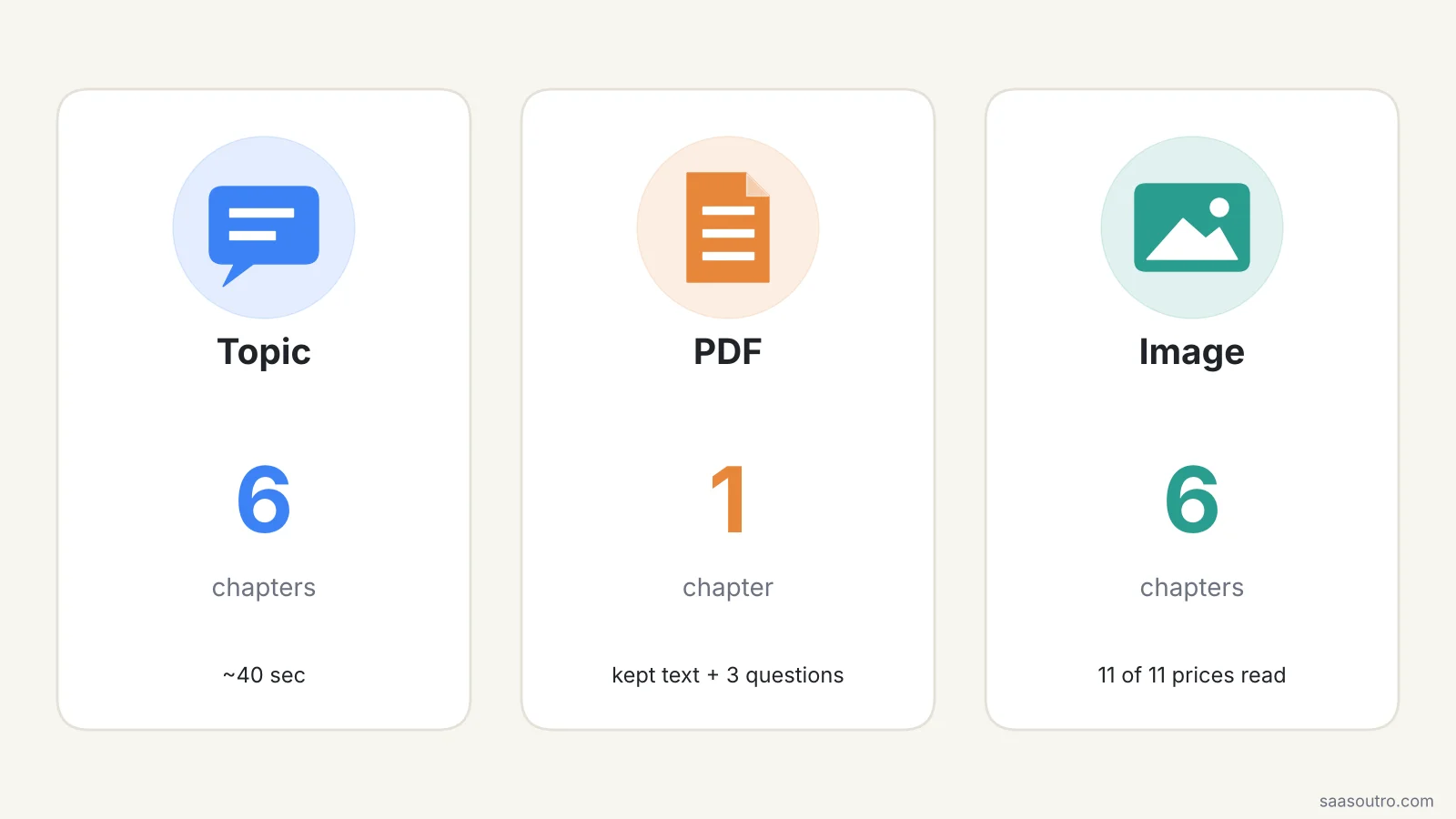 The same generator, three inputs. What each one gave me for 10 credits.
From a Topic: The Hotel Lesson
The generator screen is clean. You pick three things: the language you teach, your students' own language (used for translations), and a CEFR level from A1 to C2. edio also suggests topic ideas for each level, like "A delayed train to London" for A2 or "Claiming for a cancelled flight" for B1.
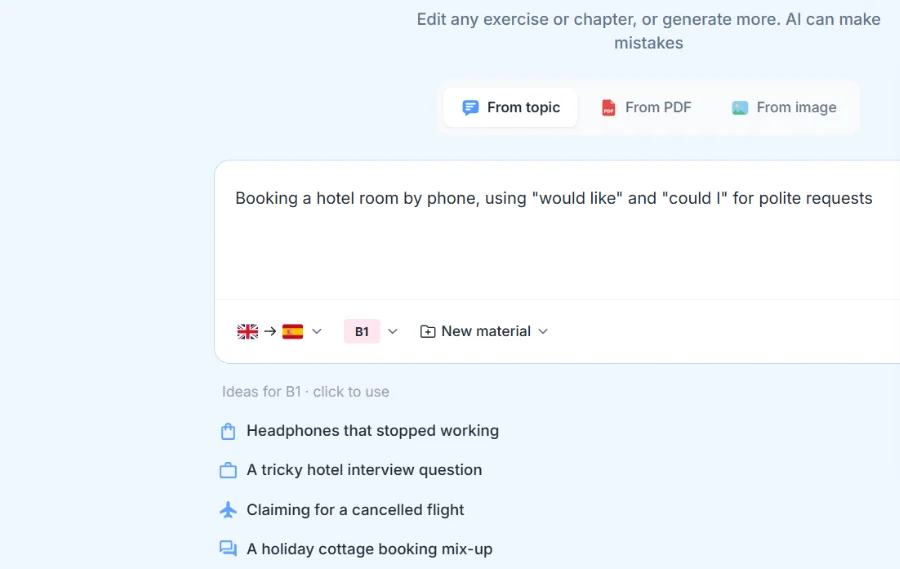 The topic box I used, with English to Spanish and level B1 selected.
Before it spends anything, edio shows a "Check before generating" screen with the cost. A lesson is 10 credits. You can add an AI cover image for 10 more, and switch the listening audio from one standard voice to a dialogue in natural voices for another 10.
I clicked generate, and about 40 seconds later I had a full lesson with six chapters:
Warm-up: an "open a box" speaking game, 8 vocabulary words with Spanish translations and audio, and a matching exercise
Reading: a hotel booking confirmation email, true or false, drag the words into gaps, and a word choice exercise
Listening: a 49-second phone call between a guest and a receptionist, with a multiple choice quiz and true or false. The transcript is there for the teacher but hidden from students.
Grammar: a clear chart of "would like" and "could I", then five practice exercises
Speaking: a spin-the-wheel question game and a "choose the right reply" chat exercise
Homework: a writing task, a 2-minute recorded speaking task, and more practice
That's 28 exercises in total. What impressed me most was that it actually followed my brief. I asked for "would like" and "could I", and the grammar chapter, the listening script and the homework were all built around those two phrases.
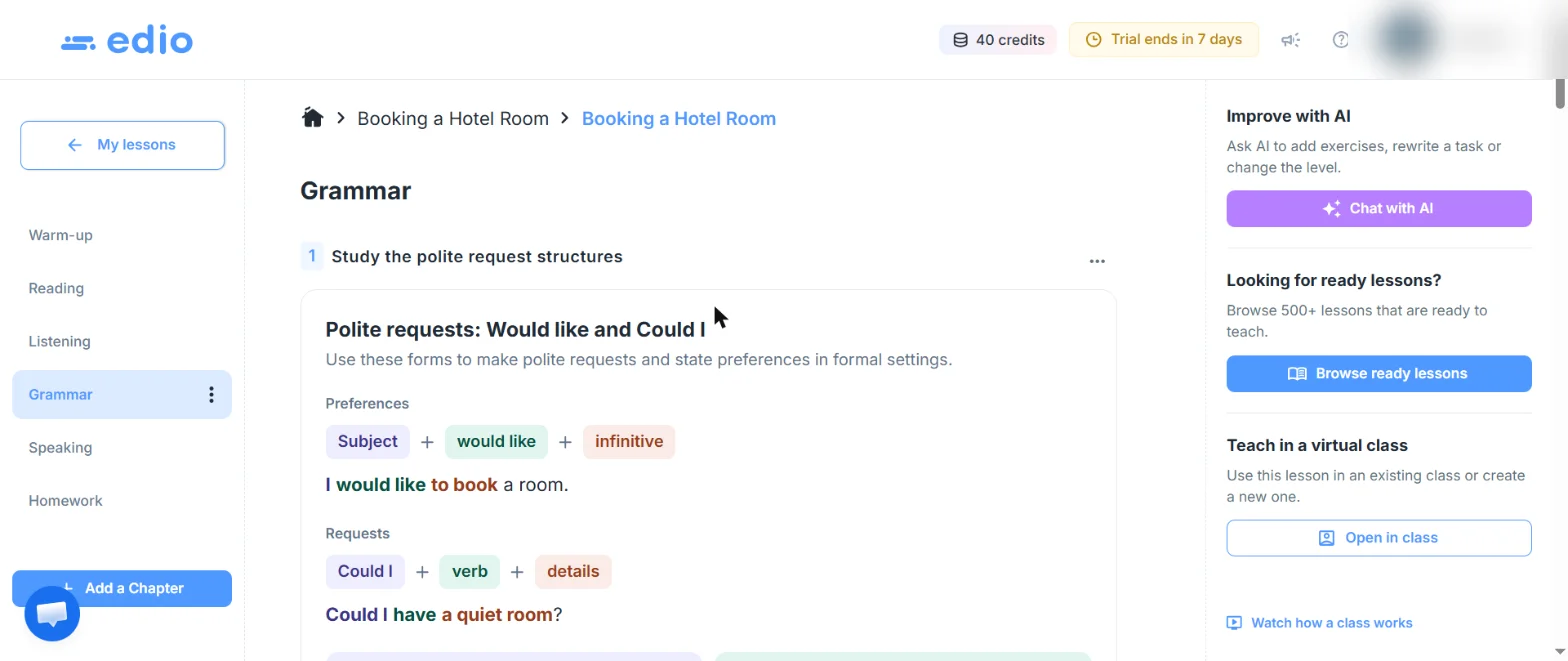 The grammar chapter edio built for "would like" and "could I", with colored sentence parts.
From a PDF: Pick the Right Mode
The PDF option takes files up to 5 pages and has two modes: Transform (keep content) and Inspire (fresh exercises).
I used Transform on my one-page reading, which had no exercises in it. edio charged 10 credits and gave me one chapter: my text, copied word for word, plus three discussion questions. That's it.
To be fair, that is what "keep content" means. If your PDF is a worksheet that already has exercises, Transform is the mode that turns them into interactive ones. But if you upload a plain reading text and want a lesson built around it, use Inspire. I learned that the expensive way, and the app doesn't explain the difference until you try it.
From an Image: The Café Menu Test
This was the test I expected to go wrong, and it was the most impressive one.
I uploaded a photo of a café menu with 11 food and drink items and their prices. edio read every item and every price correctly, all 11 of them, and rebuilt the menu as a neat interactive "real-life document" inside the lesson. Then it built six chapters around it: vocabulary with translations, a listening, a reading, a grammar chapter on polite requests, speaking and homework. There was also a nice "sort the items into Breakfast, Lunch, Drinks and Cakes" exercise.
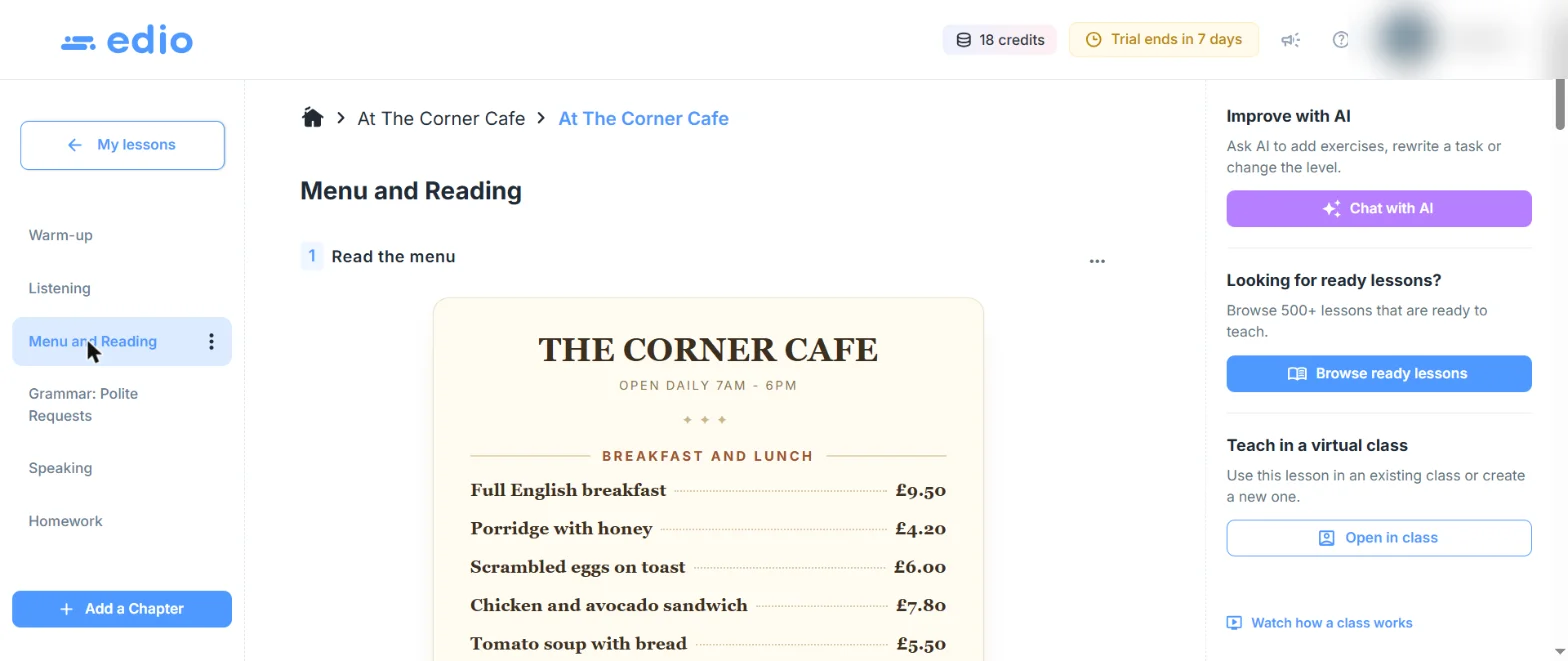 My café menu photo, rebuilt by edio as an interactive menu with every price correct.
One thing to watch: the reading text it wrote around the menu added details that were not on my image, like the café being "busy during the weekend". It's harmless in a language lesson, but you should read what the AI writes before you teach it.
Editing With the AI Chat
Every lesson has an "Improve with AI" chat on the right. I went back to my thin PDF lesson and typed: add 6 true or false questions, a vocabulary exercise with 8 words, and a gap fill using those words.
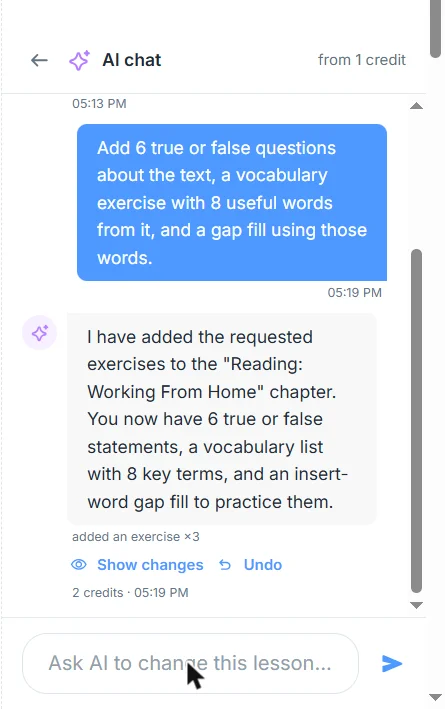 Asking the AI chat to add three exercises cost 2 credits and came with an Undo button.
It added all three in about 15 seconds for 2 credits, with Spanish translations on the vocabulary and a "Show changes" and "Undo" option. That fixed the PDF problem for very little. You can also edit any exercise by hand.
Where the AI Slipped
The lessons were good, but not perfect. Here is what I would have fixed before class:
Some questions have two right answers. One word bank offered both "Could" and "May" for "___ I have the bill, please?" Both are correct. Since edio checks answers on its own, a student who picks the "wrong" right answer gets marked down.
One quiz question was too strict. It asked "How do you start a polite request?" with "Could I..." as the answer, but "Can I..." is also fine in everyday English.
Small slips. The hotel email was dated 2024. "Suite" was translated as "habitación de lujo". A gap fill needed "employees" but the word bank only had "employee".
Homework repeats itself. Much of the homework was the same drills as the grammar chapter with new sentences.
None of this is serious, and it took me a few minutes to spot. But edio's own screen says "AI can make mistakes", and they're right. Plan for a quick check of every lesson.
The Exercise Types and Ready-Made ESL Lessons
edio's homepage and features page say there are 32 interactive exercise types, and that 23 of them can be written by AI. Oddly, the demo lesson inside the app says "24 exercise types". Either way, there is plenty: matching, true or false, quizzes, fill in the blank, drag and drop, word order, anagrams, memory games, spin the wheel, open the box, teacher-reviewed writing and audio, real-life documents like menus and tickets, and embeds for Wordwall, Genially, Quizlet and Miro.
You can see the full list on edio's exercise types page.
If you don't want to generate anything, there is a library of ready-made lessons you can teach straight away.
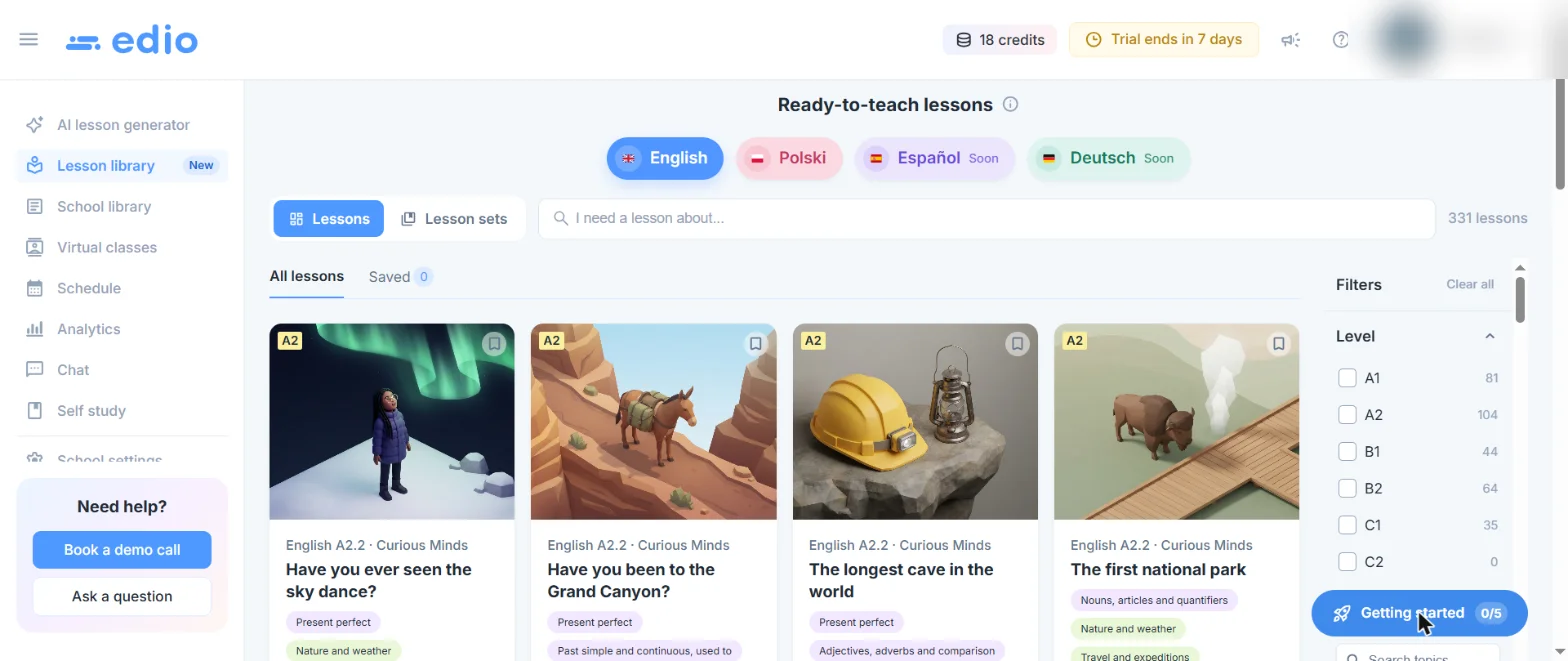 The ready-made English library: 331 lessons from A1 to C1.
When I checked, the English library had 331 lessons: 81 at A1, 104 at A2, 44 at B1, 64 at B2, 35 at C1 and none at C2. The Polish library had 277 more, and Spanish and German were marked "Soon". That adds up to edio's "500+ lessons" claim, but if you teach advanced English, there isn't much for you yet. The levels follow the CEFR scale, so they will line up with most coursebooks.
On languages: edio says it supports 17. The students' language list I saw was almost all European, plus Turkish and Russian. There was no Arabic, Chinese, Hindi or Urdu. If your students speak one of those, the translations in vocabulary exercises won't work for them.
Part 2: The edio Virtual Classroom
This is where edio is different from a plain AI lesson generator. The lesson you build is the classroom. You and your student work inside the same exercises at the same time, instead of you sharing your screen.
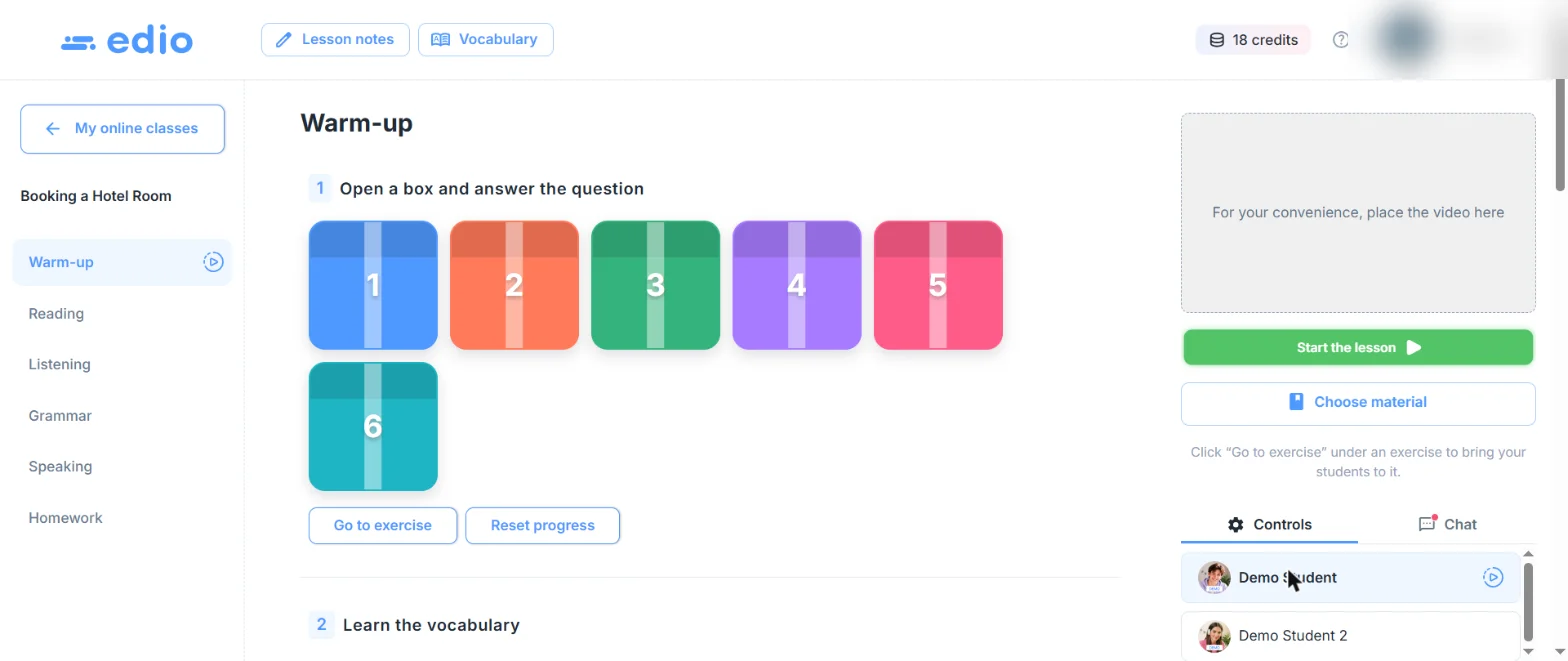 My hotel lesson opened inside edio's virtual classroom, teacher view.
I opened my hotel lesson in a demo class with one click, using "Choose material". The teacher view has:
The lesson in the middle, with chapters down the left side
A video area at the top right for the call
Start the lesson, which also takes one lesson off each student's balance
Go to exercise, which jumps every student to the exercise you are on
A Controls panel to switch between students and see each one's answers and progress
Chat, lesson notes, and a Vocabulary button that sends a word to a student's screen so they can save it
When you finish a lesson, you and the student rate each other and leave feedback. edio also lists Zoom and Google Meet among its integrations, alongside Miro, Quizlet and Wordwall.
The catch is that I could only test the teacher side with demo students. I could not test video quality or how fast answers show up for the teacher, because that needs a real student on another device. Use your trial week to run one real lesson with a student before you pay.
Part 3: School Management, Scheduling and Analytics
This is the part that makes edio a language school management tool and not just a lesson maker. It covers the basics well, but it is not as deep as dedicated school software.
Here is what I found:
Students: you add a student with their email, name and native language. Each student shows their lesson balance with plus and minus buttons, a history, and their own analytics page.
Lesson balance system: you can switch it on in school settings. You add lessons to a student's balance by hand, and one is taken off every time you start a class. Students see their own balance and history. That's handy for schools that sell lesson packages.
Schedule: a weekly calendar where teachers set their own hours and admins can view all teachers.
Analytics: total sessions, average lesson length, average student feedback, attendance rate and a session trend chart. Mine showed demo data, so I can't judge it with real numbers.
Team roles: school owners, admins and teachers.
Other tools: built-in chat, an announcement banner, legal documents, self-study courses, and an API that lets outside systems invite students to your courses.
White label: your own logo, favicon, custom domain and branded emails. It is a paid add-on, covered below.
What I didn't see: invoicing, payment collection from students or parents, payroll for teachers, or automated reminders. If you run a school with 20 teachers and need billing, you will probably still want a tool like Teachworks next to edio.
edio AI Pricing in 2026
edio prices by the number of students in your virtual classes. Every plan has the same features. Bigger plans just give you more students and more AI credits. All prices are in euros and exclude VAT.
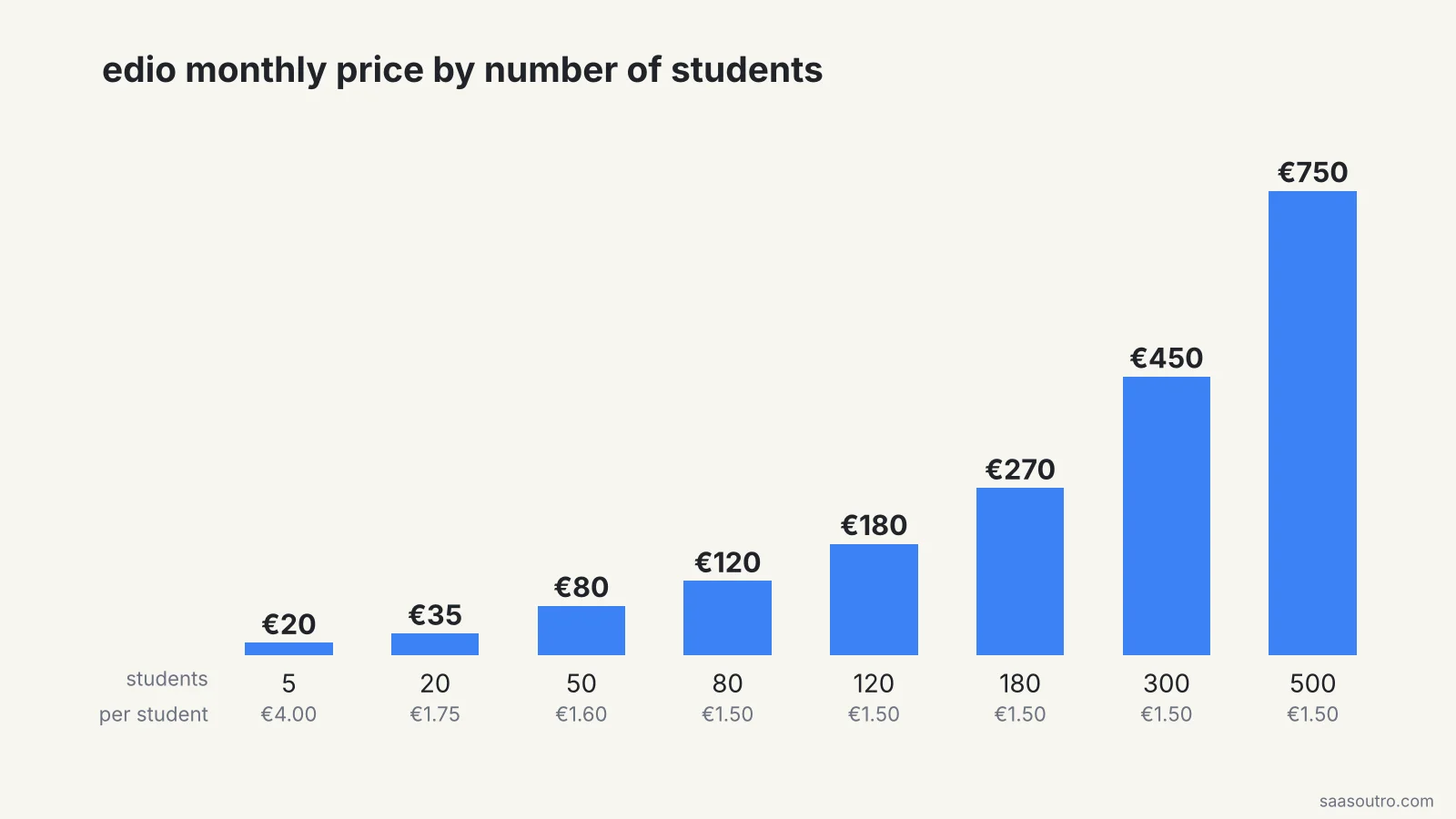 edio's in-app price for each student count, and what it works out to per student.
The public pricing page shows three plans: €20 a month for 5 students, €90 for 60 students, and €240 for 160 students. Inside the app, the plan slider goes further, in small steps up to 500 students. These are the prices I saw there:
Students | Price per month | AI credits per month | Cost per student |
|---|---|---|---|
5 | €20 | 150 | €4.00 |
20 | €35 | 600 | €1.75 |
50 | €80 | 1,500 | €1.60 |
80 | €120 | 2,400 | €1.50 |
120 | €180 | 3,600 | €1.50 |
180 | €270 | 5,400 | €1.50 |
300 | €450 | 9,000 | €1.50 |
500 | €750 | 15,000 | €1.50 |
500+ | Custom | Custom | Custom |
So past the smallest plans, edio costs about €1.50 per student a month, with 30 AI credits per student included.
Monthly vs Annual Pricing
Annual billing gives you 2 months free, which edio says saves 17%. That makes the 5-student plan about €200 a year instead of €240. You can upgrade, downgrade or cancel anytime, and your plan stays active until the end of the billing period.
How AI Credits Work
This is the part edio's pricing page doesn't explain, so here is what I found in the app:
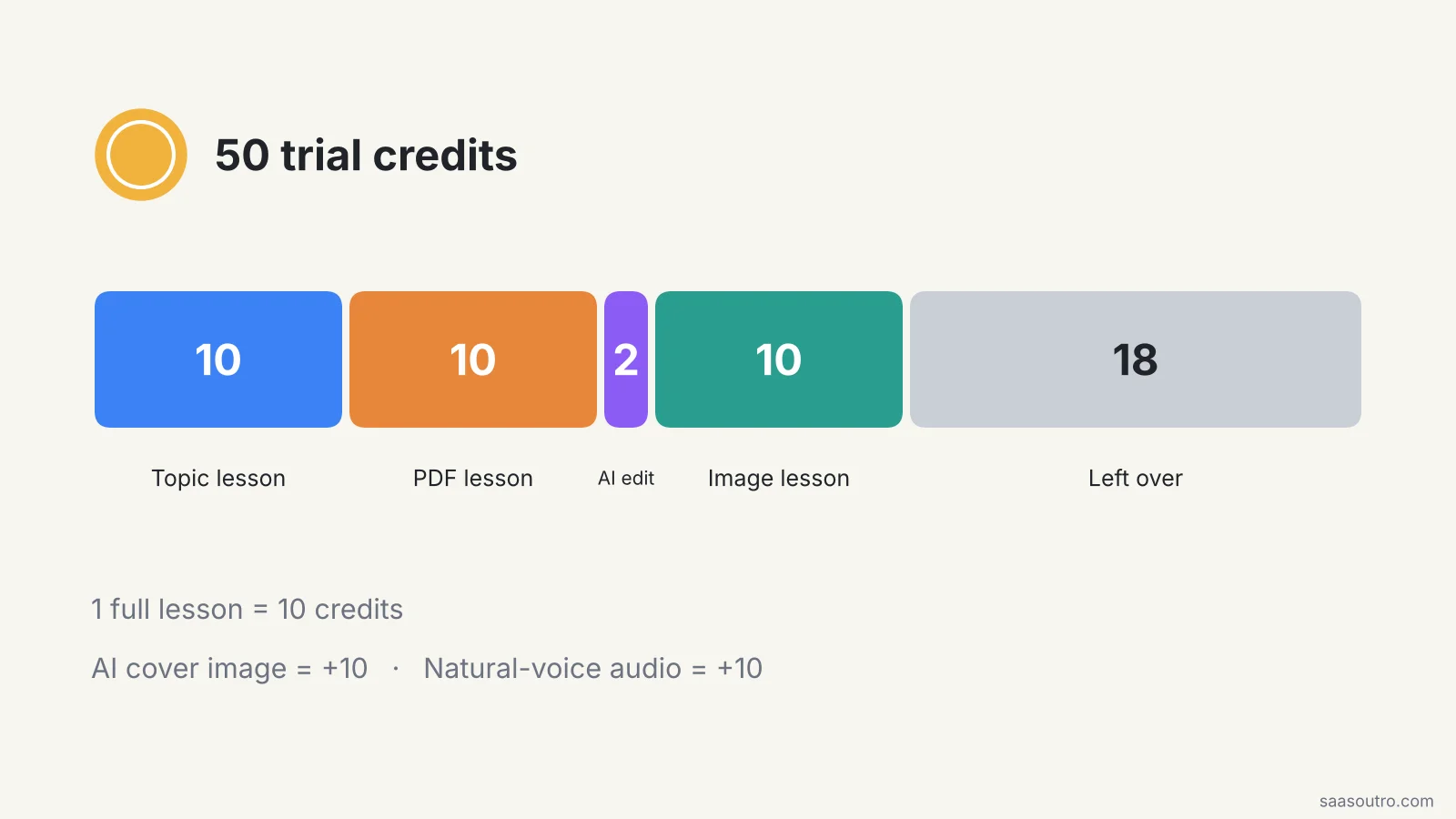 The check screen before every lesson shows the credit cost. Cover images and natural voices cost extra.
A full lesson costs 10 credits, whether it comes from a topic, a PDF or an image.
An AI cover image costs 10 more.
Natural-voice dialogue audio costs 10 more.
AI chat edits start at 1 credit. Adding three exercises cost me 2.
On the €20 plan, 150 credits gets you about 15 full lessons a month. If you run out, top-ups never expire and cost €7 for 500 credits, €25 for 2,000, €65 for 6,000 and €150 for 15,000. At 10 credits a lesson, the smallest top-up works out to about 14 cents per lesson.
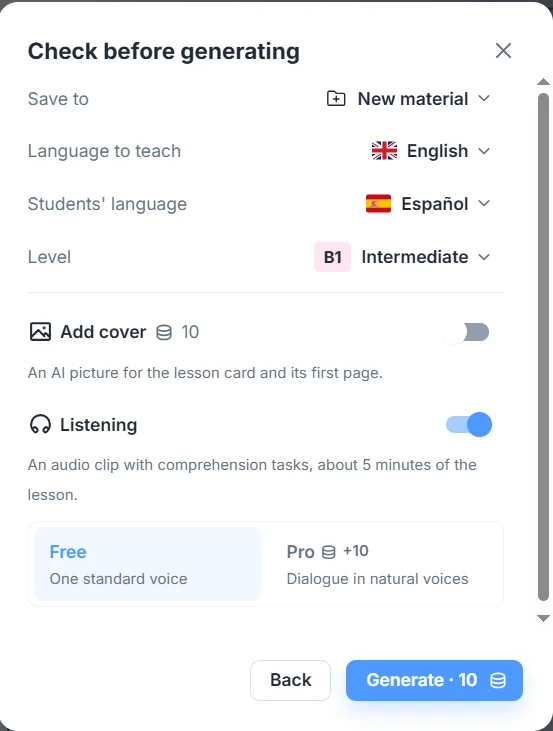 Where my 50 trial credits went during testing.
White-Label and Online Course Pricing
White label costs €150 a month or €1,000 a year on top of your plan. That gives you your own logo and domain, so students see your school's name instead of edio.
If you sell self-paced online courses, edio needs a €20 monthly subscription plus invitations. Each invitation gives one student 6 months of access, from €20 for 10 up to €750 for 500.
Is the Free Trial Enough?
The 7-day free trial needs no card, but 50 credits only covers about 5 lessons, and two of your 5 student spots are already used by demo students. My advice: generate two or three lessons on topics you really teach, and run one real lesson with a student. That will tell you more than any review, this one included.
Who Should Use edio AI?
edio is a strong fit for:
Online language tutors who want to stop spending evenings making worksheets. The €20 plan is cheap for 5 students, and the generator does most of the prep.
Small and mid-size language schools teaching European languages online, especially English and Polish, where the ready-made library is biggest.
Schools that sell lesson packages, thanks to the balance system that takes off a lesson every class.
Teachers who already have materials in PDFs or photos and want to turn them into interactive lessons.
You may want something else if:
Your students speak Arabic, Chinese, Hindi or Urdu and need translations in their own language.
You need invoicing, payments and payroll in the same tool.
You teach school subjects other than languages. edio is built for language teaching.
You mostly teach C2 learners. The ready-made library has nothing there yet.
edio AI Pros and Cons After Testing
Pros
Builds a full, well-structured lesson in under a minute that follows your brief closely
Reads images accurately. It got every item and price on my menu right.
Lessons, classroom and homework are all one thing, so there is no copying between tools
Clear credit costs shown before every generation, and top-ups that never expire
Affordable at around €1.50 per student once you grow past the smallest plans
7-day free trial with no card
Cons
Some auto-checked exercises have more than one correct answer
PDF "Transform" mode can give you very little from a plain text
Only 50 credits in the trial, about 5 lessons
Student languages are mostly European
School admin is basic, with no billing or payroll
No independent user reviews to check yet, and exercise counts differ across the site (32 vs 24)
edio AI Alternatives Worth a Look
No single tool does exactly what edio does, so the right alternative depends on which part you need most.
Tool | Best for | Starting price | How it compares |
|---|---|---|---|
Teachworks | Tutoring business admin | $16.49/mo + a fee per lesson | Much stronger scheduling and billing, no AI lessons |
TutorCruncher | Tutoring agencies | $30/mo | Built for invoicing and agency workflows, not lesson creation |
ClassIn | Live virtual classrooms | Free plan, paid from $99/mo per teacher | A deeper live classroom, less focused on language lessons |
Moodle | Full LMS on a budget | Free (self-hosted) | Very flexible, but no AI lesson builder and more setup work |
LearnWorlds | Selling online courses | $49/mo | Better for course businesses and sales pages, not live lessons |
MagicSchool AI | AI tools for school teachers | Free, Plus from $12.99/mo | Many AI tools for general teaching, no classroom or school admin |
My quick picks:
For language tutors: stick with edio. Nothing else here builds interactive language lessons and runs them live in one place.
For admin-heavy schools: use Teachworks or TutorCruncher for billing and scheduling, and edio for teaching.
For course sellers: LearnWorlds is the stronger online course platform.
For K-12 teachers: MagicSchool AI covers more subjects for less money.
And if your learners mostly study alone on their phones, an app is probably a better fit than a teaching platform. See our breakdown of Duolingo pricing for that route.
edio AI FAQ
What is edio AI?
edio AI is a teaching platform for language schools, tutors and online course creators. It combines an AI lesson generator, a virtual classroom and school management tools such as scheduling, lesson balances and student analytics. It is made by Poledio, a company based in Poland.
How much does edio AI cost?
edio starts at €20 a month for 5 students with 150 AI credits. Larger plans cost about €1.50 per student a month, such as €80 for 50 students or €750 for 500. Annual billing saves 17%, and all prices exclude VAT.
Does edio AI have a free trial?
Yes. edio has a 7-day free trial with no credit card. In my test, the trial came with 50 AI credits and room for 5 students, two of them taken by demo students.
How do edio AI credits work?
A full AI lesson costs 10 credits. A cover image or natural-voice audio adds 10 credits each, and AI chat edits start at 1 credit. Paid plans include 30 credits per student each month, and extra credits start at €7 for 500 and never expire.
Can edio create lessons from a PDF or an image?
Yes. You can upload a PDF of up to 5 pages or an image. In my test, the image option read every item and price on a café menu correctly. For a plain text PDF, choose "Inspire" mode, because "Transform" keeps your content and adds very little.
Is edio AI good for language teachers?
Yes, especially for online tutors and schools teaching English and other European languages. The lessons follow CEFR levels from A1 to C2, include auto-checked exercises, and can be taught live in edio's virtual classroom.
Does edio offer a white-label option?
Yes. White label costs €150 a month or €1,000 a year on top of your plan. It lets you use your own logo, favicon and domain so students see your school's brand.
Is edio AI worth it?
For a language tutor or online language school, yes. It saves real prep time and the per-student price is fair. If you need full billing and payroll, or teach students who need non-European translations, you will need to pair it with another tool or look elsewhere.
My Final Grade for edio
edio does the hard part well. It turned a one-line idea, a plain reading and a photo of a menu into lessons I would actually teach, and it put them straight into a classroom. The admin side is good enough for a small school, but not a replacement for full school software.
I'd give it 4.2 out of 5. Start the free trial, spend your 50 credits on lessons you really need this week, and check every answer key before your first class.