


Most AllEvents reviews are positive, and I agree on the big point. AllEvents is a legit, low-cost event discovery platform and ticketing tool, rated about 4.6 out of 5 on Capterra, G2 and Software Advice. Listing is free, and buyers pay a flat $1 per ticket. The catch I found is a 10% cut if you do not sell only through AllEvents. The refund rules also leave most decisions to the organizer. It is a strong pick for small and community organizers, and a weaker one for big, complex events.
Pricing pages are built to be read in five seconds. I spent an hour on this one, and the most important number was hiding behind a toggle.
That is why I did not want to write another summary of star ratings. I wanted to see what you actually pay and what you actually get.
So here is what I did:
I browsed AllEvents as an attendee, starting from the New York city page.
I went through a real checkout for a $25 ticket and stopped just before payment.
I played with the organizer pricing calculator and read the full Terms of Use.
I compared ratings and complaints on Capterra, G2, Software Advice, Trustpilot and both app stores.
I took screenshots at every step, and you will see them through this review.
One honest note. I did not publish a live event or pay for a ticket, so my notes on the organizer dashboard come from the official pricing page, the organizer app listing and what organizers say in their reviews.
AllEvents Reviews at a Glance
Here is where AllEvents stands on the big review sites when I checked in November 2026.
Source | Rating | Number of reviews |
|---|---|---|
Capterra | 4.6 / 5 | About 150 |
G2 | 4.6 / 5 | About 305 |
Software Advice | 4.6 / 5 | 157 |
Trustpilot | 4.3 TrustScore | 618 (14% are 1 star) |
AllEvents app, Google Play | 4.7 / 5 | About 13,000 ratings |
AllEvents app, App Store | 4.8 / 5 | About 5,500 ratings |
Event Manager (organizer app), App Store | 2.0 / 5 | Only 10 ratings |
Those numbers look great at first. But notice the split. Business review sites are filled by organizers who chose AllEvents and liked it. Trustpilot also hears from people who never signed up and found their events listed anyway. I will come back to that.
And here is my own scorecard after testing.
What I judged | My score | Why |
|---|---|---|
Ease of publishing | 4.5 / 5 | Sign in with Facebook, Google or email and you are close to live |
Ticketing fees | 4.5 / 5 exclusive, 3 / 5 non-exclusive | $1 per ticket is cheap, the 10% cut is not |
Event discovery and reach | 4 / 5 | Big audience, lots of categories |
Event listing accuracy | 3 / 5 | I found duplicates and a junk listing |
Refund clarity | 2.5 / 5 | No refund policy on the event pages I checked |
Customer support | 4 / 5 | Most reviews praise it, a few report no reply |
Overall | 4 / 5 | Great value with a few traps to know about |
What Is AllEvents?
AllEvents is two things in one place.
For attendees, it is an event discovery platform. You pick a city and browse local events, things to do, concerts and festivals, workshops and conferences, parties and community events.
For organizers, it is event management software. You can create an event, sell tickets, run registrations, promote the event and check people in at the door.
The company behind it is AllEvents Informations Pvt. Ltd., based in Ahmedabad, India. It has been running since 2011. It says it serves more than 20 million event seekers and 300,000 organizers across 40,000 cities. Those are its own numbers, so treat them as claims.
There is one more thing to know early. A lot of organizers say they found their events on AllEvents without ever posting them there. That points to listings being pulled in from public pages, such as Facebook events. It is the root of most of the angry reviews, and it matters for safety, so I cover it properly below.
How Does AllEvents Work?
The flow is simple on both sides.
If you are an attendee:
Pick your city. The New York page I tested had categories like Music, Parties, Business, Sports and Theatre, each with an event count.
Open an event. You can mark it as "Interested", share it or add it to your calendar.
Click Book Tickets, pick a ticket type and add your name, email and phone number.
Pay, then get a QR code e-ticket by email, SMS or WhatsApp.
If you are an event organizer:
Sign in with Facebook, Google or email. Clicking Create Event takes you straight to this screen.
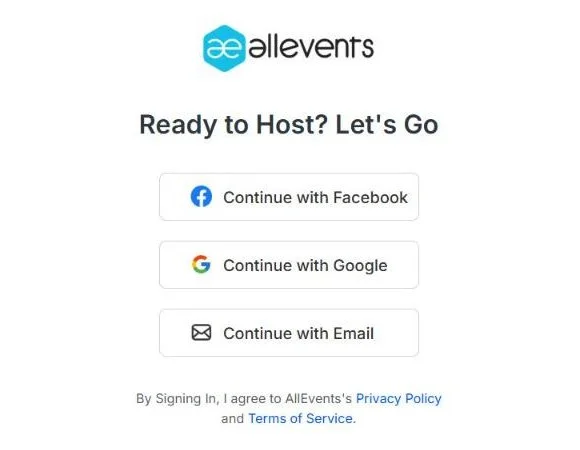 The organizer sign-in screen. There is no separate signup form.
Create the event with a title, date, location and description.
Turn on ticketing and set your ticket types, prices and limits.
Connect PayPal or Stripe so ticket money reaches you.
Publish, then promote and track sales from your dashboard.
My Hands-On Test as a Ticket Buyer
This is where things got interesting.
The city page
The New York page was busy, which is good. It opens with a featured event, a Find Tickets button and a menu of categories like Food & Drinks, Business, Festivals and This Weekend.
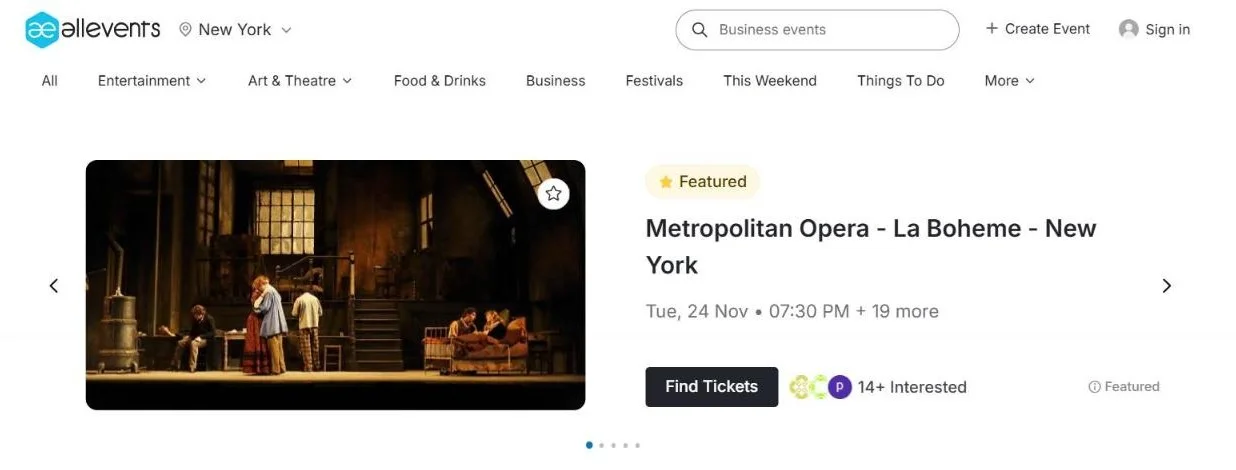 The New York city page I started from.
Some listings showed prices in dollars, like $30 to $100 for a party. Many showed no price at all.
But I also found problems. On my first pass, the same party appeared twice in one list, and a boat party was duplicated too. One listing had a title of random letters, tied to a venue in Abbots Ripton, which is a village in England, not New York.
When I went back later for screenshots, those had been cleared. But a new one caught my eye. Under Concerts in New York sat a card titled "J. Cole - Hamburg", placed at Barclays Center in Brooklyn.
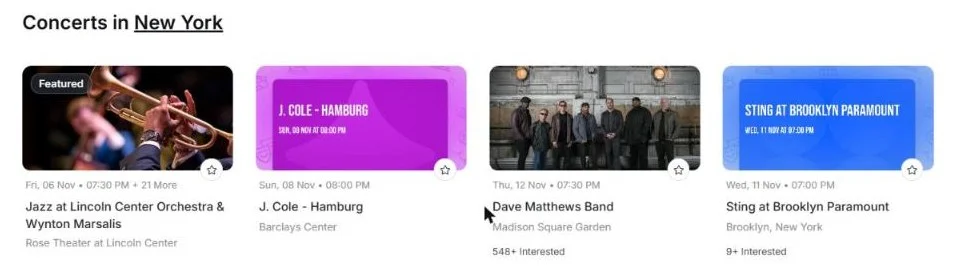 A New York concert listing with a German city in its title.
None of that is a disaster. But it tells me the listings are not checked closely. Event listing accuracy is the weakest part of the attendee experience.
The event page
I opened a singles party in Manhattan with tickets from $25.
The page did a few things right. There was a blue verified tick next to the organizer's name. There was a "Secured by PayPal" line under the Book Tickets button. And a Host Details box let me follow or message the organizer.
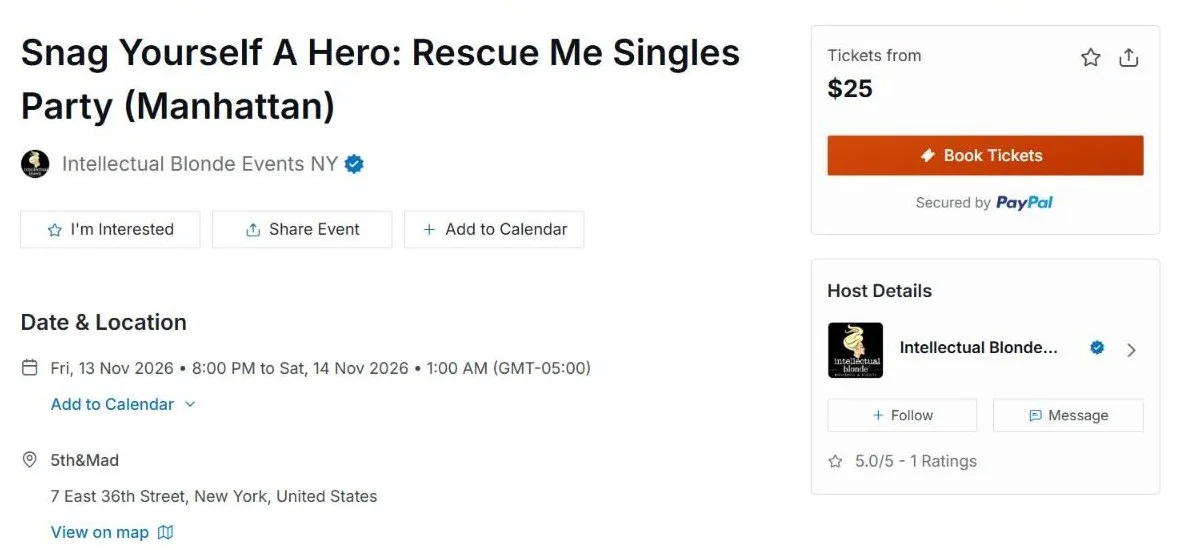 The verified tick, the PayPal line and the Message button are the trust signals I look for.
Notice the organizer rating, though. It says 5.0 out of 5, but from just 1 rating. That tells you very little.
What I could not find was a refund policy. I checked two ticketed events in New York, and neither showed one on the page. One page simply said booking fees and taxes may apply.
The checkout
I clicked Book Tickets and added one $25 ticket.
A timer appeared at once, holding my spot for just under 10 minutes. That is a nice touch, because it stops the ticket from being sold while you type.
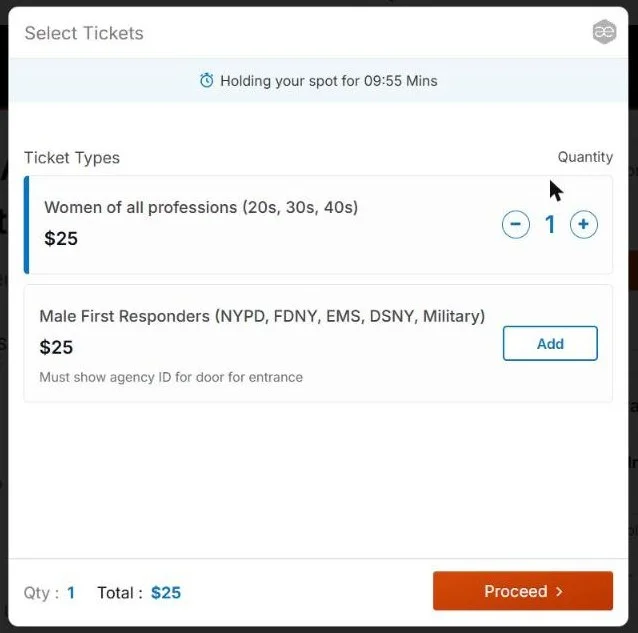 The ticket picker. The total still shows $25 with no fee added.
The next screen asked for the attendee's name, email and phone number. The total still showed $25 at this point, with no fee line yet. So the $1 booking fee is not shown until the final payment step. I stopped there and did not pay.
My takeaway as a buyer: the ticket purchase experience is smooth, but you see the full price late, and you see the refund rules almost never.
AllEvents Features for Event Organizers
Since I could not publish a live event, this section is built from the official pricing page, the organizer app listing and organizer reviews. Here is what you get.
Event creation and publishing
Organizers say this is the best part. Reviews keep praising how fast it is to create and publish an event. You get your own event page and an organizer profile page that collects followers. Several Capterra reviewers also like the white-label option, which keeps your own branding on the page.
Online ticketing and registration
You can set up multiple ticket categories, paid and free tickets, discount codes and donation tickets. You can also add custom registration forms to collect what you need from attendees. Booking confirmations and digital tickets go out by email and SMS.
QR code tickets and attendee check-in
Every ticket comes with a QR code. On the day, you scan tickets with the organizer app for quick attendee check-in. Event attendance tracking then shows up in your dashboard.
Event promotion tools
This is what makes AllEvents different from a plain ticketing tool. The free tools include a trackable link generator, a short link maker, a QR code generator, a designs creator for social media posts, and Google event featuring.
Paid event promotion is also on offer. The organizer app lists Featured Listings, push notifications and social media ads as promotional options. AllEvents also says it shares events across a network of 5,000 partner websites.
Analytics and attendee data
You get live analytics on ticket sales tracking and revenue, plus insight into where your best sales come from. The pricing page also says your attendee data belongs to you, and you can export it any time. That is a big plus for community building.
Email and broadcast limits
You can send scheduled email campaigns and event notifications to attendees. But each plan caps your broadcasts, from 100 on the free plan to 1,000 on Professional.
If email is a big part of your event marketing, I would treat AllEvents as the ticket desk and run your newsletter on a dedicated email tool. You can export your attendee list and move it over.
AllEvents Pricing: Free Listing, a $1 Fee and a 10% Catch
Let me start with the simple part.
Listing an event is free. Free events cost nothing at all, with no booking fees and no monthly fees. For paid tickets in the US, the buyer pays a flat $1 per ticket, and you keep 100% of the ticket price you set. You can also choose to absorb that $1 yourself.
Card processing is extra. Stripe or PayPal charge their own fees on every sale. The good news is that the money goes straight into your connected PayPal or Stripe account. AllEvents does not hold it. For payments in Indian rupees, the payout lands in your bank 3 to 4 business days after the event.
The toggle most reviews miss
On the official AllEvents pricing page there is a calculator with two small buttons: Exclusive and Non-Exclusive.
I set it to a $50 ticket and 1,000 tickets sold.
On Exclusive, I keep $50,000 and AllEvents gets $1,000. That is just the $1 buyer fee.
On Non-Exclusive, I keep $45,000 and AllEvents gets $6,000. The calculator spells it out as the $1 buyer fee plus 10% for non-exclusivity.
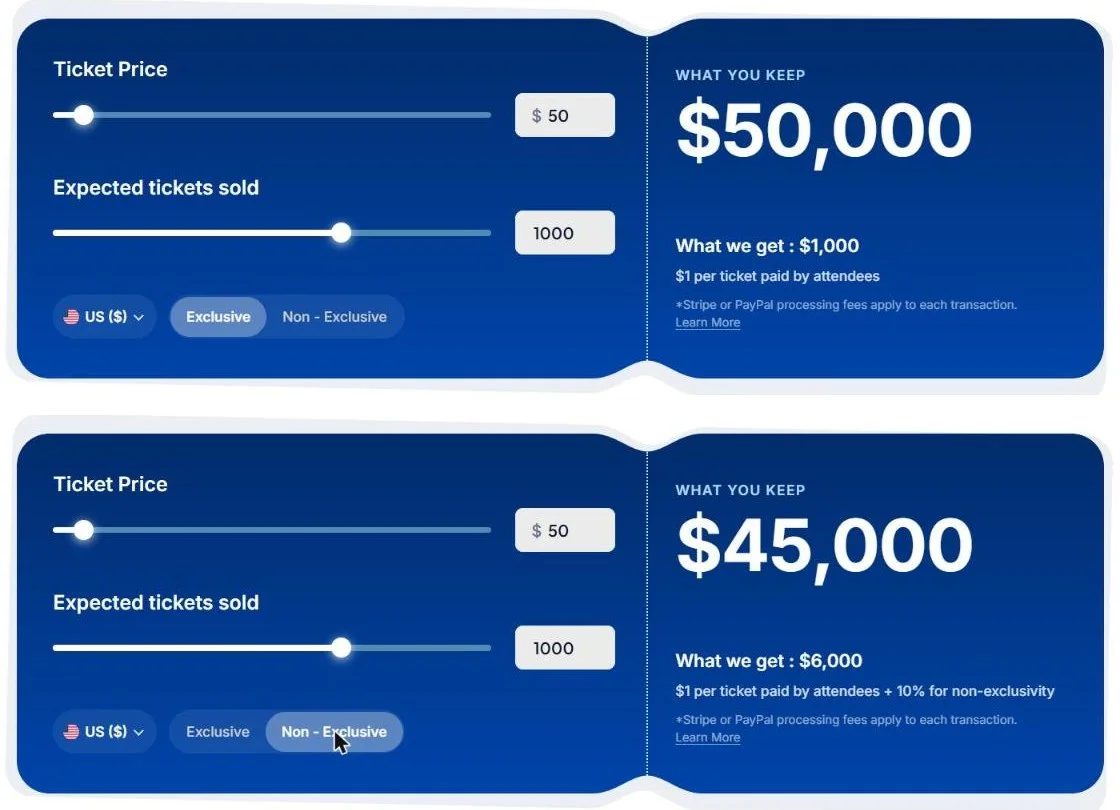 Same ticket price, same sales. One click on the toggle costs $5,000.
That is a $5,000 difference from one click. I did not see it in any of the competing reviews I read.
The page does not define "exclusive". But the Terms of Use say the booking fee can be a flat fee, a percentage, or both, depending on your agreement with AllEvents. And one Capterra reviewer, a Chamber of Commerce president, says AllEvents dropped the organizer fee when they stayed exclusive.
My reading is simple. If AllEvents is your only ticket seller, you pay almost nothing. If you also sell on your own site or another platform, expect the 10% cut. Ask support to confirm your rate in writing before you publish.
Subscription plans
You do not need a paid plan to sell tickets. Plans only unlock more active events and marketing tools.
Plan | Price | Active events | Leads per event | Broadcasts | Offline tickets |
|---|---|---|---|---|---|
Free | $0 | 5 | 10 | 100 | None |
Essential | $12 / month | 20 | 50 | 500 | 100 |
Professional | $60 / month | 100 | Unlimited | 1,000 | 1,000 |
Power | $200 / month | 100+ | Unlimited | Unlimited | Unlimited |
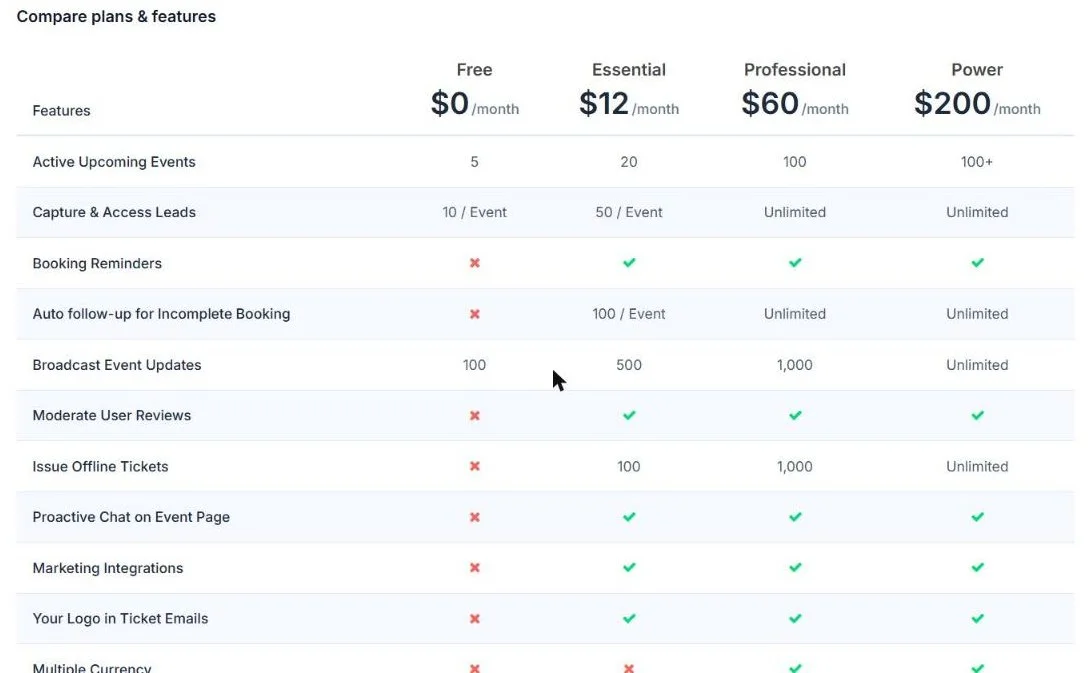 The plan table on the AllEvents pricing page.
When I scrolled through the full table, the free plan turned out to be thinner than the headline suggests. It has no booking reminders, no marketing integrations, no logo in ticket emails, no affiliate management and no webhooks. Selling in more than one currency needs Professional or higher. What every plan does get is ticket types, donations, discount codes, custom forms, the Facebook Pixel and check-in with the app.
Watch the free plan limit if you run recurring events. One Trustpilot reviewer said the cap of 5 published events blocked their weekly series. Every date counts.
What you really pay on a $20 ticket
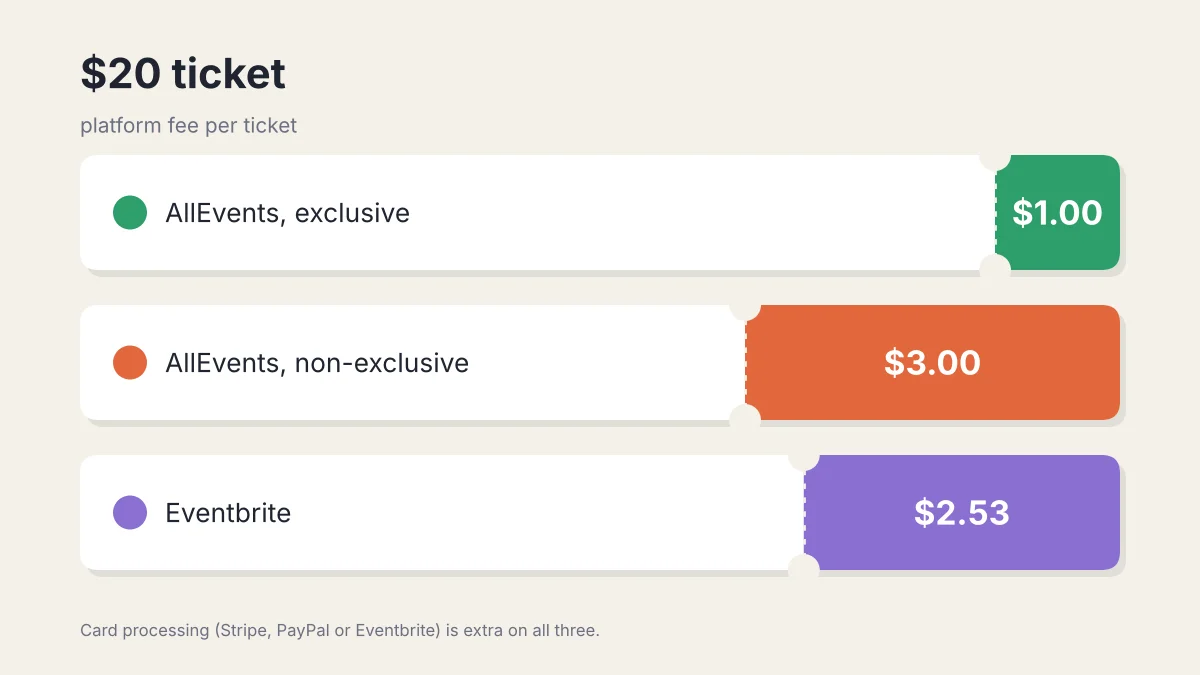 On a $20 ticket, the non-exclusive cut costs more than Eventbrite's fee.
Here is the same math for a small event: 200 tickets at $20 each. Eventbrite's US fee is 3.7% plus $1.79 per ticket, which comes to $2.53 on a $20 ticket. All figures are before card processing.
Setup | Fee per ticket | Who pays it | What you keep from 200 tickets |
|---|---|---|---|
AllEvents, exclusive | $1.00 | Buyer | $4,000 |
AllEvents, non-exclusive | $3.00 | $1 buyer, $2 you | $3,600 |
Eventbrite, fee passed to buyer | $2.53 | Buyer | $4,000 |
Eventbrite, you absorb the fee | $2.53 | You | $3,494 |
So AllEvents is the cheapest option by a clear margin, but only on the exclusive deal. Go non-exclusive and it costs more than Eventbrite.
AllEvents Pros and Cons
Pros
Free event listing and free ticketing, with no setup fee.
A low $1 booking fee on exclusive events.
Ticket money goes straight to your PayPal or Stripe account.
A large audience that is already looking for things to do.
Free promotion tools like QR codes, trackable links and design templates.
You own your attendee data and can export it.
Most organizer reviews praise fast, friendly support.
Cons
The 10% non-exclusive cut is not in the headline pricing.
Duplicate and junk listings on city pages.
Events can show up on AllEvents without the organizer's consent.
No refund policy shown on the event pages I tested.
Outside India, the booking fee is not refundable.
The free plan caps you at 5 active events.
The organizer iOS app has a 2.0 rating, though from only 10 ratings.
A few organizers report ticketing setup errors, such as failing to add a refund policy.
Is AllEvents Legit and Safe?
Yes, AllEvents is legit. It is a real company that has been running since 2011, payments go through PayPal and Stripe, and most organizers rate it highly.
Whether it is safe depends more on the event than on the platform.
What the Terms of Use say
The Terms state plainly that AllEvents is not responsible for the accuracy, legality, safety or quality of events on its pages. Buyers are expected to check that an event is real.
The refund rules depend on where the event is:
Events outside India: the organizer decides refunds, based on the refund policy on the event page. The booking fee and handling fees are not refundable.
Events in India: AllEvents holds the organizer's money for 2 days. If an event is cancelled or a valid complaint comes in, AllEvents can refund the full amount, including the booking fee.
So if you buy a ticket for a US or UK event and the organizer will not refund you, AllEvents will not step in. That is the most important safety point in this whole review.
The copied events problem
This is the biggest theme in negative AllEvents reviews. Organizers on Trustpilot and Reviews.io say their events were listed without permission, sometimes with ticket options they never set up. One buyer on Reviews.io described waiting at a pickup point, only to be told by the real organizer that they had nothing to do with AllEvents.
To be fair, these are user reports, not proof that it happens to everyone. Many reviews from 2025 and 2026 are positive. But the pattern has been around for years, so I take it seriously.
How I would stay safe as an attendee
Look for the blue verified tick next to the organizer's name.
Open the organizer profile and check their ratings and other events.
Cross-check the event on the organizer's own website or social pages.
Find the refund policy before you pay. If you cannot see one, ask the organizer.
Pay with a method that lets you open a dispute if something goes wrong.
What to do if your event was copied
Email support@allevents.in with the event link and proof that you are the organizer. Ask them to either hand the listing over to you or take it down.
If your event or brand keeps showing up on sites you never used, that is really a brand problem, not just an AllEvents problem. In that case it is worth looking at brand protection tools that watch the web for misuse of your name.
What Real Users Say in AllEvents Customer Reviews
I read through the recent reviews on Capterra, G2, Software Advice and Trustpilot. Here is the honest picture.
What organizers love:
How quick it is to publish an event.
The low ticketing fee. "Low ticketing fee" is literally the reason one long-time Capterra reviewer gave for choosing it.
Support that replies fast, often through chat.
Extra reach. One pop-up restaurant on Trustpilot said guest numbers went up after importing its Facebook events.
What people complain about:
Events listed without consent, as covered above.
Unwanted emails that kept coming after people asked to unsubscribe.
Paid promotion that did not lead to any sales, according to one 2026 Trustpilot review.
The 5-event cap on the free plan.
A missed onboarding call with support.
On Trustpilot, 72% of reviews are 5 star and 14% are 1 star. That kind of split usually means two different groups of people. Organizers who use it are happy. People who had their events copied, or who got spam, are not. On the recent 1-star reviews I read, I did not see any public replies from the company, which I would like to see change.
AllEvents vs Eventbrite
This is the comparison most organizers are really making.
AllEvents | Eventbrite | |
|---|---|---|
Listing free events | Free | Free |
Fee on paid tickets (US) | $1 per ticket, plus 10% if non-exclusive | 3.7% + $1.79 per ticket |
Card processing | Stripe or PayPal rates | 2.9% per order |
Where the money goes | Straight to your PayPal or Stripe | Usually through Eventbrite's own payment processing |
Refunds | Organizer decides outside India | Organizer sets a 1, 7 or 30 day policy, with automatic refunds available |
Discovery audience | Strong, especially for local events | Strong, very well known |
Listing control | Weaker, copied events reported | Stricter, with a process to report unauthorized sellers |
Best for | Small, frequent, budget-conscious events | Organizers who want a well-known brand and stricter controls |
My take: AllEvents wins on cost if you go exclusive. Eventbrite wins on trust and refund handling.
Best AllEvents Alternatives
If AllEvents does not fit, these are the event management platforms I would look at next.
Eventbrite: the default choice for public ticketed events, with a big audience and clear refund settings.
Meetup: better for recurring groups and community events than one-off ticket sales.
Ticket Tailor: a ticketing tool with low, flat fees. You bring your own audience, since it is not a discovery site.
Eventzilla: solid event registration software for workshops, classes and conferences.
Humanitix: a not-for-profit ticketing platform that gives its profits to charity, free for free events.
If you only need free visibility, Facebook Events is still worth using alongside any of these.
Who Should Use AllEvents?
AllEvents is a good fit if you are:
A small business or solo organizer running workshops, classes or local events.
A community group or nonprofit that wants free event listing and some extra reach.
An organizer in India, where AllEvents handles payouts and has stronger refund rules.
Happy to sell tickets only through AllEvents, so you get the $1 deal.
An attendee looking for upcoming events and things to do in your city.
I would skip it if you are:
Running a large conference that needs sponsor, exhibitor or floor plan tools.
Selling the same event on several platforms, because the 10% cut adds up fast.
An organizer who needs tight control over where your event appears.
My Verdict: Is AllEvents Worth It?
For most small organizers, yes.
On an exclusive deal, AllEvents is the cheapest serious ticketing option I have looked at. You get free listing, a $1 fee paid by the buyer, money straight into your own account and a real audience of people looking for events.
But it is not as cheap as it looks if you sell anywhere else. Then that 10% cut makes it pricier than Eventbrite. And as a buyer, I would always check the organizer and the refund policy before paying, because AllEvents does not promise to step in on events outside India.
My advice is to start on the free plan with one exclusive event. Ask support to confirm your fee in writing. If the sales come in, scale up from there.
AllEvents Reviews FAQ
Is AllEvents free to use?
Yes. Listing events and selling tickets is free for organizers. Free events cost nothing. On paid tickets, the buyer pays a flat $1 per ticket in the US, unless the organizer chooses to cover it. Paid plans from $12 a month only add more active events and marketing tools.
Is AllEvents legit?
Yes. AllEvents is run by AllEvents Informations Pvt. Ltd. in Ahmedabad, India, and has operated since 2011. It is rated about 4.6 out of 5 on Capterra, G2 and Software Advice. The main complaints are about events being listed without the organizer's consent, not about the platform taking money and disappearing.
Is AllEvents safe for buying event tickets?
It is safe when the event is real and the organizer is verified. Check for the blue verified tick, look at the organizer's profile and ratings, and confirm the event on the organizer's own site. AllEvents says in its Terms that it is not responsible for the accuracy or quality of events.
Does AllEvents offer refunds?
It depends on the event. Outside India, the organizer decides refunds and the booking fee is not refundable. For events in India, AllEvents can refund the full amount, including the booking fee, if the event is cancelled or a valid complaint is raised.
How much does AllEvents charge event organizers?
On an exclusive deal, nothing beyond the $1 that buyers pay. If your event is non-exclusive, the pricing calculator adds a 10% cut on top of the $1 buyer fee. Stripe or PayPal processing fees apply either way.
Can I sell tickets through AllEvents?
Yes. You can sell paid and free tickets with multiple ticket types, discount codes and donation options. Money goes straight into your connected PayPal or Stripe account, and attendees get QR code tickets.
How do I create an event on AllEvents?
Sign in with Facebook, Google or email, then add your event title, date, location and description. Turn on ticketing, connect PayPal or Stripe, and publish. Organizers say the whole process takes only a few minutes.
Why is my event on AllEvents when I never posted it?
Many organizers report this. It appears AllEvents pulls in events from public sources such as Facebook. Email support@allevents.in with proof that you are the organizer, and ask to claim the listing or have it removed.
How can I contact AllEvents customer support?
You can use the chat window on the AllEvents website or email support@allevents.in. AllEvents says its organizer support team is available 24/7.
Is AllEvents better than Eventbrite?
It is cheaper if you sell only through AllEvents. Eventbrite is better for refund handling, listing control and brand trust. If you sell on several platforms, Eventbrite can work out cheaper.
Can I find free events on AllEvents?
Yes. Many listings on city pages are free, from community events to meetups and workshops. Pick your city, browse by category and look for events with no price listed.