

Brand protection software is a tool that watches the internet for anyone misusing your brand, such as fake sellers, lookalike websites, impostor social accounts or advertisers bidding on your name, and then helps you remove them. The best tools do both jobs: they find the abuse automatically and send takedown requests or complaints for you.
The catch, in my experience researching this market, is that no single tool covers every channel well. So the first job is working out which kind of brand abuse you actually have.
The quick version, if you only read one part:
Your main problem | Tool type to buy | Tools I would shortlist | Public price |
|---|---|---|---|
Fakes on Amazon, eBay and other marketplaces | Marketplace and counterfeit | Red Points, Corsearch | Quote only |
Phishing sites, fake accounts, lookalike domains | Website, domain and social | BrandShield, Netcraft, ZeroFox, Doppel | Quote only |
Brand bidding and hijacked search ads | Search ad and affiliate | AdPolice, The Search Monitor, BrandVerity | From about $500 a month (Search Monitor) |
Affiliates leaking coupons and stealing commission | Search ad and affiliate | Marcode | From $850 a month (Capterra) |
Small budget, just starting out | Search ad and affiliate | Bluepear | From $199 a month (Capterra) |
I explain each type, each tool and what drives the price further down.
$467 Billion in Fakes, and Most Guides Still Miss Half the Problem
According to the OECD and EUIPO, global trade in fake goods was worth around $467 billion in 2021. That is roughly 2.3% of all world imports.
That number explains why most "best brand protection tools" lists focus on counterfeits. But when I read the guides ranking for this topic, I noticed two things.
First, most of them are written by a vendor that ranks itself first. Second, almost none of them mention paid search or affiliate abuse at all.
That second gap matters. For a lot of online brands, the biggest leak is not a fake handbag on a marketplace. It is a competitor or an affiliate quietly using your brand name in search ads, and you paying for the clicks.
So I wrote this guide to cover the whole category, not just one corner of it.
What Is Brand Protection Software?
Brand protection software, sometimes called digital brand protection software or brand enforcement software, is technology that detects and stops brand abuse across digital channels. That includes search engines, online marketplaces, social media platforms, ecommerce websites, mobile applications and digital advertising networks.
In plain terms, I think of it as software to monitor brand misuse online, like a security guard for your brand name. It patrols the places your customers go, spots anyone pretending to be you or selling under your name, and calls in the right people to remove them.
Most brand protection platforms do three things:
Monitor channels for your brand name, logos, products and trademarked terms.
Detect and prioritize real threats, while filtering out false positives.
Enforce by sending takedown requests, trademark complaints or legal notices.
Some brand protection solutions also include managed services, where a human team handles the enforcement for you. That is where the line between software and brand protection services starts to blur.
How Does Brand Protection Software Work?
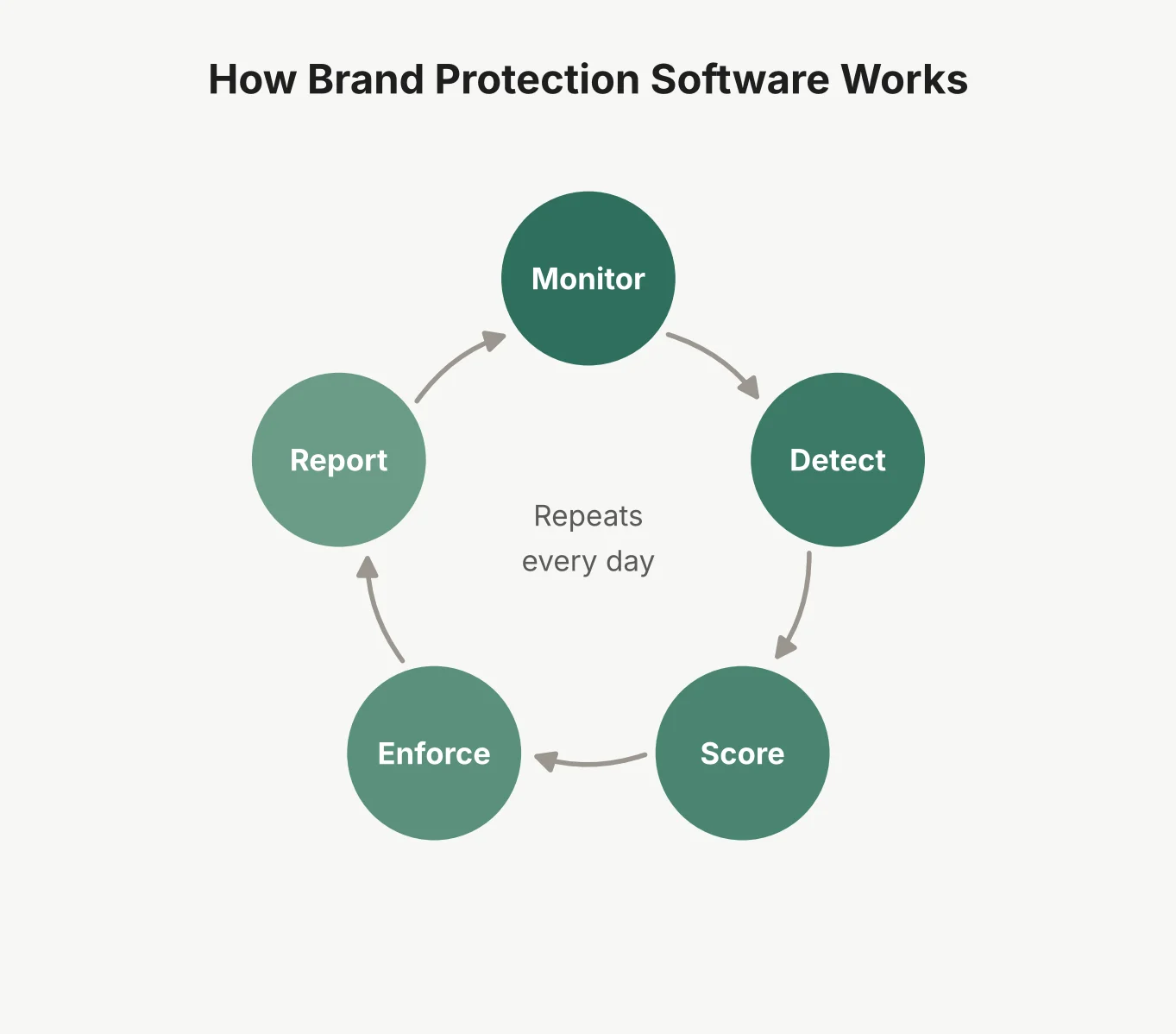 Whatever the vendor, I find almost every tool runs the same five step loop.
1. Monitor. The software scans its channels for your brand terms, product images and logos. This is real-time monitoring in the better tools, and a daily or weekly crawl in cheaper ones.
2. Detect. Automated detection, often using image recognition and text matching, flags possible matches. A lookalike domain, a listing using your product photos, or a search ad with your brand name in the headline.
3. Score. Risk scoring decides what matters. A fake login page that steals customer passwords is urgent. A reseller using your logo a bit loosely is not.
4. Enforce. Enforcement workflows send takedown requests to marketplaces, hosts, registrars and social platforms, or file trademark complaints with search engines. Good tools handle evidence collection automatically, with screenshots and timestamps.
5. Report. Automated reporting shows what was found, what was removed, and how fast. Case management and incident tracking keep every case in one place.
The loop never stops, because brand abuse does not stop. The real difference between tools is how many channels they watch and how much of step four they automate.
The Five Threats These Tools Detect
Here is the list of brand abuse I would want any buyer to understand before looking at tools. Each one needs a slightly different kind of brand abuse detection software.
Trademark Infringement and Unauthorized Brand Use
This covers anyone using your brand name, logo or trademarked terms without permission. It might be in an ad, on a website, in a product listing or in an app store.
Trademark monitoring software, which some vendors sell as brand infringement monitoring, watches for unauthorized brand use and helps you act on it. This is what most people mean by brand protection software for trademark infringement. Some tools, like Corsearch, go further and also watch trademark registries for new marks that look like yours.
If your main worry is your trademark appearing in search ads, it helps to know what search engines will and will not remove before you buy anything. Google, for example, polices trademarks in ad text but not in keywords.
I walk through what it will and will not remove in my guide to filing a Google trademark complaint. So software to monitor trademark violations in Google Ads should focus on the ad copy itself.
Brand Bidding and Paid Search Abuse
Brand bidding is when someone buys your brand name as a search keyword, so their ad shows when customers search for you. Trademark bidding by competitors is often allowed. The same thing done by your own affiliates usually breaks their terms.
This is a whole problem area on its own, so I covered it in full in my guide to brand bidding.
In short, software to detect unauthorized brand bidding needs paid search monitoring that checks your branded keywords many times a day, from different locations, because these ads often run only at night or in one city.
Affiliate Fraud and Ad Hijacking
Ad hijacking is a nastier version of brand bidding. An affiliate copies your ad, shows your own website address, and routes the click through their affiliate link. You then pay them commission on a customer who was already searching for you.
Related tricks include coupon abuse, where private discount codes leak to coupon sites, and browser extensions that take credit at checkout. All of this is unauthorized affiliate activity that hurts your affiliate attribution.
Spotting it is a job for affiliate fraud detection, and for software to detect affiliate ad hijacking in particular. I explained the warning signs in my affiliate fraud guide, and it is the area where specialist paid search tools beat the big general platforms.
Counterfeit Products and Unauthorized Sellers
This is the classic brand protection problem. Counterfeit products on online marketplaces, gray market sales of real goods outside approved regions, and unauthorized resellers undercutting your prices.
Software to detect counterfeit products online scans marketplaces like Amazon, eBay, AliExpress and many regional sites. It flags listings that use your trademarks, copy your product photos or sell suspiciously cheap.
The OECD found that clothing, footwear and leather goods made up 62% of seized fakes. If you sell physical goods in those areas, this is probably where you start.
Fake Websites, Domains, and Social Media Accounts
Brand impersonation online is now as common as counterfeiting. It includes lookalike domains, phishing websites that copy your login page, fake social media accounts, and fake customer support numbers.
This is where online brand protection software overlaps with brand security software. Phishing websites can steal your customers' passwords and payment details, so speed matters far more than for a fake listing. Netcraft, for example, says its median phishing takedown time is 33 minutes.
Domain monitoring tools also watch new domain registrations for names close to yours, so you can act before a site goes live.
Key Features to Look For
After going through the leading tools, these are the features I would check, in order of importance.
Automated Brand Monitoring and Alerts
Brand monitoring software is the base layer. Like most online brand monitoring tools, it should scan every channel you care about, on a schedule that matches the risk.
I would look for violation alerts you can tune. Too many alerts and your team ignores them. Too few and you miss things. Good tools let you set what triggers an alert and who gets it.
Ask about monitoring coverage in detail. "We monitor marketplaces" can mean 5 sites or 500.
Trademark and Paid Search Monitoring
If you advertise on search engines or run an affiliate program, this feature matters a lot. Look for:
Checks on your branded keywords many times a day, not once.
Monitoring from multiple countries and cities.
The ability to identify the advertiser or affiliate behind each ad.
Trademark complaints to Google and Microsoft filed for you.
General brand protection platforms often treat paid search as an add-on. If ads are your main problem, a specialist tool usually does this better.
Evidence Collection and Takedown Management
Detection is only half the job. Brand protection software with automated takedowns saves the most time, because sending takedown requests by hand to dozens of platforms is slow and dull.
I would ask every vendor three questions here:
Which platforms can you send takedowns to automatically?
What is your takedown success rate, and how do you measure it?
Is there a limit on takedowns, or an extra charge per takedown?
Some vendors, like Red Points, advertise unlimited takedowns on their main plans. Others price by volume. That difference can change your bill a lot.
Reporting, Analytics, and Integrations
Good reporting shows trends, not just a list of cases. Which channels are getting worse? How fast are takedowns working? How much money did you protect?
Software integrations matter too. Look for connections to your affiliate networks, ad accounts, ticketing system and analytics tools. Threat intelligence feeds are a plus for security teams.
What a Good Tool Actually Gets You
Here is what I think a brand actually gets from a good tool:
Revenue protection. Fewer fake sales, fewer hijacked commissions and lower advertising costs on your own brand terms.
Customer trust. Customers who buy a fake or get phished usually blame you, not the criminal.
Brand integrity and brand reputation. Your name stays tied to your real products and your real prices. That is why some vendors call these brand reputation protection tools.
Operational efficiency. One dashboard replaces hours of manual searching, screenshots and emails.
Stronger trademark enforcement. Organized evidence makes legal action easier when you need it.
The return on investment is easiest to prove for paid search and affiliate abuse, because you can count the commissions you cancel. It is harder for counterfeits, where you are estimating sales you would have made.
Who Needs It, Team by Team
Not every business needs a paid tool. Here is how I would think about it by team.
Ecommerce and Consumer Brands
Brand protection software for ecommerce brands mostly means marketplace monitoring. If third-party sellers list your products, or fakes of them, this is the first tool to buy. Brands with strong price rules also need unauthorized reseller tracking.
Affiliate Marketing Teams
Brand protection software for affiliate programs focuses on search ads, coupon sites and browser extensions. The goal is affiliate compliance: making sure partners follow your rules and do not get paid for sales they did not drive.
Marketing and PPC Teams
Brand protection software for digital marketing teams watches competitor ads on your branded keywords. It helps you decide when to bid on your own brand, and it gives you evidence for trademark complaints.
Legal and Intellectual Property Teams
Legal teams care about intellectual property infringement, copyright infringement and trademark watching. They need strong evidence, good records and tools that support legal action, not just takedowns.
For brand protection software for small businesses, I would usually start with manual checks and free platform tools, like Amazon Brand Registry or Google's trademark complaint form, then buy software once the problem is clearly costing money.
Types of Brand Protection Software
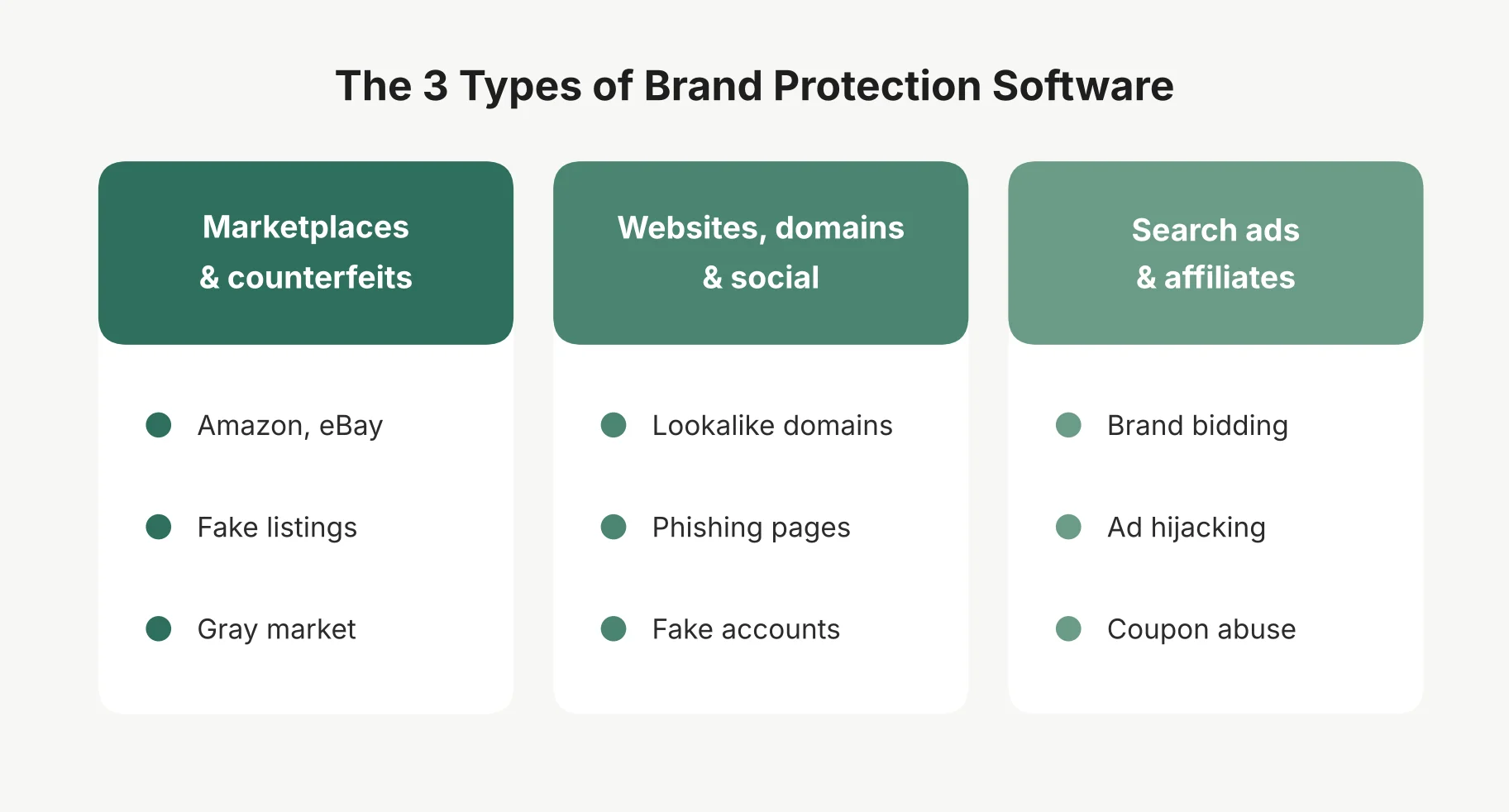 This is the part I think matters most, and the part most guides skip. Brand protection solutions fall into three broad types.
Type | What it protects | Typical buyer | Example tools |
|---|---|---|---|
Marketplace and counterfeit | Product listings, gray market, piracy | Ecommerce, consumer and legal teams | Red Points, Corsearch |
Website, domain and social | Phishing, fake sites, impostor accounts | Security and digital risk teams | BrandShield, Netcraft, ZeroFox, Doppel |
Search ad and affiliate | Brand bidding, ad hijacking, coupon abuse | PPC and affiliate teams | AdPolice, The Search Monitor, BrandVerity, Marcode |
Some large platforms cover two columns. Very few cover all three equally well. If a vendor claims they do, I would ask for proof in the column you care about most.
Best Brand Protection Software and Tools
Here is my shortlist of the best brand protection software for businesses, and the best online brand protection tools for each type of threat. I have not run every tool on a live account, so this is built from vendor documentation, public reviews and listings. All pricing notes were checked in October 2026.
Red Points
Red Points is one of the best known names for counterfeit and marketplace protection. It covers marketplaces, fake websites, social media, gray market sales, piracy and domain abuse.
Its pricing page shows no prices, but it does describe a flat fee with unlimited detections and takedowns on its counterfeit plans. The entry plan covers up to 10 trademarks. It holds 4.3 out of 5 on Capterra from 20 reviews.
Best for: consumer brands with a serious counterfeit problem across many marketplaces.
Corsearch
Corsearch started in trademark clearance and watching, and joined with brand protection firm Incopro in 2021. It says it searches 191 trademark databases and scans over 1,000 online platforms daily.
That mix makes it strong for legal teams who want trademark registration watching and anti-counterfeiting in one place. Pricing is by quote.
Best for: legal and IP teams at large brands.
BrandShield
BrandShield focuses on online brand threats: phishing, lookalike domains, executive and brand impersonation, fake ads, rogue apps and social media scams. It pairs AI detection with a managed service, including a named threat analyst for each customer.
It describes its pricing as tiered by coverage and company size, with no public figures.
Best for: brands worried about impersonation and phishing as much as counterfeits.
Netcraft
Netcraft comes from the security side. It is best known for finding and taking down phishing websites, fake shops, scam phone numbers and impersonation sites. It says it takes down around a third of the world's phishing attacks.
Pricing is custom. If your customers are being phished in your name, this is the kind of tool I would look at first.
Best for: banks, fintechs and any brand whose customers get phished.
ZeroFox
ZeroFox is an external cybersecurity platform with a strong brand protection side. It finds fake social media profiles, impersonation pages, deepfakes of executives, lookalike domains and phishing infrastructure, and it watches dark web sources for threats.
It says detection triggers automated takedowns, and that it works with registrars, hosting companies and app stores to remove threats in hours. Pricing is by quote.
Best for: brands that need executive protection and social media impersonation covered alongside phishing.
Doppel
Doppel is one of the newer names, built around AI for social engineering threats. It looks for impersonation across many channels, uses a threat graph to link related attacks, and automates takedowns. It also runs deepfake based training for staff.
It raised a $70 million Series C in November 2025 and lists customers such as Coinbase and Ramp. Pricing is by quote.
Best for: fast growing tech and finance brands facing AI driven impersonation and scams.
AdPolice
AdPolice is a paid search specialist. It monitors your branded keywords, finds advertisers and affiliates bidding on them, and puts automated takedowns at the center. It has 4.8 out of 5 on Capterra from 26 reviews. Pricing is by quote.
Best for: affiliate managers fighting brand bidding and ad hijacking. If it is not the right fit, I compared the options in my roundup of AdPolice alternatives.
The Search Monitor
The Search Monitor covers branded search ad monitoring, affiliate compliance and competitor ad intelligence. It is one of the few tools in this space with published prices, spread across four products from about $500 to $1,200 a month, plus crawl fees.
Best for: PPC teams that want brand protection and competitor data in one tool. I broke down every plan in my Search Monitor review.
BrandVerity
BrandVerity is a long running tool for paid search and trademark monitoring, with affiliate compliance features. It does not publish prices. It holds 4.9 out of 5 on Capterra from 15 reviews.
Best for: brands monitoring brand bidding across many markets. I compared nine BrandVerity alternatives that do the same job.
Marcode
Marcode is a newer tool built around affiliate fraud. It finds affiliates hijacking your brand ads, leaking coupon codes or abusing browser extensions, then cancels their commission through network integrations. Capterra lists it from $850 a month. I covered it in depth in my Marcode review.
Best for: retail brands with large affiliate programs on networks like Awin or Impact.
For smaller budgets, Bluepear is worth a look too. It covers brand bidding monitoring and affiliate compliance and is listed on Capterra from $199 a month.
How to Choose the Right Tool
If you are wondering how to choose brand protection software, here is the simple process I would follow before booking any demo.
Step 1: Find your biggest leak. Search your brand name on Google, your top marketplace and the main social platforms. Do it from a couple of locations. Note what you find. That tells you which of the three types you need.
Step 2: Match the tool type to the leak. Counterfeits point to a marketplace tool. Phishing points to a digital risk tool. Hijacked ads point to a paid search tool.
Step 3: Check coverage in detail. Ask for the exact list of marketplaces, countries, search engines and social platforms covered. Generic claims hide gaps.
Step 4: Test false positive detection. Ask for a trial on your real brand. Count how many flags are real. A tool that buries your team in false alarms will not get used.
Step 5: Ask how enforcement works. Is it automated, done by their team, or left to you? Is there a takedown limit? What is the takedown success rate on your main channels?
Step 6: Check integrations and reporting. Make sure it connects to your affiliate network, ad accounts or ticketing system, and that reports show money protected, not just case counts.
This is also how I would run a brand protection software comparison between two finalists: same brand, same channels, same two weeks, then compare what each one caught.
How Much Does Brand Protection Software Cost?
Brand protection software pricing is hard to pin down, because most vendors only give quotes. Here is what I could find in public listings.
Tool | Public price | Pricing model |
|---|---|---|
Bluepear | From $199 a month (Capterra) | Usage based |
The Search Monitor | About $500 to $1,200 a month, plus crawl fees | Per product |
Marcode | From $850 a month (Capterra) | Usage based |
Red Points | Not public | Flat fee, unlimited takedowns on main plans |
AdPolice, BrandVerity, BrandShield, Corsearch, Netcraft, ZeroFox, Doppel | Not public | Custom quote |
From what I have seen, three things drive the price up:
Number of brands and trademarks you want covered.
Number of channels and countries monitored.
Managed services, where the vendor's team does the enforcement for you.
Enterprise brand protection software solutions with managed enforcement across many countries cost far more than a single paid search monitoring tool. The best way to keep cost in check is to buy for your biggest leak first, then expand.
Brand Protection Software vs. Brand Monitoring Software
People often use these terms as if they mean the same thing. I do not think they do.
Brand monitoring software tells you where your brand is being mentioned. It is often built for marketing, tracking reviews, social mentions and online reputation. It rarely takes action.
Brand protection software is about abuse. It looks for infringement, fakes and impersonation, and it includes enforcement: takedowns, complaints and evidence for legal action.
There is a third comparison worth making: brand protection software vs digital risk protection. Digital risk protection is the security version, focused on phishing, data leaks, attacks on executives and threats on the dark web. Tools like Netcraft, BrandShield, ZeroFox and Doppel sit between brand protection and digital risk protection.
If your real worry is attacks on your own systems rather than your brand, that is a cloud security question instead.
Brand protection is also not the same as click fraud protection, which deals with fake clicks and bot traffic. I explained how brand protection compares with click fraud tools in a separate guide.
A quick way to tell them apart: monitoring tells you what people are saying, brand protection removes what should not be there, and digital risk protection stops attacks on your business and customers.
Questions Buyers Ask Before They Sign
What is brand protection software?
Brand protection software is a tool that monitors online channels such as marketplaces, websites, social media and search ads for misuse of your brand. It detects threats like counterfeits, impersonation and brand bidding, then helps you remove them through takedowns and complaints.
How does brand protection software work?
It runs a continuous loop. It monitors channels for your brand terms and images, detects possible abuse, scores each case by risk, enforces through takedown requests or trademark complaints, and reports on the results.
What is the best brand protection software?
In my view, it depends on your main threat. For counterfeits on marketplaces, Red Points and Corsearch are strong options. For phishing and impersonation, BrandShield, Netcraft, ZeroFox and Doppel. For brand bidding and affiliate abuse in search ads, AdPolice, The Search Monitor, BrandVerity or Marcode.
How much does brand protection software cost?
Most vendors only give quotes. Public listings put some paid search tools between about $199 and $1,200 a month. Enterprise platforms with managed takedowns across many channels cost much more and are priced by scope.
Do small businesses need brand protection software?
Not always. Small businesses can start with free tools like marketplace brand registries and search engine trademark complaint forms. Paid software makes sense once brand abuse is clearly costing you sales or ad spend.
Can brand protection software remove fake websites?
Yes, many tools can. They send takedown requests to the hosting company, domain registrar or platform. Security focused tools like Netcraft specialize in removing phishing websites quickly.
What is the difference between brand protection and digital risk protection?
Brand protection focuses on misuse of your brand, like counterfeits, impersonation and trademark abuse. Digital risk protection is wider and more security focused, covering phishing, data leaks and threats to your systems and people. Many tools overlap both.