

In this BidNet review, we found that BidNet Direct is a legit government bid notification service, now run by SOVRA, and you can join for free. But the free Basic plan only covers bids from member agencies. In our test, that was 18 out of 190 open janitorial bids. To see the rest of state and local government bids, you pay $599 a year for one state, $1,199 for three states or $1,999 for the whole country. Federal bids cost another $149 a year. For a small business that sells to one or two states, the Local plan paid yearly is fair value. Paying monthly is not.
Most BidNet reviews online tell you two things: it has a free plan, and it has thousands of bids. Both are true. What they skip is how those two facts fit together.
So we tested it ourselves on November 16, 2026. We searched real government bid opportunities, filtered them by agency type, opened bid pages as a logged out visitor, checked every pricing toggle, and walked through vendor registration up to the point where it asks for personal details.
Here is what we found, written for small and medium-sized businesses that want government contracts without wasting money.
What Is BidNet Direct?
BidNet Direct is an online government contract bidding platform. It helps public sector suppliers find procurement opportunities from state and local government agencies, and it helps those agencies publish bids and manage vendors.
It works on two sides:
For government buyers: agencies use BidNet Direct to post solicitations, distribute bid documents, send addendum notifications and collect electronic bids. BidNet says it gives its core vendor and bid management tool to participating agencies at no cost.
For vendors: businesses use it to search for bids, get email bid alerts and submit bids to agencies that use the platform.
BidNet Direct is now part of SOVRA. SOVRA is the brand mdf commerce launched in 2024, after the investment firm KKR bought the company. The SOVRA family also includes Periscope and MERX, which you may know if you have bid on public tenders in Canada.
The site says over 1,100 government agencies self-publish bids on BidNet Direct, and it claims to cover over $3 trillion in government spending.
How Does BidNet Work?
The easiest way to understand BidNet is to know that it has three kinds of bids. The search page even marks each one with its own icon.
Member Agency Bids (check icon): posted directly by agencies that use BidNet as their own procurement portal. These are the bids the free plan covers.
State & Local Bids (map icon): bids that BidNet gathers from other state procurement portals, city sites, school districts and higher education institutions. These need a paid plan.
Federal Bids (building icon): federal government contracts. These need the Federal Bids add-on.
Member agencies are grouped into regional purchasing groups. I counted 49 of them on the Purchasing Groups page. Most are named after a state, like the Florida Purchasing Group or Texas Purchasing Group. A few have their own brand names, like MITN for Michigan, Rocky Mountain E-Purchasing for Colorado and Wyoming, and Empire State Purchasing Group for New York.
When a new agency joins your group, its bids show up in your account without you doing anything. Your free account then sends real-time bid matches to your inbox based on what you sell.
BidNet Review: What I Found When I Tested It
 I picked a common small business service to test with: janitorial work. Cleaning companies are exactly the kind of small business BidNet markets to.
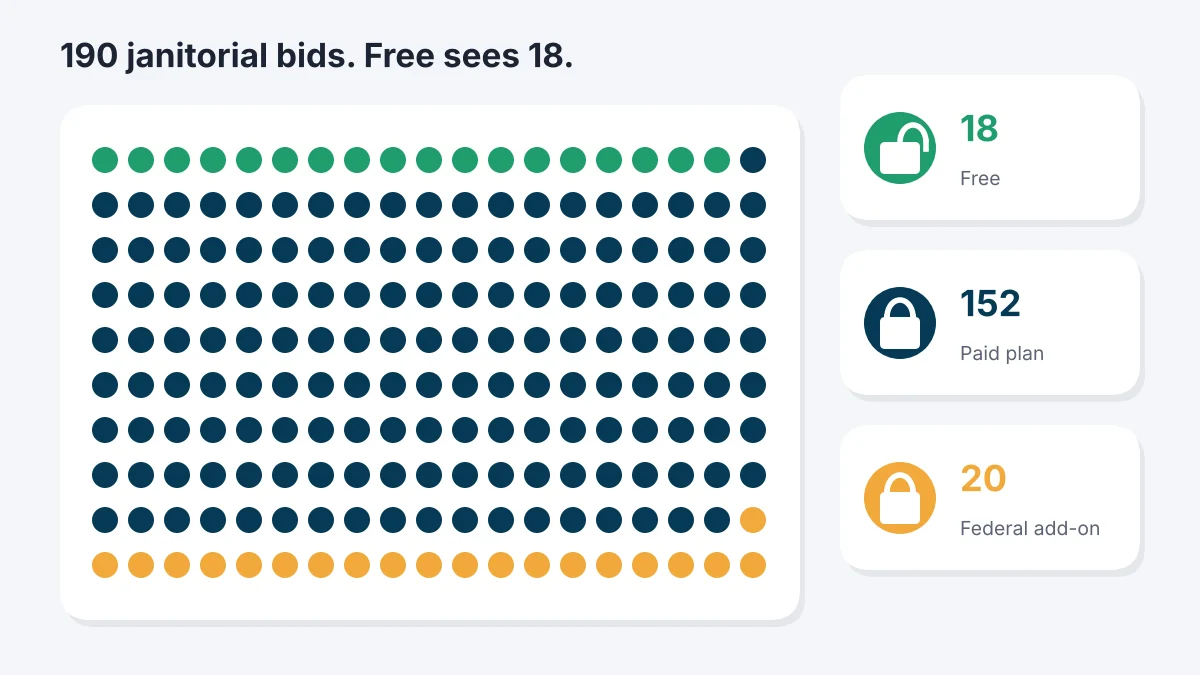
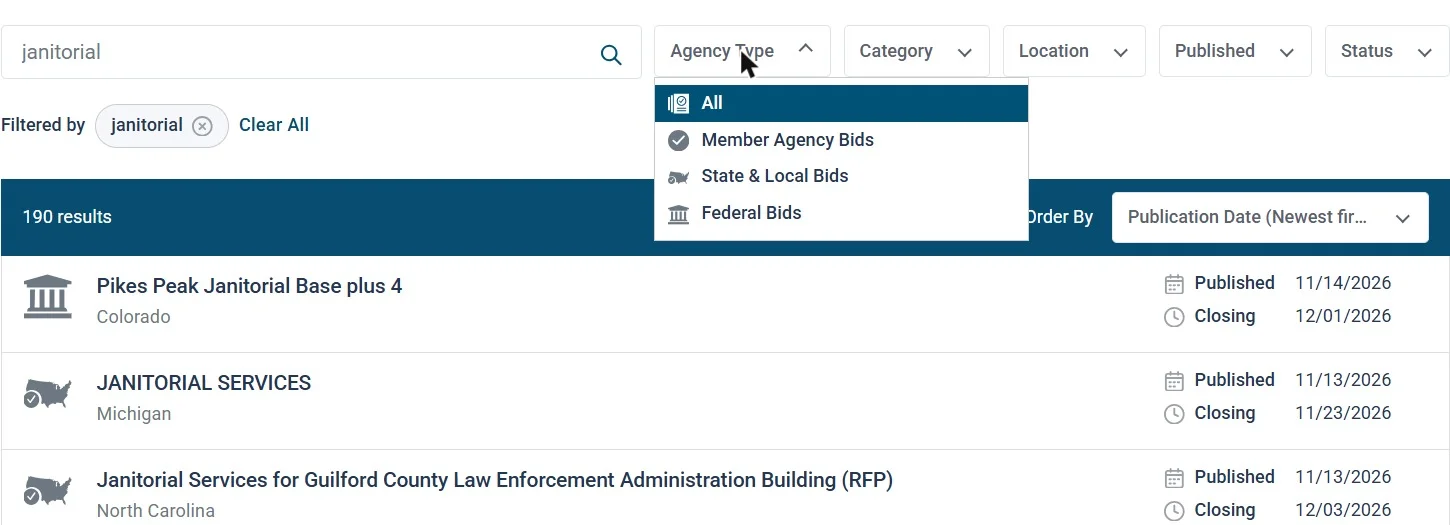
A search for "janitorial" returned 190 open bids across the country. That looks great until you use the Agency Type filter, which splits results into member agency, state and local, and federal bids.
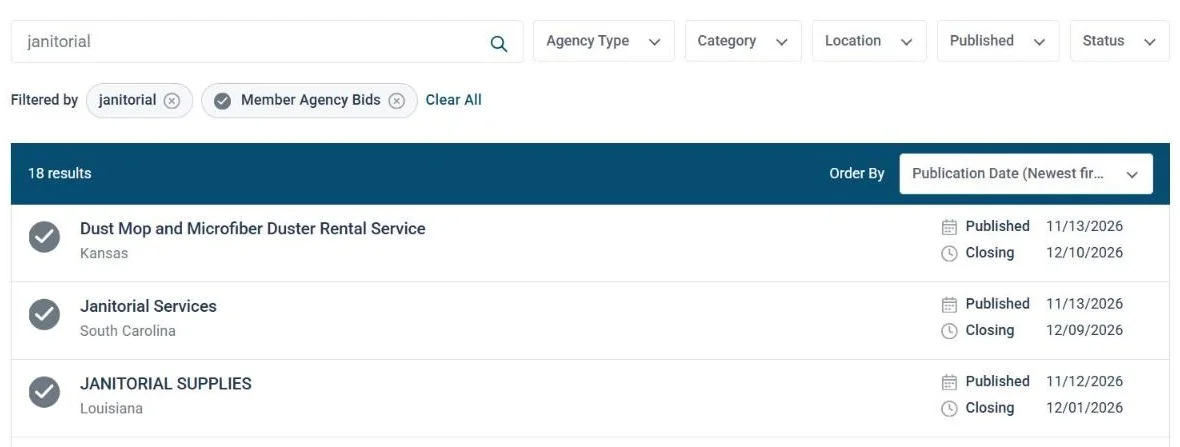
 When I filtered to Member Agency Bids, the list dropped to 18 results.
 Here is the full split:
Bid type | Janitorial bids | Plan you need |
|---|---|---|
Member Agency Bids | 18 | Free Basic |
State & Local Bids | 152 | Local, Regional or National |
Federal Bids | 20 | Federal Bids add-on |
Total | 190 |
So a free account covered about 9% of the janitorial bids I found. I ran a second search for "landscaping" to make sure this was not a one-off. It returned 846 bids, and 84 of them were member agency bids. That is about 10% again.
This is the single most useful thing to know before you sign up. The free plan is not a trial and it does not expire. But it is a narrow window. Whether it is enough depends on whether the agencies you want to sell to are members in your state.
What You See Before You Log In
You can search without an account, which is nice. But when you open a bid, only the title, state, published date and closing date are visible.
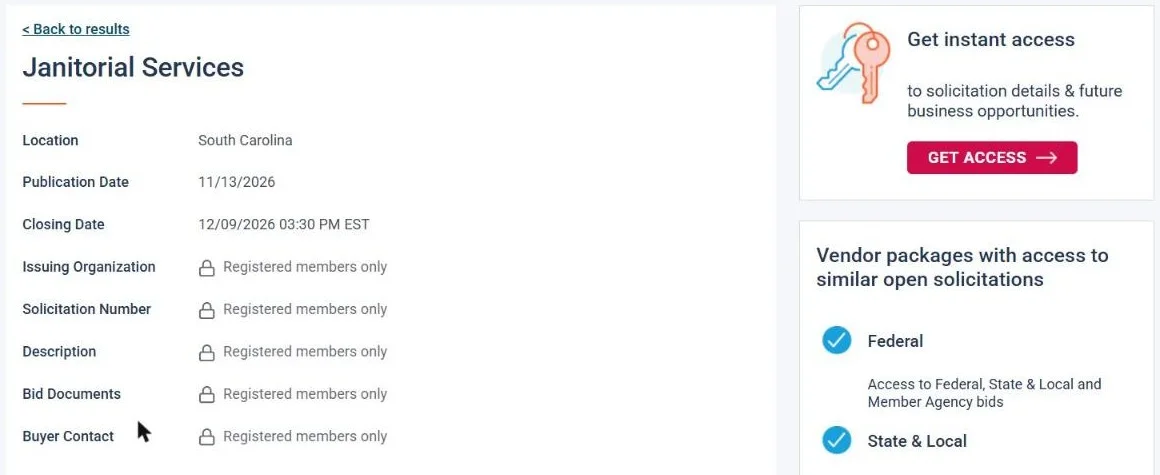 The issuing organization, solicitation number, description, source, bid documents and buyer contact all say "Registered members only." So you cannot judge a bid properly until you register.
Search Noise Is Real
Keyword search is broad. In my "landscaping" results I saw a lighthouse roof replacement, a traffic engineering contract and a long list of door and fence packages for a high school rebuild. They matched because the word "landscaping" appeared somewhere in the documents.
In the janitorial results, a cleaning contract for a National Weather Service office in Sioux Falls, South Dakota, was listed under Mississippi. That is probably where the contracting office sits, but it can throw off a state filter.
Users on G2 say the same thing. One reviewer complained that narrow keyword searches still return too wide a range of results. If you buy a paid plan, plan to spend your first hour building tight saved searches.
Key Features of BidNet Direct
Government Bid Search
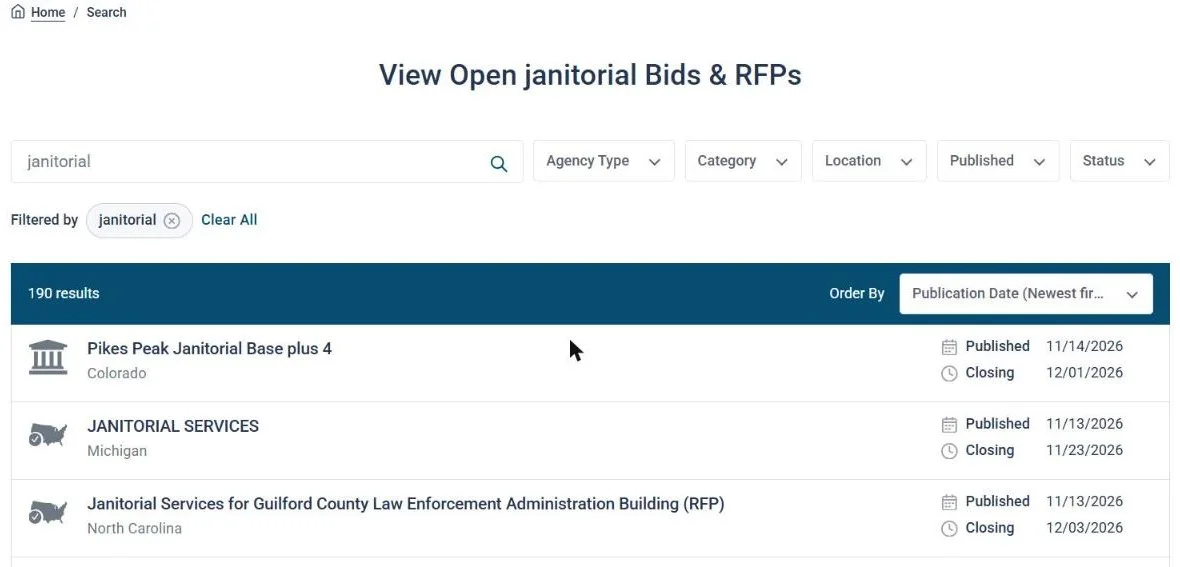 The bid opportunity search lets you filter by Agency Type, Category, Location, Published date and Status. You can sort by publication date. Paid plans add advanced bid search with more filters and the option to save searches.
Automated Bid Notifications
This is the main reason most vendors use a government bid notification service.
Basic (free): real-time bid matches from member agencies sent to your inbox.
Paid plans: a daily bid match summary that also includes aggregated state and local bids.
Federal add-on: a separate daily federal bid match summary for your chosen states.
One G2 reviewer said notifications can feel like too much once they are switched on. My advice is to start with a few categories and widen later.
Vendor Registration and Management
When you register, you add your company details and choose categories that describe what you sell. Many public agencies classify purchases with NIGP commodity codes, so picking the right categories is what decides whether your alerts are useful or noisy.
For government buyers, this side of the platform works as a supplier database. Agencies can see registered vendors and invite them to bid.
Electronic Bid Submission
The Basic plan says you can "browse and submit bids to Member Agencies." So for member agency bids, you can download bid documents and send your response online instead of mailing a sealed envelope. For aggregated state and local bids, you usually respond through the agency's own portal, because BidNet is only showing you the notice.
Saved Searches and Solicitation Tracking
Paid plans let you save advanced searches and track solicitations across several states. The regional purchasing group pages also say vendors get access to documents and real-time addendum updates from member agencies. Missing an addendum is one of the easiest ways to get a bid thrown out, so this matters more than it sounds.
BidNet Pricing and Plans
BidNet Direct publishes its prices, which is not true of every tool in this space. Here is what I saw on the vendor solutions page on November 16, 2026.
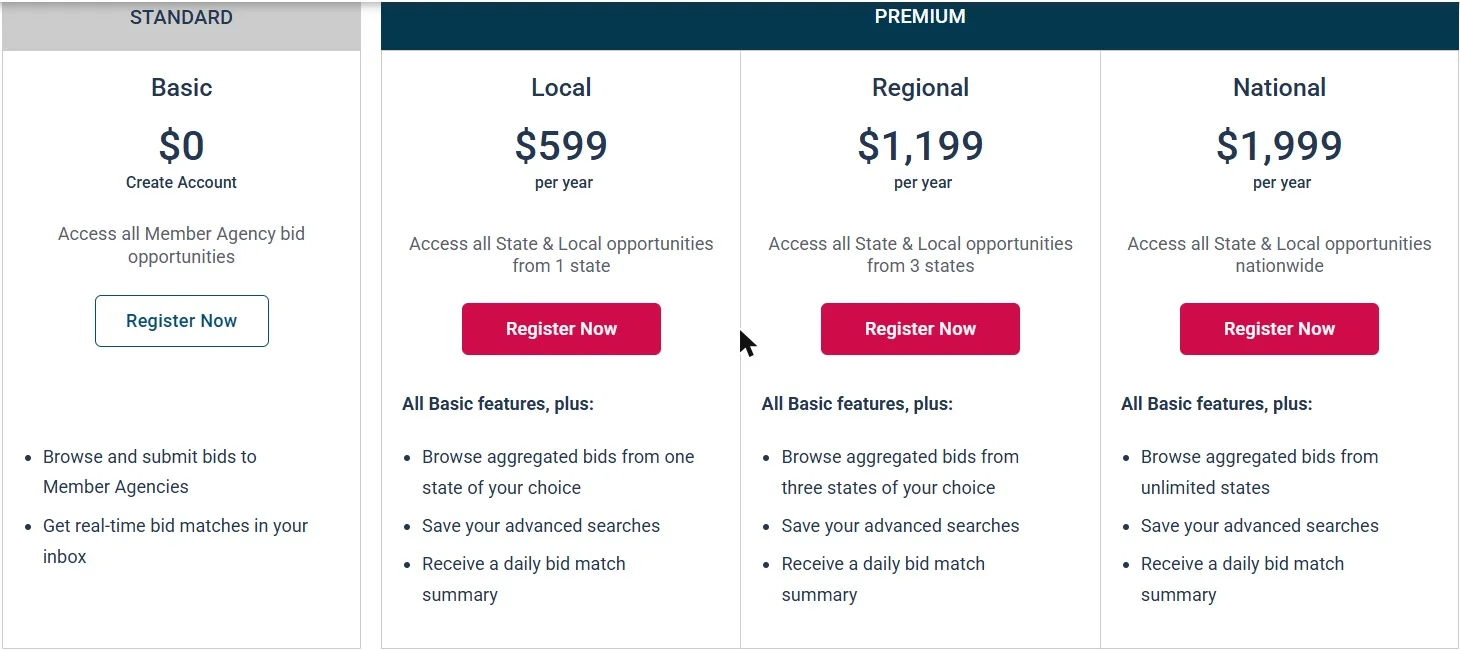
Plan | Yearly price | Coverage | What you get |
|---|---|---|---|
Basic | $0 | Member agency bids | Browse and submit to member agencies, real-time bid matches |
Local | $599 | State and local bids in 1 state | Basic, plus saved advanced searches and a daily bid match summary |
Regional | $1,199 | State and local bids in 3 states | Same as Local, for three states |
National | $1,999 | State and local bids nationwide | Same as Local, unlimited states |
Add-ons:
Federal Bids: $149 per year. Federal bids from your chosen states, with a daily federal match summary.
Advertising Profile: $249 per year. A starred, high-visibility profile with your logo, videos and brochures.
PinPoint Analytics (construction only): $499 per year. Award details, market insights, competitive intelligence and historical bid research.
Prices are in USD and do not include tax.
Here is the cost per state, which helps you pick a plan:
Local: $599 for 1 state, so $599 per state.
Regional: $1,199 for 3 states, so about $400 per state.
National: $1,999 for every state.
If you sell in two states, Regional is cheaper than buying two Local plans. If you sell in five or more states, National makes sense.
The Monthly Price Trap
The pricing page has a toggle labeled "Monthly" and "Yearly (Save 50%)." When I switched to monthly, the Local plan showed $199 per month, and the Regional and National plans disappeared from view.
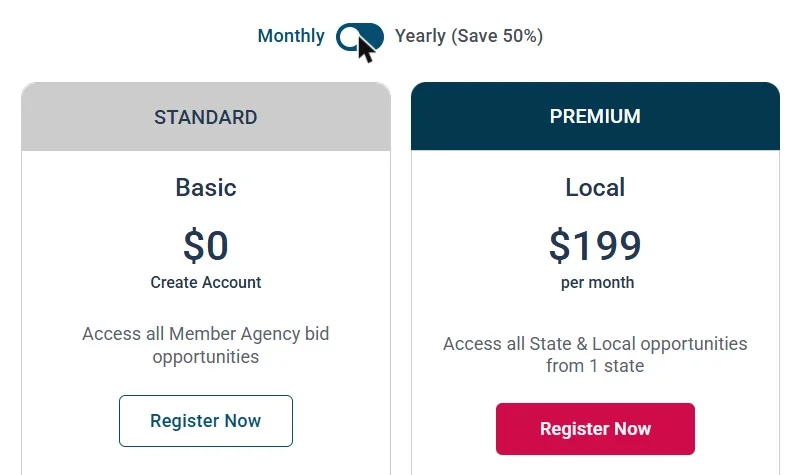 $199 a month is $2,388 a year. That is four times the $599 yearly price, not double.
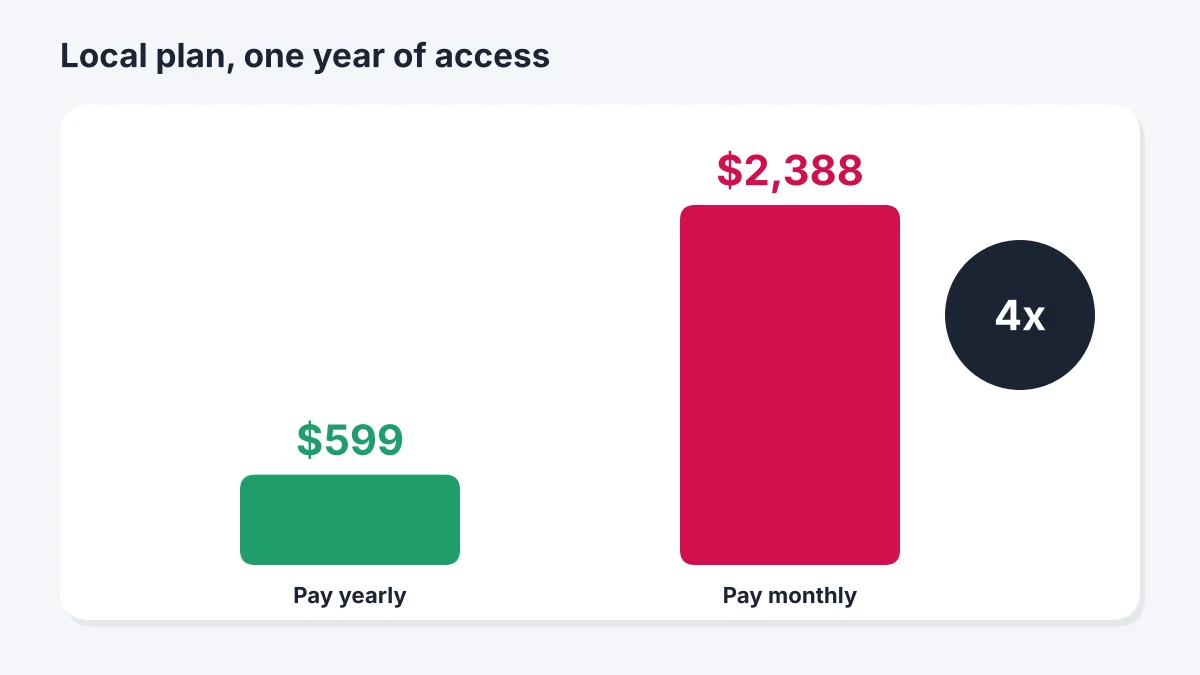 I also noticed that SOVRA's own supplier pricing page lists Local at $100 per month, Regional at $200 and National at $330. So two official pages from the same company show different monthly numbers. Before you pay monthly, call the account team at 844-964-6379 and get the price in writing. If you plan to stay more than three months, the yearly plan is the clear winner.
How to Register on BidNet Direct
Here is the BidNet registration process, step by step.
Step 1: Go to bidnetdirect.com and click Vendor Registration in the top right corner.
Step 2: Fill in the Get Started form. It asks for your company name, first and last name, username or email, and a password. The password must be 8 to 15 characters with uppercase and lowercase letters, numbers and symbols. Then you accept the terms and conditions.
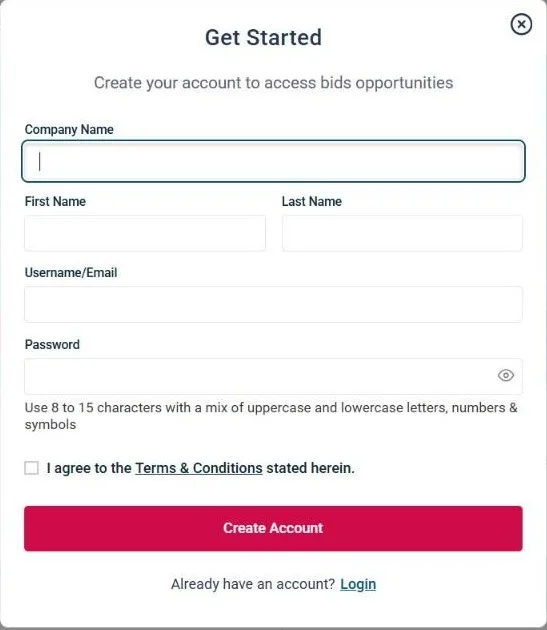 I stopped here because we do not enter personal or company details during testing.
Step 3: After you create the account, pick your regional purchasing group and the categories you sell in. Be specific. Broad categories mean noisy alerts.
Step 4: Choose a plan. Start on Basic. You can upgrade at any time.
Step 5: Use the free plan for two or three weeks. Count how many matching bids you get, and compare that with the paid search results you can see in the public search page. That tells you whether an upgrade is worth it.
A small tip: when I typed the obvious web address for the participating agencies page, I got a 404 error. The working page is under "Participating Agencies" in the top menu. Check it to see which agencies near you are members before you decide anything.
Who Should Use BidNet?
BidNet is a good fit if you:
Are a small business selling to cities, counties, school districts or special districts.
Work in a state where many local agencies are members of a BidNet purchasing group.
Sell common goods and services like cleaning, landscaping, construction, printing, IT services or supplies.
Want one place for state and local bids instead of checking ten agency websites.
BidNet is not the best fit if you:
Mainly want federal contracts. SAM.gov is free and is the official source.
Need deep competitive intelligence, like who won past contracts and at what price. GovWin IQ or GovSpend do that better, at a much higher price.
Only target one or two agencies that post on their own portals.
If you sell IT or cloud work to the public sector, expect security questions in almost every RFP. Our guide to cloud security services explains what those tools cost and what proof buyers usually ask for.
What I Liked and What Bugged Me
What I liked
The free Basic plan is permanent, not a trial.
Prices are public, which is rare in government contracting software.
You can search before you register.
Clear icons show which bids are free, paid or federal.
49 regional purchasing groups cover nearly every state.
Electronic bid submission and addendum alerts for member agency bids.
Cost per state drops a lot on Regional and National plans.
What bugged me
The free plan only covered about 1 in 10 bids in my tests.
Bid details stay locked until you register.
Keyword search pulls in a lot of unrelated bids.
The monthly price is four times the yearly price, and the "Save 50%" label undersells that.
Two official SOVRA pages show different monthly prices.
Federal bids cost extra, even on the National plan.
Very few independent reviews. G2 has 16 reviews and Capterra has 1.
BidNet Reviews From Real Users
Independent BidNet reviews are thin. G2 lists BidNet Direct at 3.9 out of 5 from 16 reviews. Capterra shows a 4.0 rating from a single review, with a 3 out of 5 for ease of use.
The good comments repeat a few points: BidNet pulls open bids into one place, it is easy to find relevant information, and it saves time compared with checking agencies one by one.
The complaints also repeat: alerts can be too frequent, keyword search is too broad, and some users find it a bit expensive.
Best BidNet Direct Alternatives
The right alternative depends on whether you chase federal, state and local, or both.
Platform | Best for | Free option | Published price |
|---|---|---|---|
SAM.gov | Official federal contract opportunities | Fully free | Free |
DemandStar | Local government bids where its partner agencies are strong | Free follow of one agency | Reported around $495 to $2,495 a year |
HigherGov | Federal and state contract research | Limited | From about $500 a year |
GovTribe | Federal contracting research | Trial | $1,200 to $1,900 per seat per year |
BidPrime | Bid aggregation across many agencies | Trial | Published plans around $4,600 to $9,500 a year |
GovSpend | Government spending data and purchase history | No | Quote only |
GovWin IQ | Deep government contract intelligence | No | Quote only, often five figures a year |
Bonfire | E-procurement and RFP portals run by agencies | Free for vendors on agency portals | Free for vendors |
Periscope S2G | Public sector bidding in states that use it | Varies by state | Varies |
BidNet vs DemandStar
These two are the closest match. Both aggregate state and local bids and both have a free tier. DemandStar lets you follow one agency group for free, while BidNet gives you all member agency bids in the purchasing groups for free. Pick based on where your target agencies actually post. Search both for your city or county before you pay either one.
BidNet vs GovWin IQ
They solve different problems. BidNet tells you about bids that are open now. GovWin IQ, from Deltek, tracks opportunities before the RFP is released, plus contract awards, budgets and competitors. Deltek does not publish prices, and reported deals often run well into five figures a year. For a small business, BidNet is the realistic starting point. For a team chasing large contracts, GovWin IQ is the research tool.
BidNet vs SAM.gov
SAM.gov is the official U.S. government site for federal contracting. It is free. You use it to register your business to work with the federal government and to search federal contract opportunities. Federal buying follows the Federal Acquisition Regulation (FAR), and the Small Business Administration (SBA) runs programs that set aside some contracts for small businesses.
BidNet Direct is mainly a state and local tool. Its Federal Bids add-on mostly saves you from checking SAM.gov yourself by sending a daily federal match summary for your states. If federal work is your main goal, start with SAM.gov for free. If you sell to cities, counties and schools, BidNet covers ground SAM.gov does not.
Is BidNet Legit?
Yes. BidNet Direct is a real, long-running platform owned by SOVRA, and real government agencies use it as their official procurement portal. When a city in Colorado or a school district in Florida posts a bid on its BidNet purchasing group, that is the official solicitation, not a copy.
What it is not is a magic list of every government bid. The free plan is honest about covering member agencies only. You just have to understand what that means before you rely on it.
Is BidNet Direct Worth It?
For most small businesses, here is the decision I would make:
Start free. Register on Basic and pick your categories carefully.
Count your matches for three weeks. If free alerts bring you bids you can win, you may never need to upgrade.
Check the public search for your state. Filter by State & Local Bids. If you see many relevant bids that the free plan does not show, upgrade.
Pay yearly, not monthly. $599 a year is reasonable. $2,388 a year for the same plan is not.
Skip the federal add-on at first. Use SAM.gov for free federal searches until you know federal work is worth chasing.
Think about it this way. If one small public sector contract is worth $20,000 to your business, the Local plan pays for itself many times over. If you are not ready to bid on anything in the next year, stay on Basic.
Frequently Asked Questions
What is BidNet Direct?
BidNet Direct is a government contract bidding platform owned by SOVRA. It lets businesses search and get alerts for state, local and federal government bids, and it lets government agencies publish solicitations and manage vendors.
Is BidNet Direct legitimate?
Yes. It is a real platform that many cities, counties, school districts and other public agencies use as their official place to post bids and collect responses.
How does BidNet Direct work?
You register as a vendor, choose your categories and your regional purchasing group, and BidNet emails you matching bids. Member agency bids are free. Aggregated state and local bids need a paid plan, and federal bids need an add-on.
Is BidNet free to use?
Yes, the Basic plan is free and does not expire. It covers bids from member agencies in BidNet purchasing groups. In our tests, that was roughly 1 in 10 of all bids shown in search.
How much does BidNet Direct cost?
On November 16, 2026, the yearly prices were Basic $0, Local $599 for one state, Regional $1,199 for three states and National $1,999 for all states. Federal Bids cost $149 a year extra and the Advertising Profile costs $249 a year.
How do I register as a vendor on BidNet?
Click Vendor Registration on bidnetdirect.com, enter your company name, your name, email and a password, accept the terms, then choose your purchasing group and categories.
Can small businesses find government contracts on BidNet?
Yes. BidNet is built mostly for small and medium-sized businesses that sell to state and local governments, like cleaning, landscaping, construction and IT service companies.
Does BidNet provide federal government bids?
Yes, through the Federal Bids add-on for $149 a year. It covers federal bids in your chosen states. SAM.gov offers federal opportunities for free.
How do BidNet email notifications work?
Free accounts get real-time bid matches from member agencies. Paid plans get a daily bid match summary that also includes aggregated state and local bids. The federal add-on sends a separate daily federal summary.
Can vendors submit bids directly through BidNet?
Yes, for member agency bids. For aggregated bids from other portals, you usually submit through the agency's own system.
What is the difference between BidNet and SAM.gov?
SAM.gov is the free, official federal contracting site. BidNet Direct focuses on state and local government bids through regional purchasing groups, and charges for wider coverage.
What are the best BidNet Direct alternatives?
The main BidNet alternatives are SAM.gov for federal bids, DemandStar for local bids, HigherGov and GovTribe for federal research, BidPrime for bid aggregation, GovSpend and GovWin IQ for market intelligence, and Bonfire or Periscope S2G for agency portals.
Does BidNet cover state and local government contracts?
Yes. That is its main focus. Free accounts see member agency bids, and paid plans add aggregated state and local bids from one, three or all states.
How can I find relevant bids on BidNet?
Pick narrow categories when you register, use the Agency Type and Location filters, and on a paid plan, save advanced searches for each service you offer. Check new matches daily so you do not miss addendums or closing dates.