

CSPM. CWPP. CNAPP. CIEM. CASB. SASE. SSE. DSPM.
Eight acronyms, and I count at least four that overlap so heavily that different vendors sell near-identical products under different names. One industry count puts more than 400 companies describing themselves as cloud security tools.
Almost none of them publish a price.
So this guide does two things nobody else on this search does. It tells you which of those acronyms you actually need and in what order. And it gives you real numbers, including the ones vendors have left sitting in public without realising.
What Cloud Security Services Actually Cover
Strip the acronyms away and I count four jobs. All four sit on your side of the shared responsibility line, which is the part of cloud computing services the provider does not cover for you.
Checking your configuration. Is anything set up wrongly? A public storage bucket, an over-permissive security group, a database exposed to the internet. Good tools score this against CIS benchmarks, PCI DSS and SOC 2 so the output doubles as compliance evidence. That is CSPM, cloud security posture management.
Protecting what is running. Are your servers, containers and functions compromised right now? That is CWPP, cloud workload protection.
Controlling who can do what. Which identities have far more permission than they need, and which chains of permissions let an attacker escalate? That is CIEM, cloud infrastructure entitlement management.
Finding sensitive data. Where is your customer data actually sitting, and is it exposed? That is DSPM, data security posture management.
CNAPP is the bundle. A cloud native application protection platform is simply all four sold together in one cloud security platform, which is where the market has converged. It usually adds IaC scanning so misconfigurations get caught in code before they reach production.
CASB, SASE and SSE solve a different problem entirely, and I would not confuse them with the rest. They govern how your staff access cloud applications, rather than how your own cloud infrastructure is configured. If you are trying to stop employees uploading files to unsanctioned apps, that is CASB territory and nothing in the CNAPP world will help.
What You Need, and in What Order
This is the part I think most buyers get wrong, because they are sold the bundle before they have used the free layer.
Start with CSPM. Misconfiguration is still the most common cause of cloud breaches, and configuration checking is the cheapest thing to fix. If you have never run a posture scan, that is step one and it may cost you nothing.
Add CWPP when you run real workloads. Containers, Kubernetes, long-running servers. If everything you run is serverless and managed, you need this less than the vendors suggest.
Add CIEM when your identity sprawl is out of hand. Usually around the point where nobody can answer what a given role can actually do, or whether a privilege escalation path exists between two accounts.
Add DSPM when you hold regulated data and genuinely do not know where all of it is.
Buy CNAPP when you would otherwise be running three of the above from three vendors. Consolidation is a real saving, not just a sales pitch.
I would not start at CNAPP. Starting there means paying for CIEM and DSPM modules that, by one vendor breakdown, each add 20 to 40 percent to the base cost, before you have learned which of them you need.
The Free Layer Most Teams Skip
Before paying anyone, I would exhaust what you already own.
Microsoft Defender for Cloud includes Foundational CSPM free. Not a trial, free. Its own pricing page states that foundational CSPM provides continuous assessments, security recommendations, Secure Score and the Microsoft cloud security benchmark across Azure, AWS and Google Cloud.
I had to read that twice. The free tier works across all three major clouds, not just Azure. Connect an AWS or GCP account and the free posture checks apply there too.
Microsoft also makes the paid Defender for Cloud plans free for the first 30 days, which is a genuine evaluation window rather than a demo.
On the AWS side, Security Hub and GuardDuty cover a meaningful amount of posture and threat detection. Google Cloud has Security Command Center.
My honest view is that a small team running a handful of accounts should turn all of this on and live with it for a quarter before taking a single vendor call. You will learn which alerts matter to you, which is the only way to judge whether a paid platform is worth it.
Cloud Security Cost: What These Services Actually Charge
Here is where this category gets difficult, and where I spent most of my time.
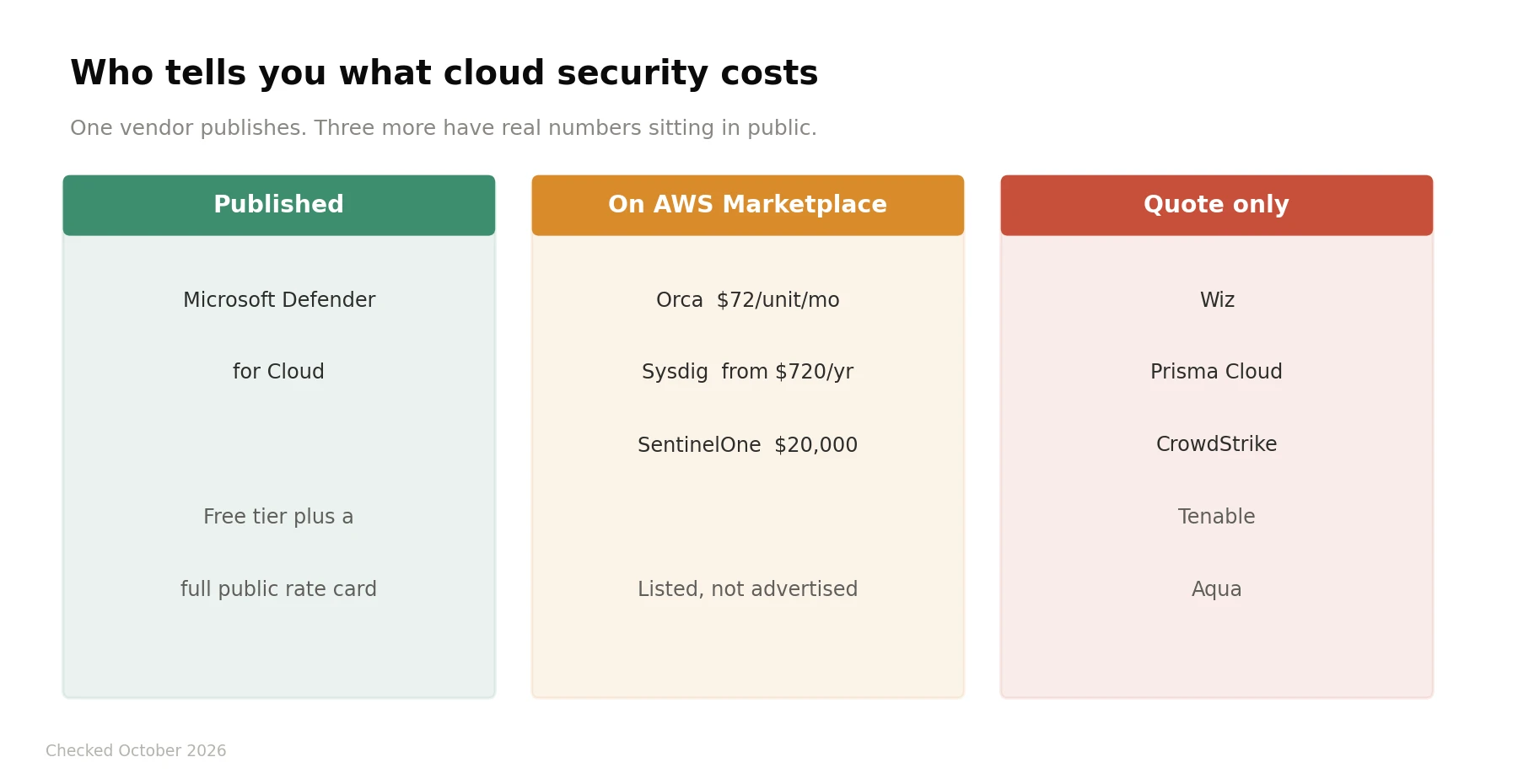 Pricing in cloud security falls into three groups.
Published. Microsoft Defender for Cloud is effectively alone here, with a full public rate card and a free tier.
Leaked through AWS Marketplace. This is the finding I would act on before anything else. Several vendors who tell you pricing is custom have real listings in public. Orca shows CNAPP Enterprise at $72 per unit per month with a minimum purchase of 20 units. Sysdig Secure appears from $720 a year with additional usage at $0.125 per unit. SentinelOne's Singularity Cloud Security listing shows a $20,000 twelve-month contract dimension while the company states that final pricing is custom.
Quote only. Wiz, Palo Alto Prisma Cloud, CrowdStrike, Tenable and Aqua. Reported figures exist, with Wiz commonly cited around $24,000 a year and Prisma Cloud from roughly $9,000 a year per 100 Business Edition credits, but none of that is published by the vendor.
As rough benchmarks from buyer data, standalone CSPM runs on per asset pricing at around $3 to $8 per cloud asset per month, or $50 to $150 per cloud account. Full CNAPP blends out around $12 to $25 per workload per month.
That opacity is not unique to security, though I have not seen it this complete anywhere else. I ran into the same pattern writing about software pricing that vendors refuse to publish, where the published players end up setting the reference point everyone else negotiates against.
The $5 Figure That Is Being Misquoted by 744x
I am giving this its own section, because I found a published guide getting it badly wrong in a way that would wreck a budget.
Defender CSPM, the paid tier, is metered hourly. Microsoft's pricing page notes that monthly estimates are based on 744 hours of usage per month.
So the hourly rate of roughly $0.007 per resource works out at about $5.21 per resource per month. Independent breakdowns put it at $5.11, and a UK-focused analysis quotes £4.03, which all land in the same place.
At least one published guide quotes $0.007 per resource per month and then concludes that a 50,000 resource estate costs $350 a month. The actual figure, using the same rate read correctly, is closer to $260,000 a year.
So if you are budgeting from a blog post rather than the rate card, I would check whether the number you copied is hourly or monthly. In this product they differ by a factor of 744.
Agentless or Agents
The other decision I would settle early, because it shapes your shortlist.
Agentless scanning reads snapshots and APIs. Nothing installed, fast to deploy, broad coverage immediately. Wiz and Orca built their businesses on this. The limit is that you see state rather than live behaviour.
Agents run on the workload and see what is happening in real time. Better for runtime threat detection, worse for deployment friction.
Most serious platforms now do both. I would weight agentless heavily if you are starting out, because coverage you actually deploy beats depth you never finish rolling out.
The Main Cloud Security Providers
Wiz. The agentless benchmark at enterprise scale, strong on attack path analysis and toxic combinations. Quote only.
Orca Security. The closest competitor, agentless side-scanning, and the one with a visible Marketplace price.
Palo Alto Prisma Cloud. Code to cloud coverage, deepest compliance framework library, credit-based pricing that is hard to forecast.
Microsoft Defender for Cloud. Free foundational tier, transparent pricing, strongest if you are already Azure-heavy.
CrowdStrike Falcon Cloud Security. Best where endpoint and cloud threat correlation matters and you already run Falcon.
Tenable Cloud Security. Identity-first, the pick when CIEM is your actual problem.
Sysdig and Aqua. Container-first, both with open source foundations.
Check Point CloudGuard. Network-security-centric, and publishes a reference figure of around $625 a month for 25 assets.
Cloud Security Questions Without the Jargon
What are cloud security services?
Tools and services that protect cloud infrastructure, covering configuration checking, workload protection, identity permissions and data discovery. Sold individually or bundled as a CNAPP.
What is the difference between CSPM and CNAPP?
CSPM checks configuration. CNAPP bundles CSPM with workload protection, identity management and data security into one platform.
Do I need a CNAPP?
Only if you would otherwise buy three separate tools. Start with CSPM and add layers as the need appears.
Is Microsoft Defender for Cloud free?
Foundational CSPM is free permanently, across Azure, AWS and Google Cloud. Paid plans are free for the first 30 days, then metered per resource.
How much does a CNAPP cost?
Benchmarks run roughly $12 to $25 per workload per month. Published examples include Orca at $72 per unit per month with a 20 unit minimum.
Are there free cloud security tools?
Yes. Defender for Cloud's foundational tier, AWS Security Hub and GuardDuty, and Google Security Command Center all provide baseline coverage at no extra cost.
Why does nobody publish cloud security pricing?
Because deals are negotiated by asset count and module mix, and transparent pricing weakens that position. Microsoft is the exception, and it is not coincidental that Microsoft also gives away the entry tier.
Is agentless cloud security good enough?
For posture, vulnerability and identity work, generally yes. For runtime threat detection, you will eventually want agents.
Do AWS native tools replace a third party platform?
For a small estate on one cloud, often yes. Multi cloud environments are where third party platforms earn their cost.
What is the shared responsibility model?
The provider secures the cloud infrastructure. You secure what you put in it: configuration, identities, data and code. Almost every cloud breach happens on the customer side of that line.
How to Get a Price Out of a Quote-Only Vendor
Four things that work, in the order I would try them myself.
Check AWS Marketplace first. Before you book any demo, search the vendor's name there. Orca, Sysdig and SentinelOne all have real figures visible, and walking into a call already knowing the list rate changes the conversation completely.
Define your scope before the first call. Asset count, cloud accounts, workloads, Kubernetes nodes, and which modules you want. Then make every vendor quote that same scope. Otherwise you will collect five numbers that cannot be compared, which is exactly what the quote model is designed to produce.
Ask what each module adds as a percentage. DSPM, CIEM and application security typically add 20 to 40 percent each. Getting that stated up front stops the price moving after you have committed.
Use the free tier as leverage. If you already run Defender's free CSPM across all three clouds, you are not a desperate buyer. That is the strongest negotiating position available in this category and it costs nothing to establish.
Pricing in this article comes from Microsoft's own Defender for Cloud pricing page, AWS Marketplace listings and published buyer analyses, checked in October 2026. Most vendors in this category quote privately, so treat every figure outside Microsoft's as a reference point rather than an offer.