

To file a Google trademark complaint, you use Google's "Report Content on Google" tool, choose Google Ads, and submit the trademark form. You name each advertiser by their website URL and show proof that you own the trademark in that country.
Google only acts when your trademark appears in the ad text itself and the advertiser is a competitor or uses it in a confusing way. It does not stop anyone bidding on your brand name as a keyword.
That second point is where most people get stuck. So I want to start there.
The Search That Starts Most Complaints
Picture this. You type your own company name into Google. The first result is not you. It is a competitor's ad, with your brand name sitting right in the headline.
Your first thought is probably "Google must take this down." Sometimes it will. Often it will not, and the reasons are not obvious.
I went through Google's own policy pages and the guides that rank for this topic. What surprised me most was how many of those guides still describe a process Google stopped using in 2023. If you follow them, you will fill in the form wrong or expect results Google no longer gives.
So this is the version I wish I had found first: what the complaint covers today, what to prepare, how to file it, and what to do next.
What Is a Google Trademark Complaint?
A Google trademark complaint is a formal request from a trademark owner, or someone acting for them, asking Google to stop a specific advertiser using their trademarked terms in Google Ads.
If you want to report trademark infringement to Google for ads, this is the main route. It sits under the Google Ads trademark policy, which is part of the Google Ads terms every advertiser accepts.
When a complaint is accepted, Google opens a Google Ads trademark investigation into the named advertiser. If it finds a violation, it restricts their ads from showing your mark in the ad text.
Here is how I explain it to people. Google is not judging whether the advertiser broke trademark law. It is only checking whether they broke Google's own advertising rules. Those are two different things, and the gap between them explains most rejected complaints.
The 2023 Change Most Guides Still Miss
Before July 24, 2023, you could file a complaint against "all advertisers" in your industry. Google would then block every unauthorized advertiser from using your mark in ad text, and you had to send a list of the Google Ads customer IDs you wanted to allow.
That option is gone. In its June 2023 policy update, Google said it would only accept and process trademark complaints against specific advertisers or ads. It also said the old industry-wide restrictions would be phased out over 12 to 18 months.
What this means for you in practice:
You have to name names. Every Google Ads trademark complaint must point at specific advertisers, identified by their URLs.
New infringers are not blocked automatically. If a fresh competitor starts using your mark next month, you file again.
Monitoring matters more than before. You cannot report what you never see.
Authorization lists matter less. You no longer need to pre-approve every partner and agency to keep their ads alive.
If a guide tells you to pick "all advertisers" or upload a list of authorized customer IDs, I would treat the rest of it with care too.
When Can You Report a Trademark Violation to Google?
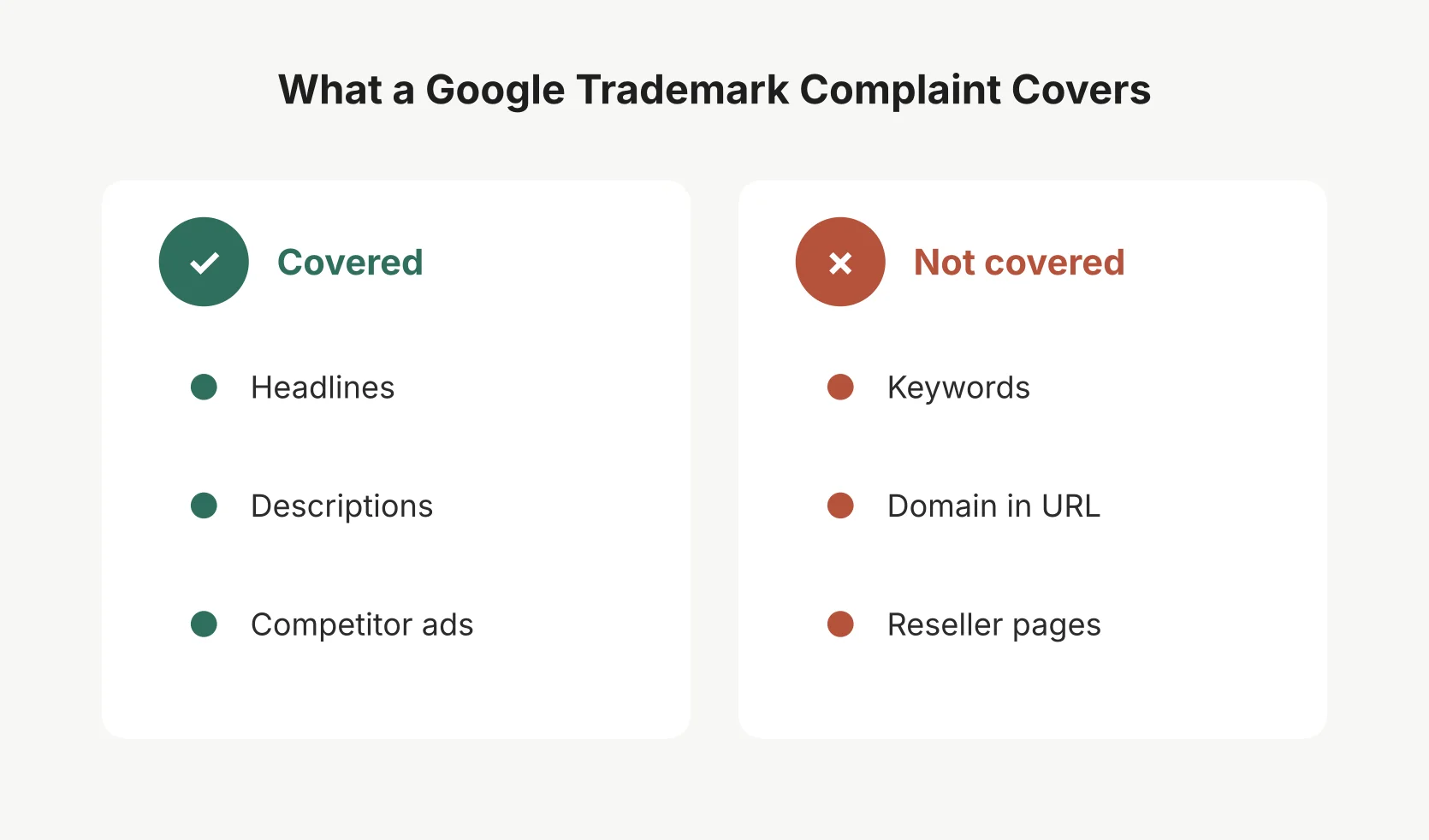 Google enforces trademarks in ad text. Keywords and reseller pages sit outside the policy.
The Google trademark policy is narrower than most brand owners expect. I find it easiest to split it into what Google restricts and what it leaves alone.
What counts as a Google Ads trademark violation
Not every case of Google Ads trademark infringement in the legal sense breaks Google's rules. According to the Google Ads trademark policy, Google may restrict an ad when your trademark appears in the ad text and one of these is true:
The advertiser is a direct competitor.
The ad uses your mark in a confusing, deceptive or misleading way.
The mark has to be in the ad itself, meaning the headline or description of the search ad copy. A trademark that only appears on the landing page does not count.
What Google Ads trademark restrictions do not cover
This is the list I wish more brand owners saw before filing:
Keywords. Bidding on your brand name is not restricted. The ad can show up for your name as long as the ad copy does not use it in a way the policy covers.
The domain in the display URL. A trademark in the second-level domain, the main part of the web address, is not restricted.
Authorized resellers and sellers. If the landing page mainly sells your product, its parts or compatible items, and shows prices and a way to buy, the ad is allowed.
Informational sites. Review pages and sites mainly about your product can use your mark.
Descriptive use. If your brand name is also a normal word, like "Apple" in an ad for fruit, ordinary use of the word is fine.
In short, Google protects your mark in sponsored search results text, not in the auction behind them.
Google Trademark Complaint Requirements: What to Prepare
Before you open the Google trademark complaint form, I suggest gathering everything in one place. The form is not hard, but missing details are the most common reason for delays.
What you need | Why Google asks for it | Where to get it |
|---|---|---|
Trademark owner information | Google only acts for the owner or their trademark representative | Your company records, or a letter of authorization if you file for a client |
Trademark registration details | Proves your trademark rights in that country | Your national trademark office, such as the USPTO, EUIPO or IPO |
Countries and industry | Google only enforces where you have shown rights | Your registration certificate |
Advertiser details | Complaints must name specific advertisers | The display URL in the ad |
Ad screenshot | Evidence of infringement, as ads change fast | Your own Google search |
Affected search query | Shows Google how to find the ad | The words you searched |
Date, time and location | Ads vary by place and time | Note it when you take the screenshot |
A few notes from my research.
You generally need a registered trademark in the country where the ad appeared. Some brand protection vendors say Google may accept unregistered, common law rights in a few countries, but I would not rely on that without legal advice.
If you file for someone else, as an agency or a brand protection tool, be ready to show your trademark authorization from the owner.
And take your screenshots before you file. Once an advertiser hears about a complaint, the ad may change.
How to File a Trademark Complaint with Google
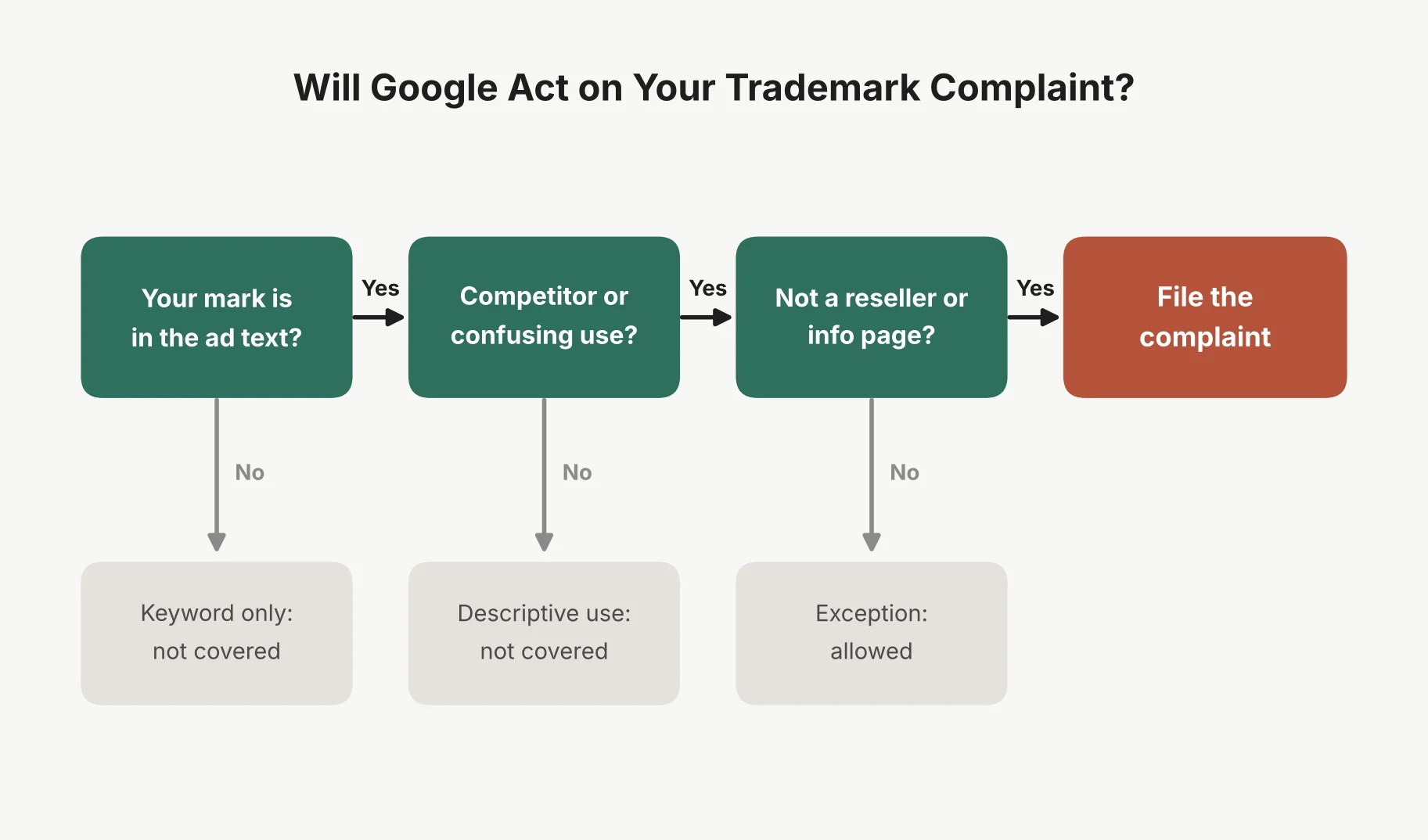 Three questions decide whether your complaint has a real chance.
If you are wondering how to report a company using your trademark in Google Ads, or how to file a trademark complaint against a Google advertiser, this is the Google trademark complaint process step by step.
I would run every ad through the three questions in the graphic above first. If an ad fails one of them, filing will not help.
Step 1: Identify the Ads Using Your Trademark
You cannot report trademark misuse on Google Ads until you have found it. Search for your brand name, your brand plus words like "review", "pricing" or "alternative", and common misspellings. Do this from each country you sell in, because ads change by location.
For each ad, note the advertiser's domain, the exact search ad copy, and the landing page. This is also the first step in how to report trademark misuse in Google sponsored ads: capture it before it changes. Check that landing page. If it is an authorized reseller of your product, it is probably allowed.
If you need to do this across many countries every week, a monitoring tool saves a lot of time. I compared several in my BrandVerity alternatives roundup.
Step 2: Find Google's Official Trademark Complaint Form
Go to Google's "Report Content on Google" page in Google's Legal Help center. Choose Google Ads as the product, then the option for trademark issues. That leads you to the trademark complaint form.
Google changes the wording of these menus from time to time. If the labels look different, look for the path about intellectual property rights in ads.
Step 3: Fill in the Trademark Owner Information
The form asks who you are and how you relate to the trademark owner. You then enter your trademark registration details: the mark, the registration number, and the country.
Use the exact mark as registered. If your registration covers "SaaS Outro" but the ads use "SaasOutro", I would mention that variation clearly.
Step 4: Add the Advertisers and Your Evidence
This is the part that matters most since the 2023 change. List each advertiser by URL. For each one, describe where your trademark appears in the ad text and why it breaks the policy.
Attach your ad screenshot and the affected search query. Be specific. "Competitor uses our brand name in headline 1" helps Google far more than "they are stealing our brand".
Step 5: Review and Submit
Check every field, confirm the declarations, and complete the complaint submission. Save the confirmation email. It is your only record of the case, and you will need it later.
That is how to submit a Google Ads trademark complaint, and really how to report trademark infringement on Google Ads in general. The filing itself takes minutes. From everything I read, the preparation is what decides the outcome.
What Happens After You Submit Your Complaint
So what happens after filing a trademark complaint with Google? The complaint goes into Google's policy review. From what Google publishes, this is roughly what happens:
Google reviews each named advertiser. It looks at where your mark appears and how it is used, against all the policy criteria together.
Violating ads get restricted. The advertiser's ads stop showing your mark in their ad text.
The restriction carries forward. Google says restrictions generally apply on an ongoing basis to ads using the same second-level domain in their final URL. So a fresh ad from the same advertiser is covered too.
The advertiser is told. They get a notification and can appeal if they think the restriction is wrong.
Google does not suspend an advertiser account right away for this kind of trademark misuse. Its policy says a warning comes at least seven days before any suspension.
One thing I want to be clear about: a successful enforcement action does not remove the advertiser from your branded searches. They can still bid on your name. They just cannot put it in their ad copy.
How Long Does a Google Ads Trademark Complaint Take?
Google does not publish an official timeframe, and I could not find one in its policy pages.
What I did find is a wide range from people who file these often. Some guides say a few business days. Brand protection vendors who file at volume have reported anywhere from one to eight weeks.
My honest read is to expect at least a couple of weeks, and longer if Google comes back asking for more information. Clear evidence and a complete form are the best ways I know to avoid that back and forth.
How to Check Your Google Trademark Complaint Status
If you are looking up how to check the status of a Google trademark complaint, the answer is simpler than you might hope. Google does not offer a public tracker for Google Ads trademark complaints that I could find. Your Google trademark complaint status lives in your email.
Here is what I suggest:
Keep the confirmation email. It usually has a reference number for your case.
Watch that thread. Google's reply, and any request for more details, comes there.
Reply in the same thread. If you need to add evidence, do not start a new complaint for the same ads.
Search again yourself. The quickest real test is to check whether the ad still shows your mark.
If you have heard nothing for several weeks, I think a polite reply on the same thread with your reference number is reasonable. Google Ads support is set up for advertiser accounts, so I would keep anything about the complaint in that email thread.
What to Do If Google Rejects Your Complaint
A rejection usually means one of three things, in my reading of Google's policy:
The use is allowed. The advertiser is a reseller, an informational site, or using your mark in a descriptive way.
The use is outside the policy. Your mark is only in their keywords, or in the domain of their display URL.
Something was missing. No registration for that country, unclear evidence, or no proof you can act for the owner.
Google does not publish a formal appeal route for trademark owners that I could find. So if you want to know how to appeal a rejected Google trademark complaint, here is what I would do.
Fix and refile. If the issue was missing details, gather them and file a new complaint for those specific advertisers.
Check other Google policies. Fake sellers can fall under Google's counterfeit policy. Ads that pretend to be you can fall under its misrepresentation policy. These sometimes work where a trademark complaint does not.
Contact the advertiser. A clear cease and desist letter fixes many cases faster than Google does. This is especially true for affiliates, who usually want to keep their commission.
Talk to a trademark lawyer. If the harm is serious, the courts are the real enforcement route. I am not a lawyer, and this is not legal advice.
Google Trademark Complaints vs. Brand Bidding
People often treat these as one thing. They are not.
Brand bidding is when someone buys your brand name as a keyword. A Google trademark complaint is about your brand name in the ad text. Google's policy lets competitors bid on your name, so you cannot use this form to report brand bidding on its own.
Here is how I would think about how to report competitors bidding on your brand name:
If they also use your mark in their ad copy, file a trademark complaint. That part Google will act on.
If they are your affiliates, use your affiliate terms. Most programs ban brand bidding, and you can withhold commission. I cover how to write those rules, and how to spot partners gaming your program, in my guide to affiliate fraud detection.
If they are competitors using a clean ad, Google will usually not step in. Your options are legal, not policy.
The legal picture is also shifting. In May 2026, a Delhi court held Google itself liable for selling a registered trademark as a keyword. I would watch that space if you sell in India.
Other Places Your Brand Can Be Misused on Google
A Google Ads trademark complaint covers search and other Google Ads formats. Your brand can turn up in other places too, and each has its own route.
Shopping ads. Product listings run through Google Merchant Center, which has its own trademark rules.
Organic search results. Trademark use in normal search results is generally a legal matter, not an ads policy one.
YouTube. Videos and channels have separate reporting forms.
Counterfeit products. These have a dedicated counterfeit complaint in Google's Legal Help center.
I mention these because it is easy to file the ads form for a problem that belongs somewhere else. The right form first time saves weeks.
Google Trademark Complaint Questions, Answered
How do I file a trademark complaint with Google?
Go to "Report Content on Google" in Google's Legal Help center, choose Google Ads, and pick the trademark option. Enter your trademark registration details, name each advertiser by URL, and attach evidence of infringement such as an ad screenshot and the search query you used.
Can I stop competitors from bidding on my brand name through Google?
Not through a trademark complaint. Google's trademark policy does not restrict trademarks used as keywords. You can only stop competitors using your mark in their ad text, and only when the use breaks Google's policy.
What information is needed for a Google trademark complaint?
You need the trademark owner information, your trademark registration details for the right country, the advertiser's URL, a screenshot of the ad, the affected search query, and the date and location of your search. Agents also need proof they can act for the owner.
How long does a Google Ads trademark complaint take?
Google does not publish a set time. Reports from brand protection vendors range from a few days to around eight weeks. Missing information makes it slower.
Can I file a complaint against all advertisers using my trademark?
No. Since July 24, 2023, Google only accepts complaints against specific advertisers or ads. You need to name each one by URL.
What happens if an advertiser keeps using my trademark after a complaint?
Google says restrictions usually carry forward to new ads from the same second-level domain. If the same advertiser comes back on a new domain, you need to file again.
Is a Google trademark complaint the same as suing for trademark infringement?
No. A complaint asks Google to enforce its own advertising rules. Trademark infringement is a legal claim decided by courts. A complaint can be faster and cheaper, but it covers much less.