

SmartScout is a legit and accurate Amazon research tool. In my SmartScout review test, its sales estimates for five best-selling products matched Amazon's own "bought in past month" badges (four inside the range, one just 2% under). It is worth it if you do wholesale sourcing, brand research or agency work. It is not the cheapest pick for a beginner who only needs product ideas and keywords. Plans run from $29 a month (billed yearly) to $299 a month, and there is no free trial, only a 7-day money-back guarantee.
Most SmartScout reviews tell you the data is "pretty accurate" and move on. I wanted a number. So I opened a free SmartScout account, pulled the estimated monthly revenue for a big Amazon brand, turned it into units, and checked each product on Amazon itself.
 The results were better than I expected. The rest of this review covers what I saw in the app, what is locked, what each plan costs, and how SmartScout compares with Helium 10, Jungle Scout, SellerAmp and AMZScout.
Best for | Wholesale sellers, brand owners, Amazon agencies |
Starting price | $49/mo, or $29/mo billed yearly |
Free trial | No. 7-day money-back guarantee |
Free account | Yes, with most data blurred or locked |
Sales estimate accuracy | 4 of 5 inside Amazon's range in my test |
My rating | 4.2 out of 5 |
The Test Behind This SmartScout Review
I signed up for SmartScout with a Google account on October 29, 2026. I did not buy a paid plan, so everything below comes from the free tier, SmartScout's public pages, and Amazon's live listings. Where a feature was locked, I say so instead of guessing.
Here is what I did:
Opened the Seller Map, filtered it to Home & Kitchen, and clicked the biggest seller bubble. It was Bedsure Essentials, a large bedding brand.
Took the top five products SmartScout showed me and divided each one's estimated monthly revenue by its price. That gives the units SmartScout thinks sold in a month.
Opened each product on Amazon (set to a US delivery address) and wrote down the "bought in past month" badge Amazon shows under the title.
Tried the SmartScout Chrome extension on Amazon listings, then checked the Products, Brands and keyword tools inside the app.
One thing to know before the results. Amazon's badge is rounded. It says "3K+ bought in past month", not "3,214". So I treated each badge as a range from that number up to the next step. "3K+" means somewhere from 3,000 to 3,999.
SmartScout's Sales Estimates vs Amazon's Own Numbers
This is the part I cared about most, because every Amazon research tool is only as good as its sales estimator.
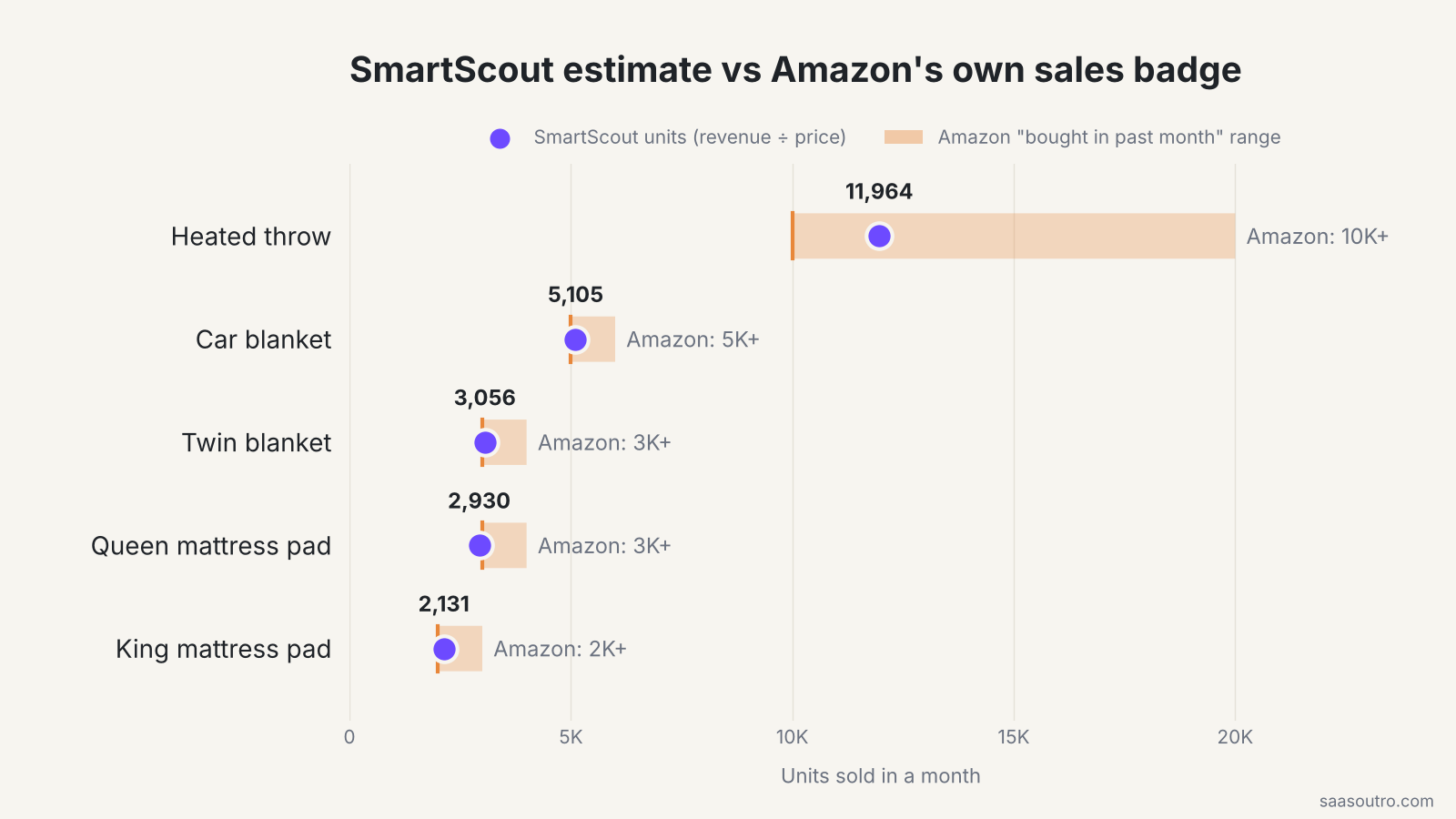 SmartScout's estimated units vs Amazon's "bought in past month" badge for five Bedsure products. Checked October 29, 2026.
Product (ASIN) | SmartScout revenue | Price in SmartScout | Implied units | Amazon badge | Result |
|---|---|---|---|---|---|
Heated throw (B0BZR6YBHK) | $598,080 | $49.99 | 11,964 | 10K+ | Inside range |
Car blanket (B0BZSCS613) | $204,040 | $39.97 | 5,105 | 5K+ | Inside range |
Twin blanket (B0BZRBGMGK) | $192,497 | $62.99 | 3,056 | 3K+ | Inside range |
Queen mattress pad (B0D5QHDQBH) | $278,283 | $94.99 | 2,930 | 3K+ | 2% under |
King mattress pad (B0D5QD49VY) | $232,282 | $108.99 | 2,131 | 2K+ | Inside range |
Four of five landed inside Amazon's range. The fifth missed the floor by 70 units. For a tool that has to guess sales from Best Sellers Rank, that is a strong result.
I also liked one small detail. The Queen and King mattress pads share one listing and the same 3,152 reviews, but Amazon shows different badges for each size. SmartScout still split them correctly, with the Queen ahead of the King. That tells me its model for splitting sales across variations is doing real work.
Now the honest caveats:
Prices move faster than the data. SmartScout listed the heated throw at $49.99. On Amazon that day it was $39.99, and four of the five products were cheaper than SmartScout showed. The units held up, but if you multiply them by today's price, the real revenue is lower. Always check the buy box price history before you trust a revenue number.
Small sellers are hard to verify. I also checked a $1,995 kitchen range that SmartScout put at about 15 units a month. Amazon shows no badge at all below 50 sales, so I could only confirm it was low, not how low.
One price looked wrong. A range hood SmartScout listed at $1,295 was $480 on Amazon. It might be a different offer, but it is the kind of thing that throws off a revenue estimate.
This is one brand in one season. October is peak season for heated blankets, and big sellers are the easiest to estimate. I would expect more error on small, slow or brand new products.
SmartScout itself says its estimates land within 80% to 90% accuracy for most brands and products, and that they can be off by more than 20% when a category grows or shrinks faster than its model expects. You can read their accuracy claims for yourself. My test fits that story. It is good enough to tell a 2,000-unit product from a 10,000-unit one, which is what most sourcing and research decisions need.
What SmartScout Is and Who Is Behind It
SmartScout is Amazon research software. It tracks around 30 million products that make money on Amazon and estimates their sales, then rolls that data up by brand, seller, category and keyword. That roll-up is what makes it different. Most tools start with a single product. SmartScout starts with the whole market and lets you zoom in.
So, is SmartScout legit? Yes. It was founded in 2019 by Scott Needham, who still runs it as CEO. It grew out of BuyBoxer, an Amazon seller he founded in 2011 that did more than $400 million in sales. SmartScout says more than 10,000 operators use it and that it analyzes over $1 billion in sales every month.
User ratings back that up, with a few warnings mixed in. When I checked in October 2026:
G2: 4.7 out of 5 from 38 reviews
Trustpilot: 4.3 out of 5 from 43 reviews, with 84% five-star and 16% one-star
Chrome Web Store: 4.2 out of 5 from 16 ratings, about 10,000 users
The one-star reviews on Trustpilot repeat the same few complaints. The Basic plan shows only part of the data, some actions like copying columns are limited, and sales emails keep coming after signup. I did not see the company reply to those reviews.
The SmartScout Tools I Used, One by One
SmartScout packs a lot into the left-hand menu. Here are the parts I opened, in the order I would use them as a seller.
Seller Map: Wholesale Sourcing and Seller Analytics
The Seller Map is the feature I would pay for. It plots Amazon sellers on a map of North America. Each bubble is a seller, the bubble size is their revenue, and the color tells you if they are a reseller or a private label brand.
You can filter by category, seller type, monthly revenue and number of sellers. With no filters I got 1,000 sellers. Filtered to Appliances, I got 462. Click a bubble and you see that seller's offers, the brands they carry, their buy box share and their history.
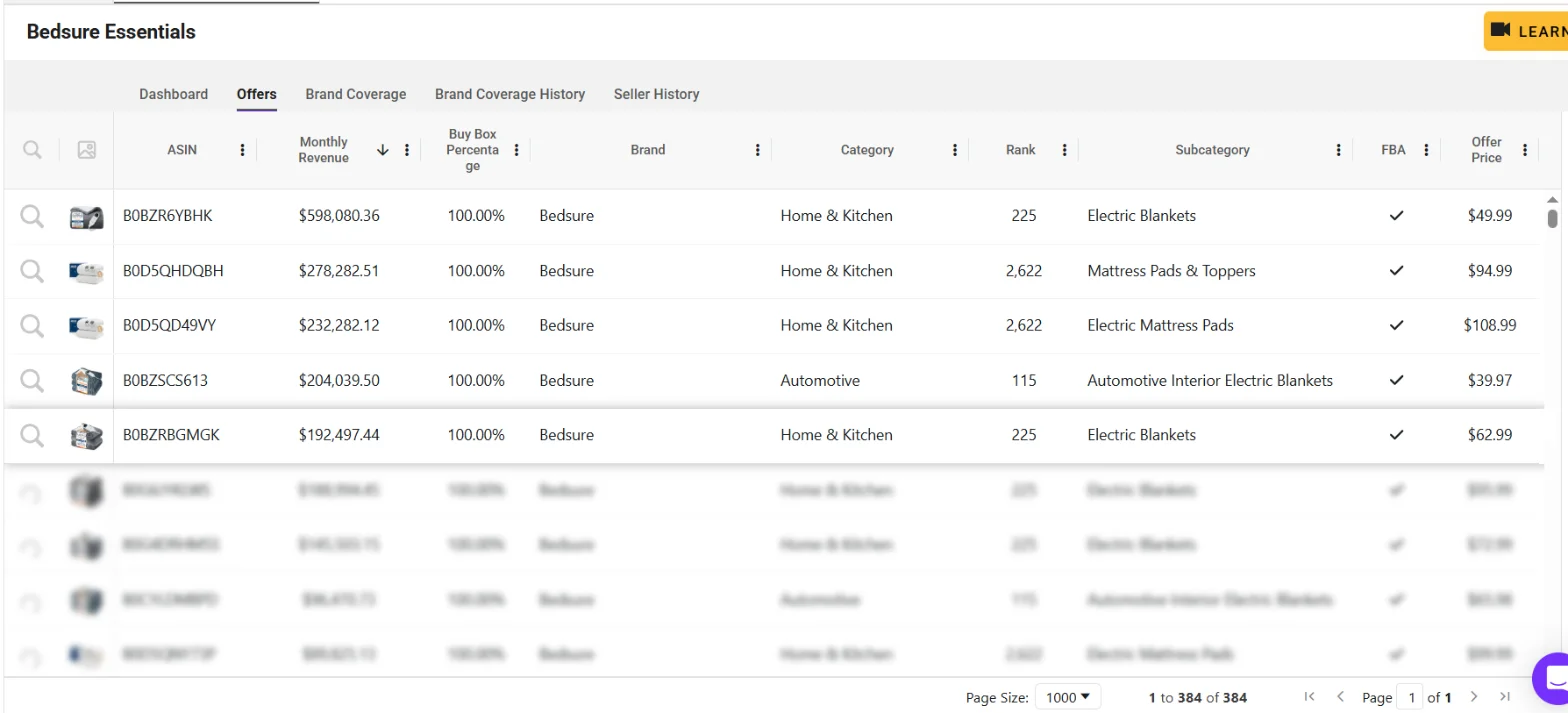 The Offers tab for Bedsure Essentials in the Seller Map. The free account shows 5 of 384 rows.
For wholesale sourcing this is gold. You can find resellers near you who already carry a brand, see which brands make them money, and work out who to contact before you ever pick up the phone. On the free account I could see the top five offers for any seller. The rest of the list was blurred, and the seller dashboard asked me to upgrade.
Product Keywords and Rank Maker: Keyword Research
This one surprised me. I typed in the Bedsure heated throw's ASIN and the Rank Maker loaded on the free account. It showed 8,299 keywords for that one product, a split of 90% organic and 10% paid, a listing score of 9.3 out of 10, and a visibility chart going back about two years.
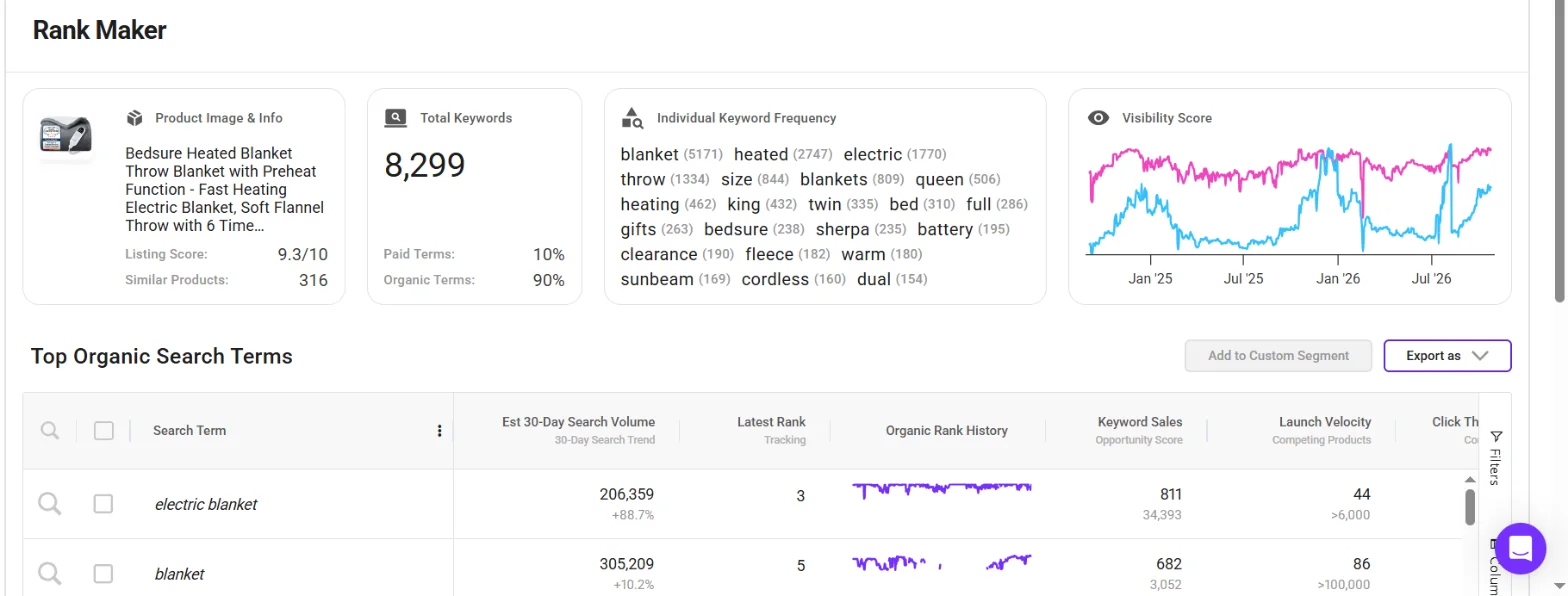 Rank Maker for a Bedsure heated throw: 8,299 keywords, with "electric blanket" up 88.7% in 30 days.
The top keyword, "electric blanket", showed about 206,000 searches in the last 30 days, up 88.7%. That is exactly what you would expect in late October, which gave me a bit more trust in the search volume data. Only the top rows were readable on the free account. Below that, everything was blurred.
The other tabs in this view are Keyword Detective, Relevancy Quadrant, Keyword Spy, Relevant Products and Ad Spy. Together they cover the competitor analysis side: which keywords a rival ranks for, which ones they pay for, and which products show up next to them.
Products and the Subcategory Tool: Product Research
The Products database is SmartScout's main product research tool. You filter millions of products by revenue, price, reviews, sellers and more. On the free account it opened with an "Upgrade to Access This Feature" box, so I could not test it.
The subcategory tool is locked even higher. On SmartScout's own plan list, subcategory level data is a Business plan feature. That matters, because finding a small, growing subcategory is one of the best ways to pick a product to launch.
Brands and Buy Box Mapping: Brand Research
The Brands page was also locked for me. On paid plans it lets you search brands by revenue, growth and category, and see every seller on a brand's listings.
If you own a brand, that seller view is the useful bit. It shows who is selling your products and how often they win the buy box, which helps you spot unauthorized resellers. If that is your main worry, it is worth looking at dedicated brand protection tools too, since they can also file takedowns for you.
Ad Spy: Who Pays for Which Keywords
Ad Spy shows which brands run ads on a keyword and which ads show up on a product page. It is handy for catching competitors who target your brand name in Sponsored Products, the Amazon version of brand bidding. The catch is price. On SmartScout's plan list, Ad Spy sits on the Enterprise plan.
The Chrome Extension: Needs a Seller Account
I expected the extension to be the easy win. The Chrome Web Store listing says you get 100 free, full-feature uses a month with no credit card. In practice, it would not show any data until I connected an Amazon Seller Central account.
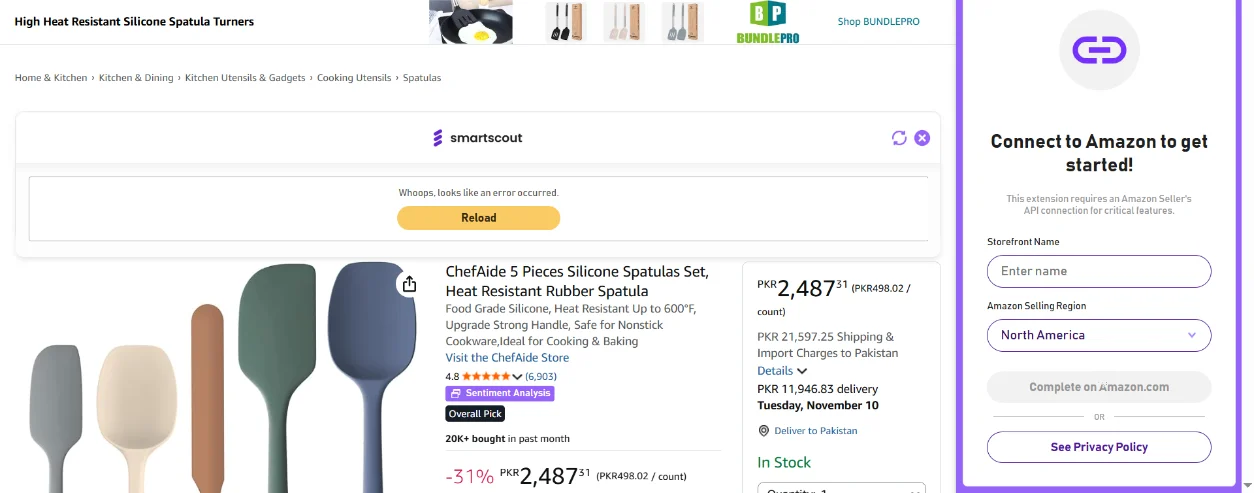 The SmartScout Chrome extension on an Amazon listing. It asks for an Amazon Seller Central connection first.
The panel on the listing showed an error, and the side panel said "Connect to Amazon to get started", explaining that the extension needs an Amazon Seller's API connection for critical features. I did not connect one, because I was testing as someone researching before they sell. If you already sell on Amazon, this will not bother you. If you are still at the idea stage, the extension is not usable yet.
What a Free SmartScout Account Gets You
SmartScout does not offer a free trial on its English pricing page. You get a free tier and a 7-day money-back guarantee on paid plans. One odd note: SmartScout's Chinese site mentions a 14-day free trial with no card. I could not find that offer anywhere on the English site, so I would not count on it.
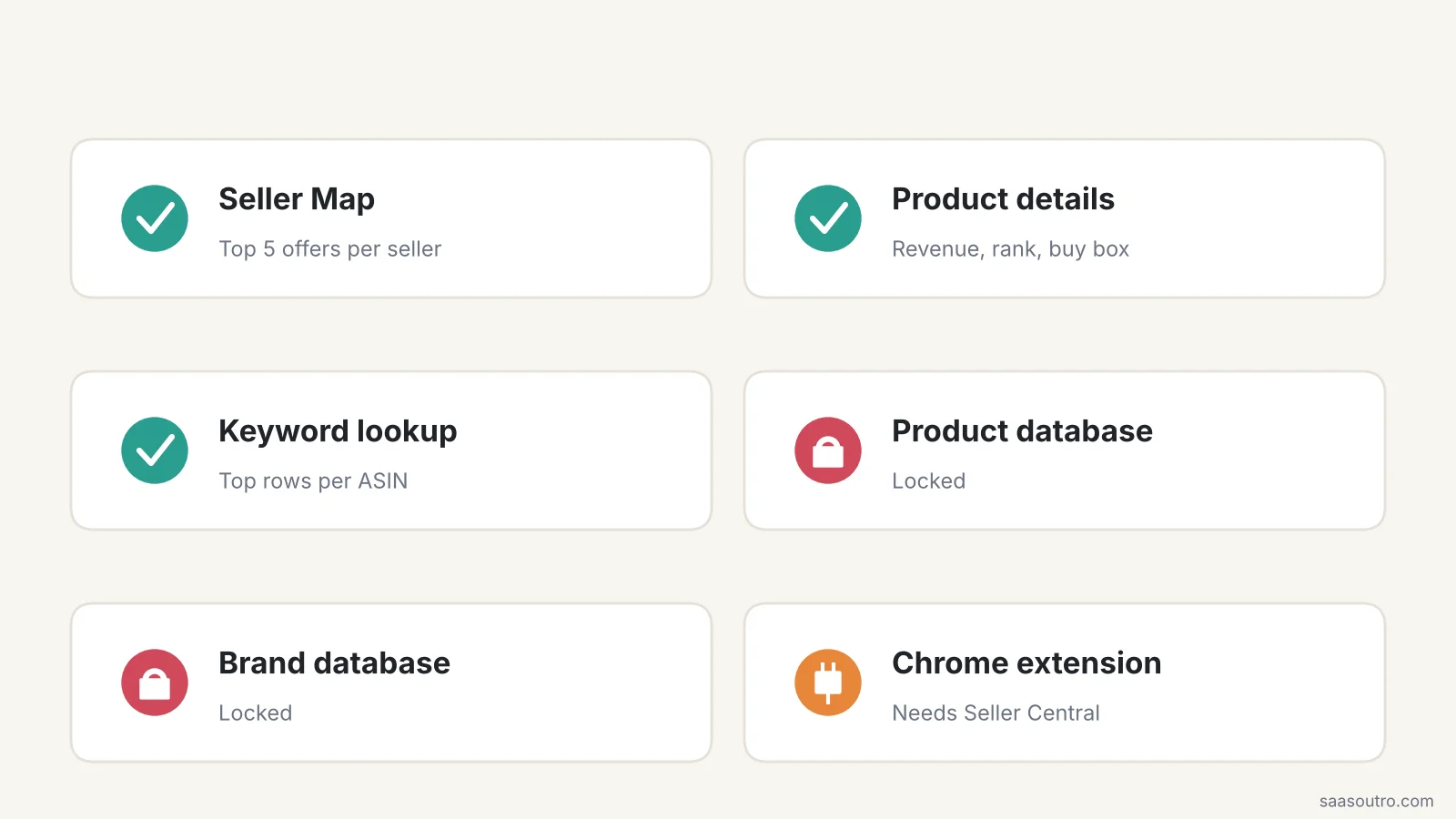 What opened and what stayed locked on a free SmartScout account.
The free tier is a preview, not a plan you can run a business on. Here is how it shook out for me:
Opened: the Seller Map with the top 5 offers per seller, product details like revenue, rank and buy box price, and keyword lookups by ASIN with the top rows visible.
Locked: the Products database, the Brands database, seller dashboards and anything past the first few rows of a table.
Blocked: the Chrome extension, until you connect Seller Central.
That is enough to check whether SmartScout's data looks right for products you already know. It is not enough to find new products.
SmartScout Pricing and Plans in 2026
SmartScout has four plans. Here is what each one costs, taken from SmartScout's pricing page on October 29, 2026.
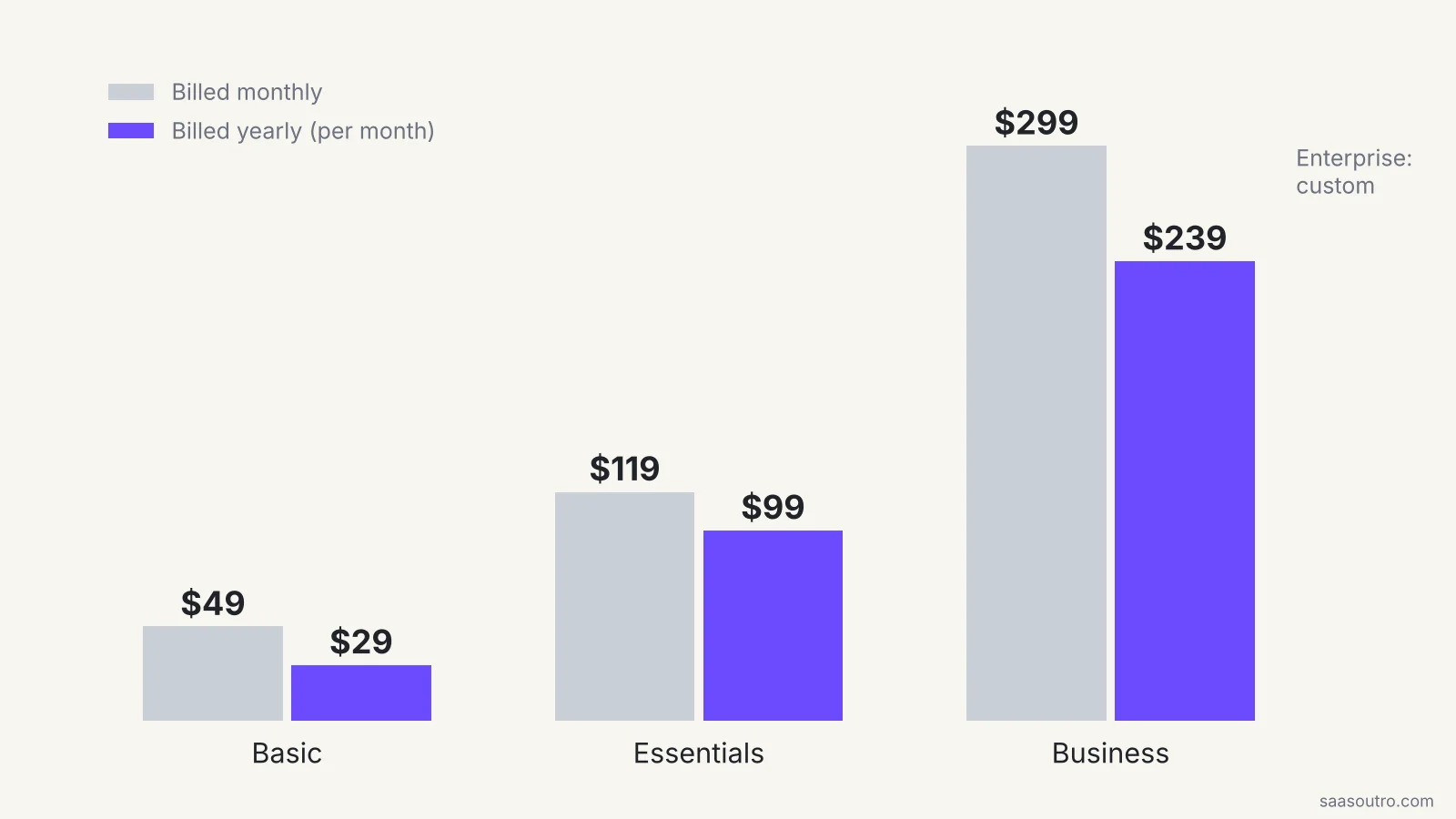 SmartScout plan prices, billed monthly vs billed yearly. Checked October 29, 2026.
Plan | Billed monthly | Billed yearly | Yearly cost | Seats |
|---|---|---|---|---|
Basic | $49/mo | $29/mo | $348 | 1 |
Essentials | $119/mo | $99/mo | $1,188 | 1 |
Business | $299/mo | $239/mo | $2,868 | 1 |
Enterprise | Custom | Custom | Custom | 2 |
Extra users cost $49 each. Every paid plan comes with the 7-day money-back guarantee.
Basic vs Essentials
Basic gives you the core data: product level data, the sales estimator, buy box and seller mapping, brand reports, the FBA calculator, a UPC scanner (5,000 scans), the iOS app, and 1,000 extension uses a month. My account's plan page also lists brand level data on Basic. The public pricing page puts it under Essentials, so ask SmartScout which is right before you buy for that one feature.
Essentials adds the keyword side: keyword level data, historical search trends, listing visibility tracking, unlimited keyword tracking, historical prices and an unlimited extension.
My take: if you are a wholesale seller who mostly needs the Seller Map, product data and the sales estimator, Basic is enough. If you sell your own brand and care about ranking, go straight to Essentials, because keywords are where private label sellers win or lose.
Is the Business Plan Worth It?
Business adds seller level data, subcategory level data, competitive keyword research, sentiment analysis, customer traffic networks, a niche research extension, TikTok Shop data and MCP access for AI tools.
At $239 to $299 a month, this plan makes sense for agencies and wholesale teams who live in the Seller Map and need full seller data. For a solo seller it is a lot of money. I would start on Essentials and only move up when you keep hitting the seller or subcategory locks.
Enterprise adds Ad Spy, the API, custom dashboards, the data lake, seller exports, share of voice and two seats. You have to book a demo for a price.
What I Liked and What Bugged Me
Here are the pros and cons that came out of my test, not a copy of the feature list.
What I liked
The sales estimates matched Amazon's own badges for big sellers, even across sizes of the same listing.
The Seller Map has no real match in other tools. Finding wholesale accounts by location and brand is fast.
The keyword data picked up the seasonal jump for "electric blanket", which is a good sign it is fresh.
The Basic plan at $29 a month (billed yearly) is cheap for this kind of brand and seller data.
The company has a real track record, and G2 users rate it 4.7.
What bugged me
No free trial, and the free tier hides most of the useful data behind blur.
The Chrome extension needs a Seller Central connection, which rules it out for people who are still researching.
Prices inside SmartScout were older than Amazon's live prices, which pushes revenue estimates up during sales.
Key features like subcategory data and Ad Spy sit on the expensive plans.
The plan pages do not fully agree on which plan includes brand level data.
SmartScout vs Helium 10, Jungle Scout, SellerAmp and AMZScout
If you are shopping for SmartScout alternatives, here is how the main ones line up on price.
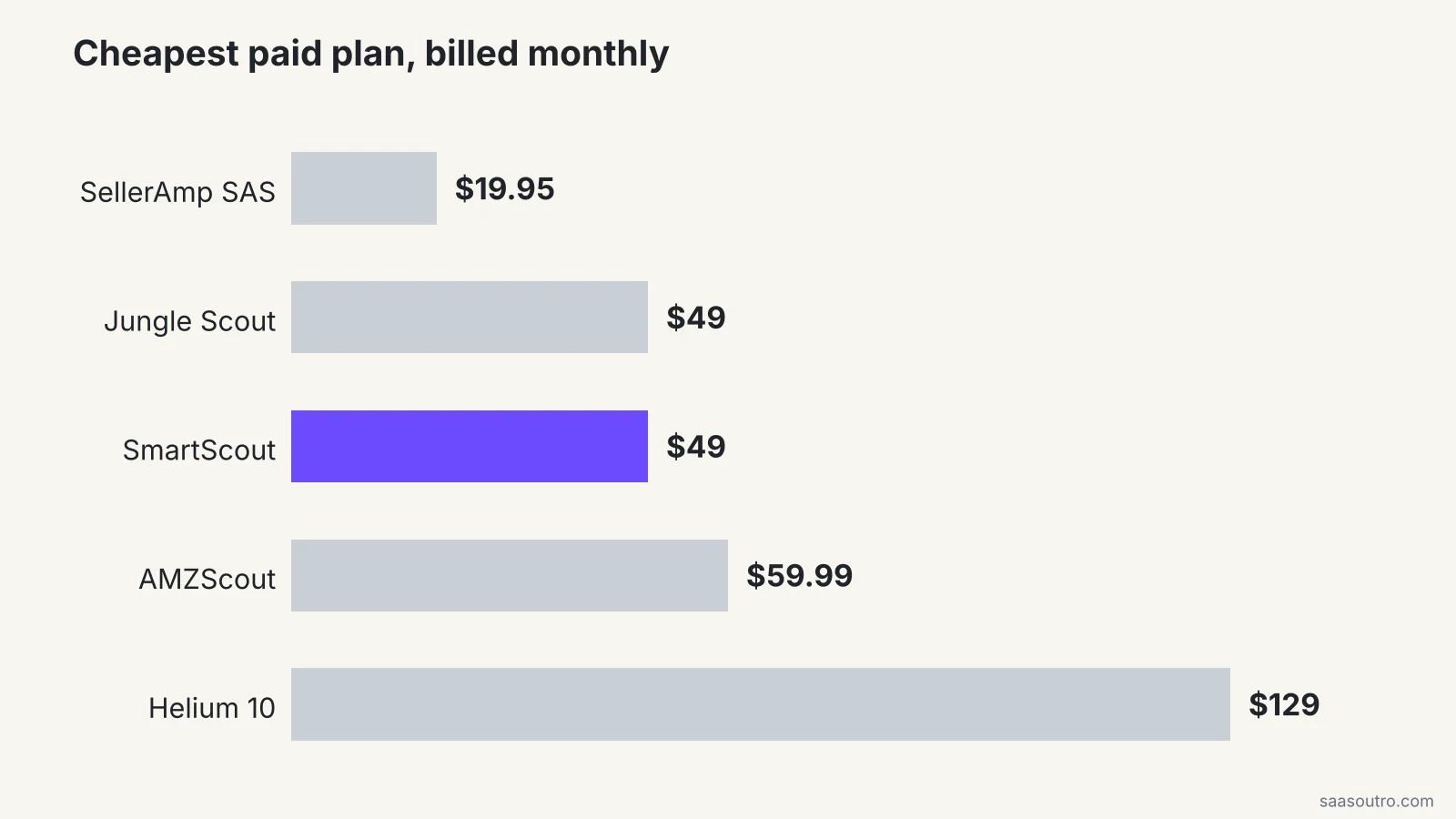 Cheapest paid plan for SmartScout and four alternatives, billed monthly.
Tool | Cheapest paid plan | Free option | Best at |
|---|---|---|---|
SmartScout | $49/mo ($29 yearly) | Free tier, 7-day refund | Brand, seller and wholesale research |
Helium 10 | $129/mo ($99 yearly) | Free plan | All-in-one tools for private label |
Jungle Scout | $49/mo ($29 yearly) | 7-day refund | Product research for beginners |
SellerAmp SAS | $19.95/mo | 14-day free trial | Checking profit on one product at a time |
AMZScout | $59.99/mo | Free trial | Cheap product research and quick checks |
SmartScout vs Helium 10
Helium 10 is the bigger toolbox. It covers product research, keyword research, listing tools, ads, PPC and inventory, all in one account. SmartScout is narrower but goes deeper on brands and sellers. If you run a private label brand and want one tool for everything, Helium 10 Platinum fits better. If you want to know who sells what and how much the whole market makes, SmartScout does that better and costs less.
SmartScout vs Jungle Scout
Jungle Scout starts at the same $49 a month, and it is the friendlier tool for a first product. Its product database and supplier tools are built for someone going from zero to one launch. SmartScout is built for people who already sell and want to grow by finding brands, sellers and gaps. For a beginner, I would pick Jungle Scout. For wholesale or brand research, SmartScout.
SmartScout vs SellerAmp
These two are not really rivals. SellerAmp SAS checks whether one product is profitable to resell, right on the Amazon page or from a barcode scan. SmartScout tells you which brands and sellers are worth chasing in the first place. Many wholesale sellers use both: SmartScout to find the brands, SellerAmp to check each product. If you only buy a few products at a time, SellerAmp alone at $19.95 is enough.
SmartScout vs AMZScout
AMZScout is the budget pick for quick product ideas and sales checks, and it has a free trial. It does not have anything like the Seller Map or SmartScout's brand data. If you just want to test the waters, AMZScout is cheaper. If you need serious wholesale sourcing or brand research, it will run out of road fast.
Best SmartScout alternatives by job:
For wholesale: SellerAmp SAS, used together with SmartScout or on its own for small buys.
For product research: Jungle Scout for beginners, Helium 10 for brands that want everything in one place.
On a tight budget: AMZScout.
Who Should Pay for SmartScout
Get it if you are:
A wholesale seller looking for brands to open accounts with. The Seller Map alone can pay for the plan.
A brand owner who wants to see every seller on your listings and track your share of a category.
An Amazon agency that needs market size and brand revenue numbers for pitches and reports.
Skip it if you are:
Brand new and still looking for your first product. Jungle Scout or AMZScout will get you there for less.
Looking for listing, PPC and inventory tools in one place. Helium 10 covers more of that.
Not selling on Amazon yet and hoping to use the extension. It will not work until you connect Seller Central.
SmartScout Questions People Ask
Is SmartScout legit?
Yes. SmartScout was founded in 2019 by Scott Needham, the founder of the Amazon seller BuyBoxer, and it says more than 10,000 operators use it. It holds a 4.7 rating on G2 and 4.3 on Trustpilot. In my test, its sales estimates matched Amazon's own data closely.
Is SmartScout worth it?
It is worth it for wholesale sellers, brand owners and agencies, because the Seller Map and brand data are hard to find elsewhere. It is less worth it for beginners who only need product ideas and keywords, where Jungle Scout or Helium 10 give more help for the money.
Does SmartScout have a free trial?
No. The English pricing page offers a 7-day money-back guarantee instead of a free trial. There is a free account, but most of the data is blurred or locked.
How accurate is the SmartScout sales estimator?
In my test, four of five best-selling products landed inside Amazon's "bought in past month" range, and the fifth was 2% under. SmartScout says it is within 80% to 90% accuracy for most products. Expect more error on small, new or fast-changing products, and check the price it uses.
How much does SmartScout cost?
Basic is $49 a month or $29 a month billed yearly. Essentials is $119 or $99, and Business is $299 or $239. Enterprise is custom. Extra users are $49 each.
Is SmartScout good for wholesale sourcing?
Yes, it is one of the best tools for it. The Seller Map shows which resellers carry which brands, where they are, and how much they make, which helps you find brands to approach. Pair it with a profit calculator like SellerAmp to check each product.
Which is better, SmartScout or Helium 10?
SmartScout is better for brand, seller and market research. Helium 10 is better if you want one all-in-one tool for product research, keywords, listings and ads. Helium 10 also costs more, starting at $129 a month.
Can I use SmartScout without an Amazon seller account?
Partly. The web app works without one, but the Chrome extension needs an Amazon Seller Central connection before it shows data.
Where I Land on SmartScout
I went in expecting another Amazon tool that is "close enough". I came out trusting SmartScout's sales numbers more than most, because they held up against Amazon's own badges for products I could check.
If you are a wholesale seller, a brand owner or an agency, start with Basic or Essentials and use the 7-day guarantee to test it on products you already know. If you are still hunting for your first product, put that money into Jungle Scout or Helium 10 first, and come back to SmartScout when you are ready to grow by brand.